EasyManua.ls Logo

AERMEC Multichiller-Evo - Clock Menu; Date and Time Settings

AERMEC Multichiller-Evo
44 pages
Print Icon
To Next Page IconTo Next Page
To Previous Page IconTo Previous Page
Loading...
19
CLOCK MENU
      

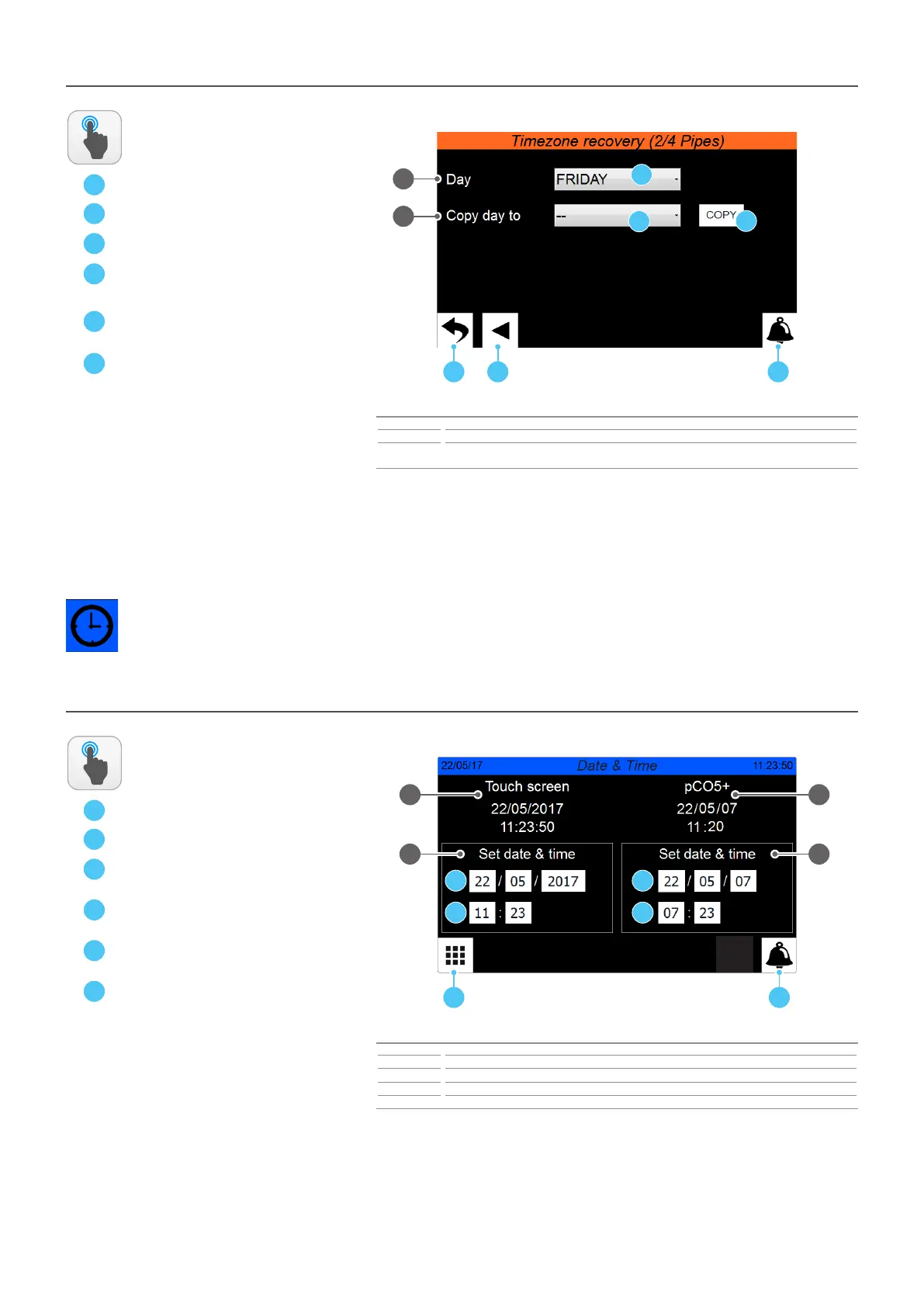
CLOCK - Date and me sengs on the main board and on the touch display board
A
B
C


      

Index Meaning
1 Indicates the actual date and time set on the pCO5+ board timer
2 Indicates the actual date and time set on the touch display board timer
3 Allows to adjust and/or modify the date and time on the pCO5+ board
4 Allows to adjust and/or modify the date and time on the touch display board
ACTIONS
AVAILABLE:
D
       

E

F

ON/OFF - Main funconing sengs - TIME PERIODS sub-menu - Copy hourly programs funcon on recovery side (if mulpurpose units are present)
A
B
C



Index Meaning
1 Indicates the day from which the hourly program will be copied
2
Indicates the day to which the hourly program will be copied (taken from the hourly program of the
specied day)
ACTIONS
AVAILABLE:
D
E
F
  

         



1
A C
D
E
F
B
2
1
A B
C
2
D
E
F
3 4

Table of Contents

Related product manuals