Afinia H800+ 3D Printer User’s Manual
36
Cleaning the Extruder Gear
The gear in the extruder may occasionally need cleaning to keep the filament feeding smoothly.
1. Long Press the Initialize button on the Control Panel to put
the printer in sleep mode.
2. Turn off the power switch on the back of the printer.
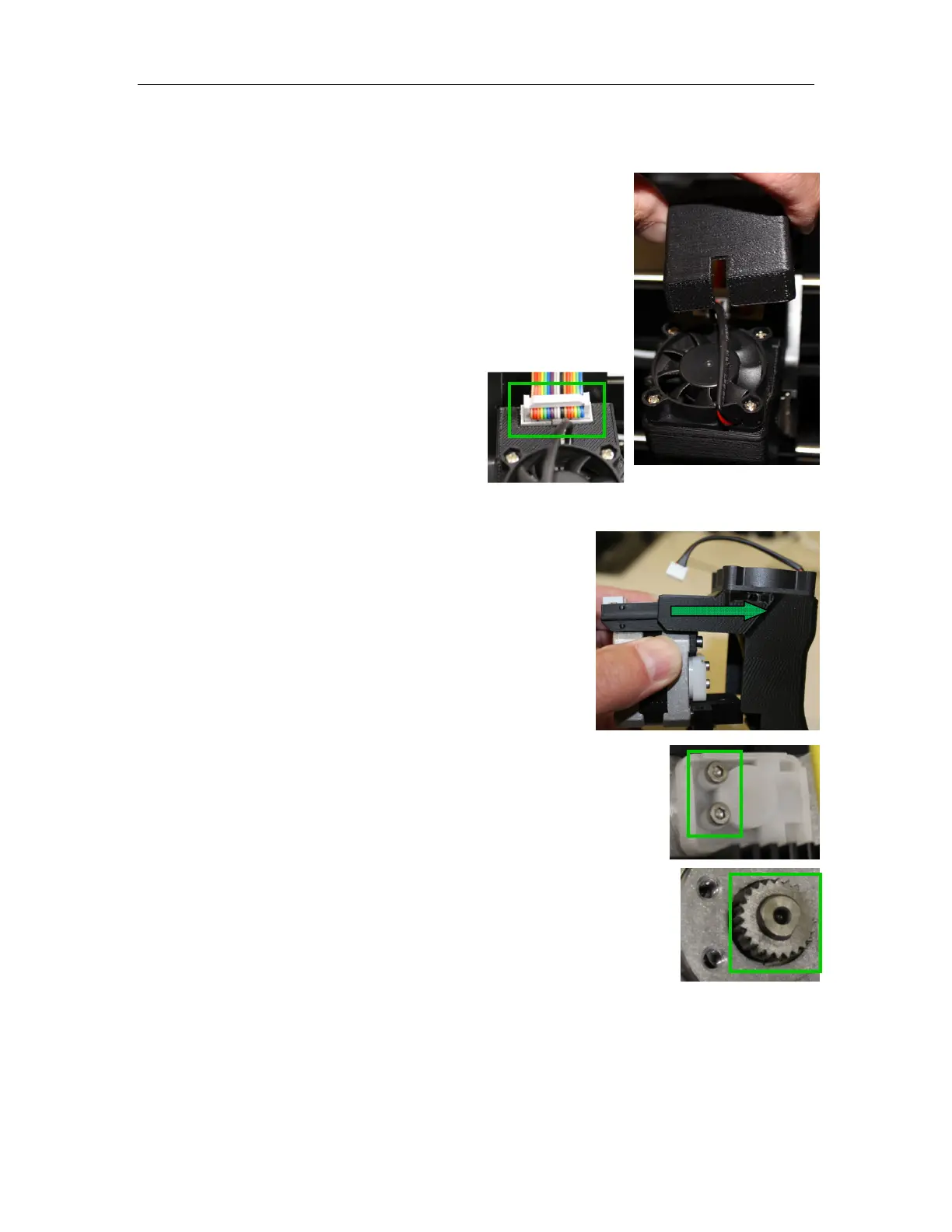
3. Lift the Cable Cover from the top of the Print Head.
4. Disconnect the Ribbon Cable from the
Print Head.
5. Remove the Print Head from the Print Head mount by pulling to the left.
6. Disconnect the fan.
7. Slide the Print Head Cover off the Extruder Motor.
8. Remove the two screws on the Extruder Gear Cover and remove
Cover.
9. Clean any filament debris from the teeth of the Extruder Gear.
10. Replace the Extruder Gear Cover and screws.
11. Replace the Print Head Cover. Slide it into place until the Cover
clicks.
12. Reconnect the fan.
13. Replace the Print Head into the Print Head mount, making sure all
three magnets are secure.
14. Reconnect the Ribbon Cable.
15. Replace the Cable Cover.
16. Turn on power and Long Press the Initialize button.



 To Next Page