1.
Be sure that the channel 4 is selected in the set-up menu. It is essential to
set this function in order to activate this set up menu.
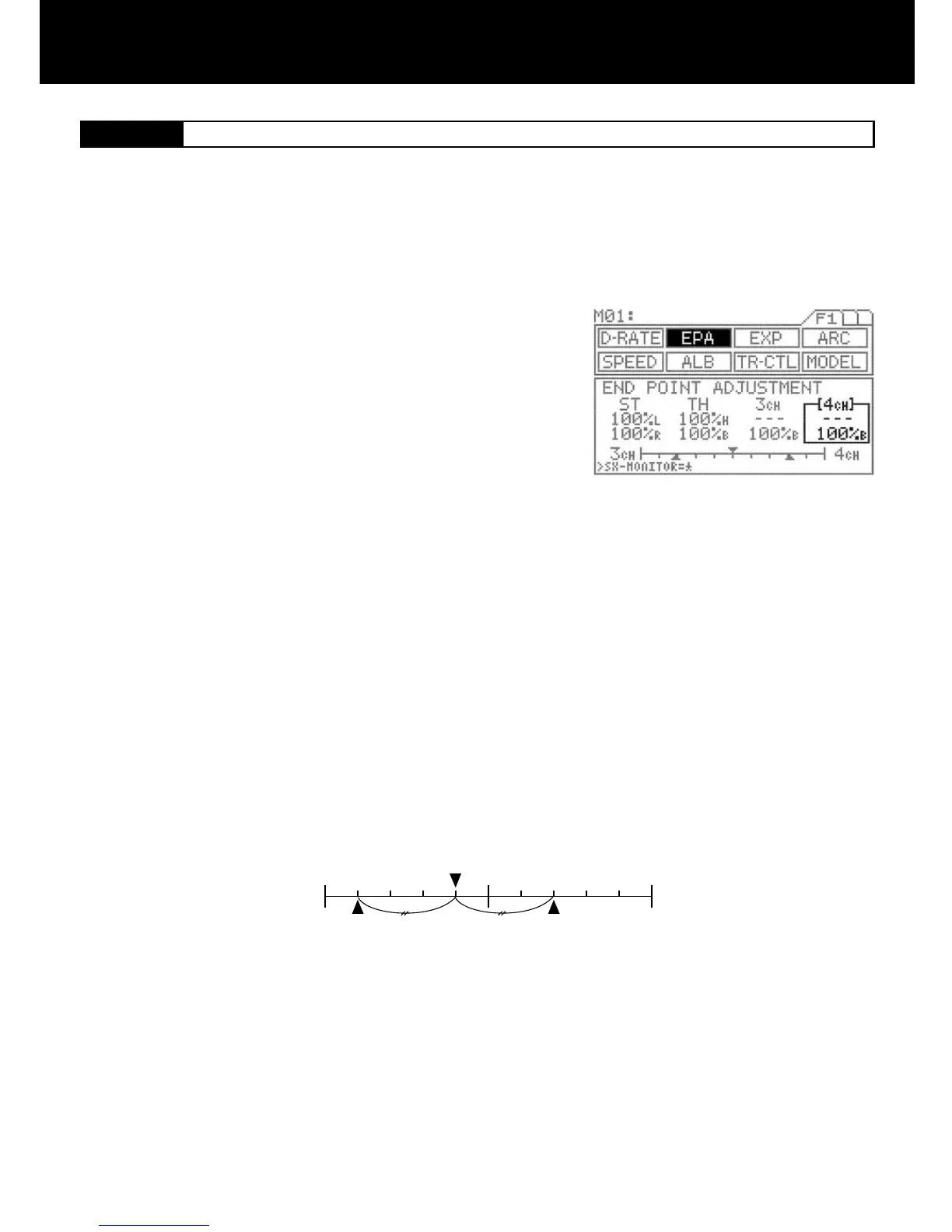
Press the function select key and move the cursor to [4ch] in EPA.
Push the throttle trigger all the way to the brake side and then adjust by
pressing the Inc.+ or Dec.- key.
Setting range 0% to 160%
Standard setting 100%
If it is necessary to arrange the EPA brake adjustment, during the opera-
tion of the vehicle, use trimmer TRM5 on the grip.
The 4th channel is exclusively for braking purpose only. When using the 4th channel as the additional BRAKE channel, end point
adjustment can be separately set from the other BRAKE channel.
IMPORTANT
Since this channel is exclusively for braking purpose, setting of EPA covers only at the BRAKE side.
TIP
Balance bar graph
The bar graph appearing at the bottom of the screen is useful when setting the brake on more than two channels.
The graph indicates the center position of two EPA values. Use it as a guide to nding a good brake balance. The lower triangles in
the graph indicate the respective EPA values.
When 3CH-BRAKE is set to ACT, the ENTER key switches the balance display between TH-3CH and 3CH-4CH. When 3CH-
BRAKE is set to INH, the bar graph shows only the TH-4CH balance.
3.
2.



 To Next Page