• Path: Set the resource path for the custom protocol. E.g., ch1/main/av_stream.
2. Click Apply to save the settings, and then click OK to close the menu. After adding the customized protocols, you can select
the protocol name listed in the drop down list. See the screen below.
2.9 Conguring HDD settings
2.9.1 CheckingHDDstatus.
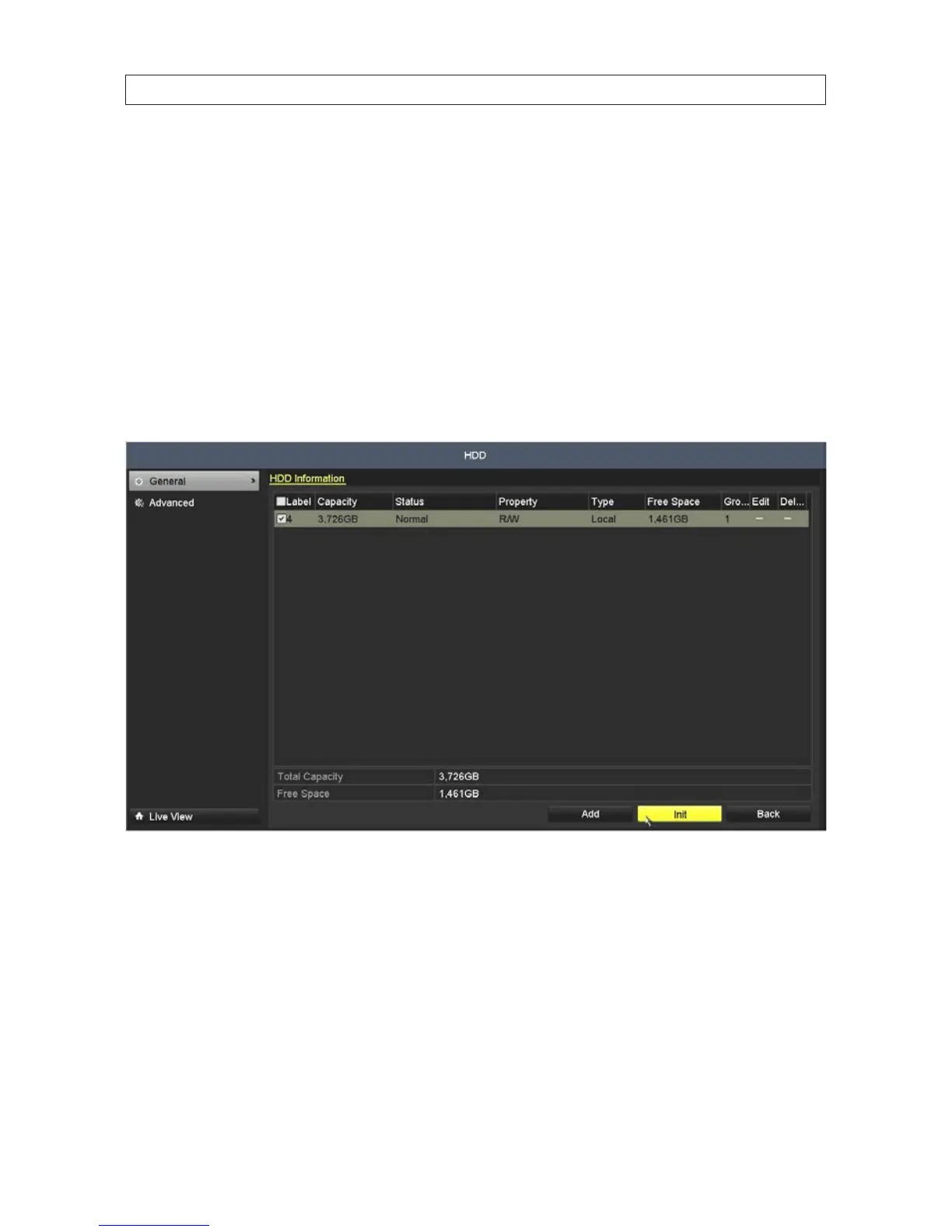
Check the status of the HDD installed in the NVR to assure it is functioning normally.
1. Open the HDD Information display. Go to Menu | HDD |General
2. Check the status of the HDD. If the status is:
— Normal or Sleeping - The HDD is working normally.
— Uninitialized or Abnormal - Initialize the HDD before continuing. Check the select box of the HDD to initialize, then
click the Init button at the bottom of the screen.
— Failed - If the HDD failed during or after initialization, replace the HDD.
3. If you installed a new HDD in your NVR chassis, select the HDD in the window then click Init to initialize it for use. Allow the
initialization procedure to complete before continuing.
SECTION 2: INSTALLING THE SYSTEM










 To Next Page