5.2.3 CustomizingPatrols
Patrols can be set to position a PTZ camera to a KeyPoint (Preset number) and hold it there there for a set duration (dwell) before
moving on to another KeyPoint (Preset number). To create Preset positions for the camera, see “5.2.1 Customizing Presets” on page
65.
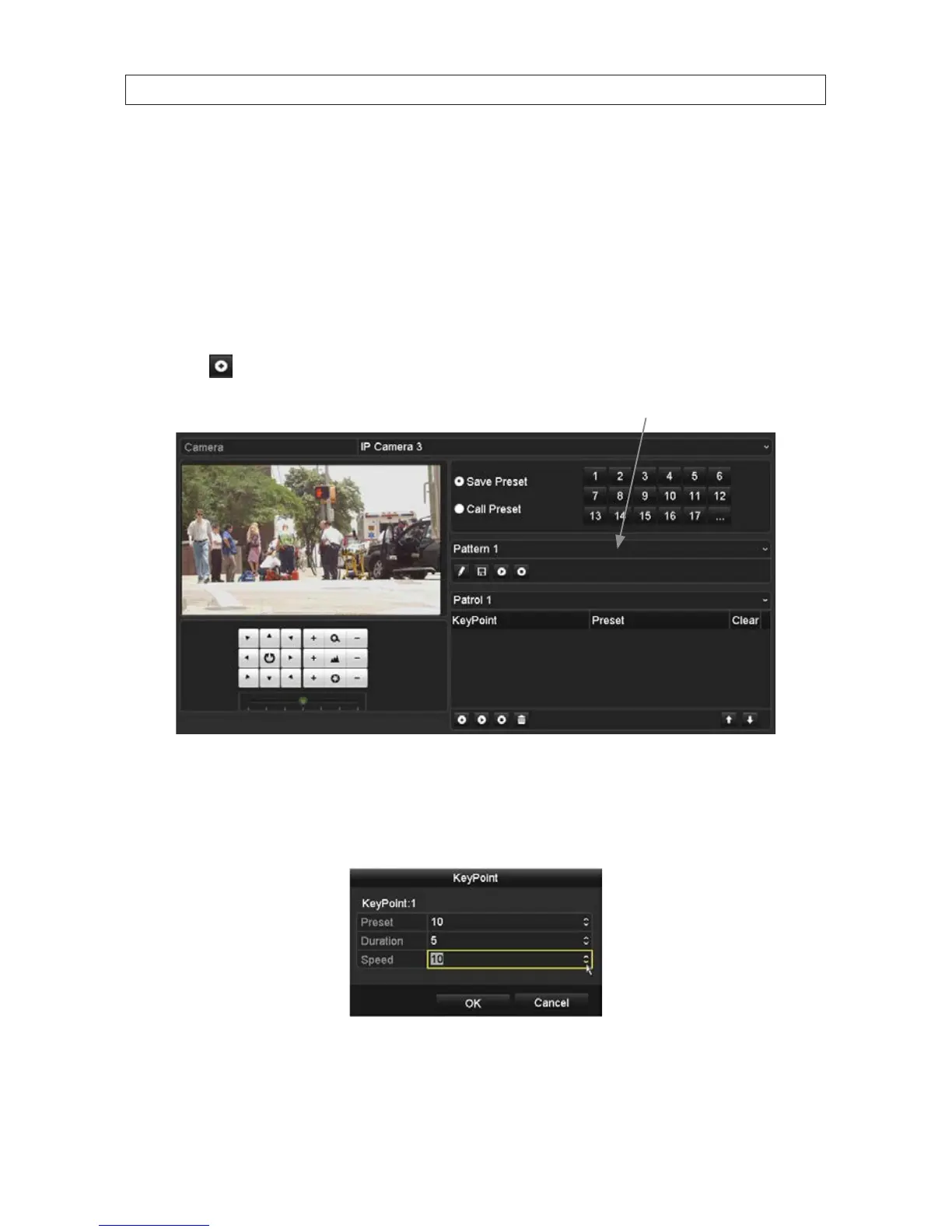
1. Open the PTZ settings menu. Go to: Menu | Camera | PTZ | More Settings
2. Select a Patrol number in the drop-down list of patrol.
3. Select the icon under Patrol option box to add KeyPoints to the patrol.
Patrol number drop down list
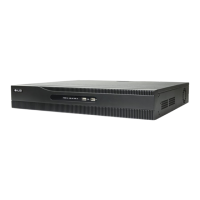
4. Congure KeyPoint parameters, such as the KeyPoint number, duration (seconds) of staying at one KeyPoint, and speed of
patrol. The KeyPoint is corresponding to the preset. The KeyPoint number indicates the step in the patrol the PTZ camera will
cycling through. Duration refers to the time span to stay at the corresponding key point. Speed denes the speed at which
the PTZ will move from one KeyPoint to the next.
5. Click OK to save the KeyPoint to the patrol.
SECTION 5: PTZ CONTROLS




 To Next Page