Professional
FM Transceiver
08
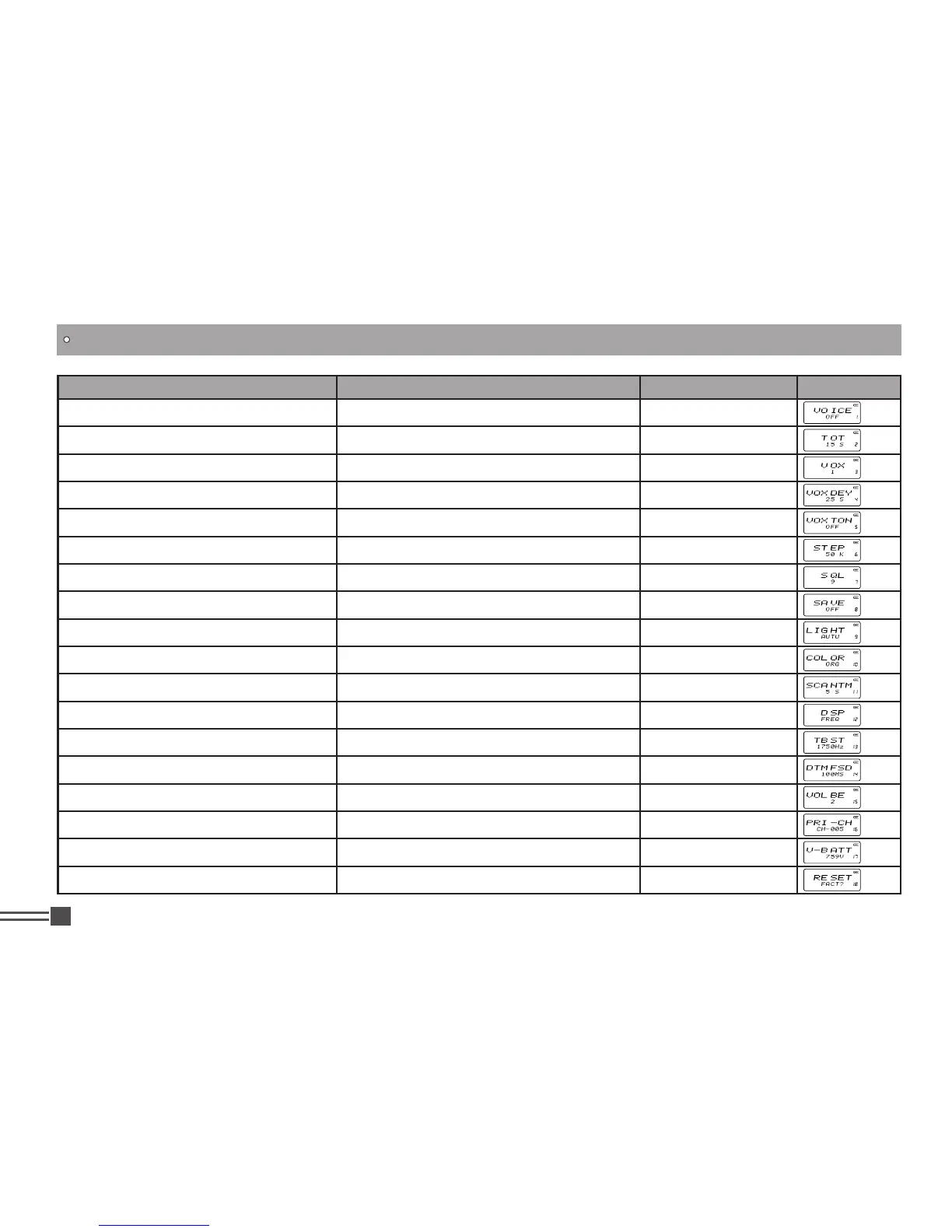
Function Menu Entry Function Option Display
Voice Prompting Selection Press PF2 and hold this key for 3 seconds
【
B
】
/
【
C
】
Time-Out Timer (TOT) Press PF2 and hold this key for 3 seconds
【
B
】
/
【
C
】
Voice Operated Transmission (VOX) Setup Press PF2 and hold this key for 3 seconds
【
B
】
/
【
C
】
Voice Operated Transmission (VOX) Delay Press PF2 and hold this key for 3 seconds
【
B
】
/
【
C
】
Voice Operated Transmission (VOX) Beep Press PF2 and hold this key for 3 seconds
【
B
】
/
【
C
】
Frequency Step Setup Press PF2 and hold this key for 3 seconds
【
B
】
/
【
C
】
Squelch level Setup Press PF2 and hold this key for 3 seconds
【
B
】
/
【
C
】
Battery Save Setup Press PF2 and hold this key for 3 seconds
【
B
】
/
【
C
】
LCD Backlight Setup Press PF2 and hold this key for 3 seconds
【
B
】
/
【
C
】
LCD Backlight Color Press PF2 and hold this key for 3 seconds
【
B
】
/
【
C
】
Scan Dwell Time Setup Press PF2 and hold this key for 3 seconds
【
B
】
/
【
C
】
Display Mode Setup Press PF2 and hold this key for 3 seconds
【
B
】
/
【
C
】
Tone Pulse Frequency Setup Press PF2 and hold this key for 3 seconds
【
B
】
/
【
C
】
DTMF Transmitting Time Setup Press PF2 and hold this key for 3 seconds
【
B
】
/
【
C
】
Beep Volume Control Press PF2 and hold this key for 3 seconds
【
B
】
/
【
C
】
Priority Channel Setup Press PF2 and hold this key for 3 seconds
【
B
】
/
【
C
】
Current Battery Voltage Enquiry Press PF2 and hold this key for 3 seconds
【
B
】
/
【
C
】
Resume Factory Default Press PF2 and hold this key for 3 seconds
【
B
】
/
【
C
】
KEY OPERATIONS / QUICK CHART



 To Next Page