EasyManua.ls Logo

Alinco DJ-A40 - Getting Acquainted; LCD Display

Alinco DJ-A40
80 pages
Print Icon
To Next Page IconTo Next Page
To Previous Page IconTo Previous Page
Loading...
Professional
FM Transceiver
18
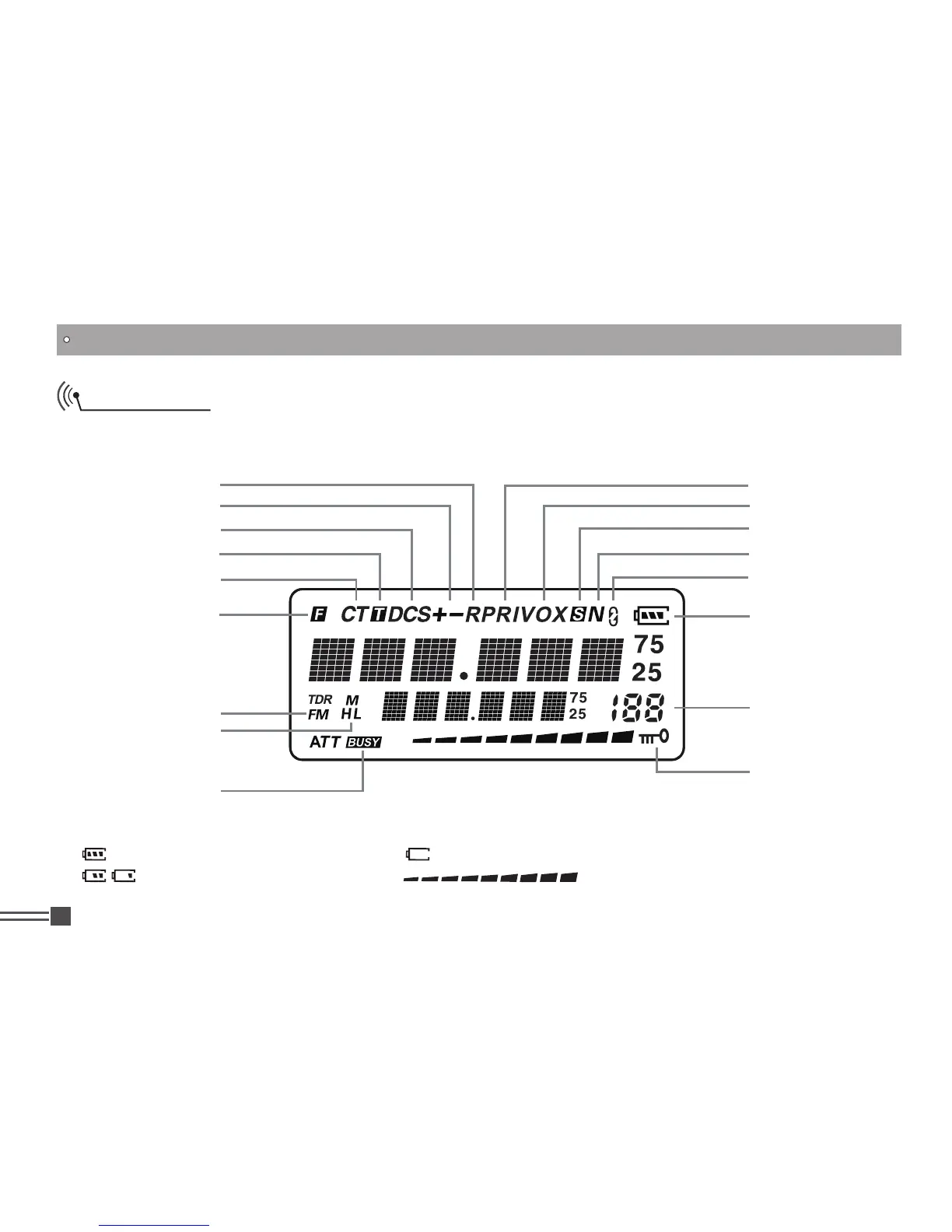
LCD Display
Following are the meaning of the icons and signs shown on the display.
Some icons may not appear while operating this product due to pre-programming status by your dealer.
GETTING ACQUAINTED
NOTE:
Battery capacity indicator(full) No power,replace battery pack or charge battery
Battery power consuming Real time display receiving signal
strength/Power Indicator
Frequency Reverse
Offset direction
DCS
Talk Around
CTCSS
FUNC Icon
FM radio
TX Power
Busy Channel
Priority Scan
VOX Function
Scan Skip
Narrow band
Scramble (Encryption)
Battery Capacity
Function Menu Serial
No. / Main Channel
No. serial No.
Keypad Lock

Table of Contents

Other manuals for Alinco DJ-A40

Related product manuals