343-3512A (03/13)
14 of 27
Optimize
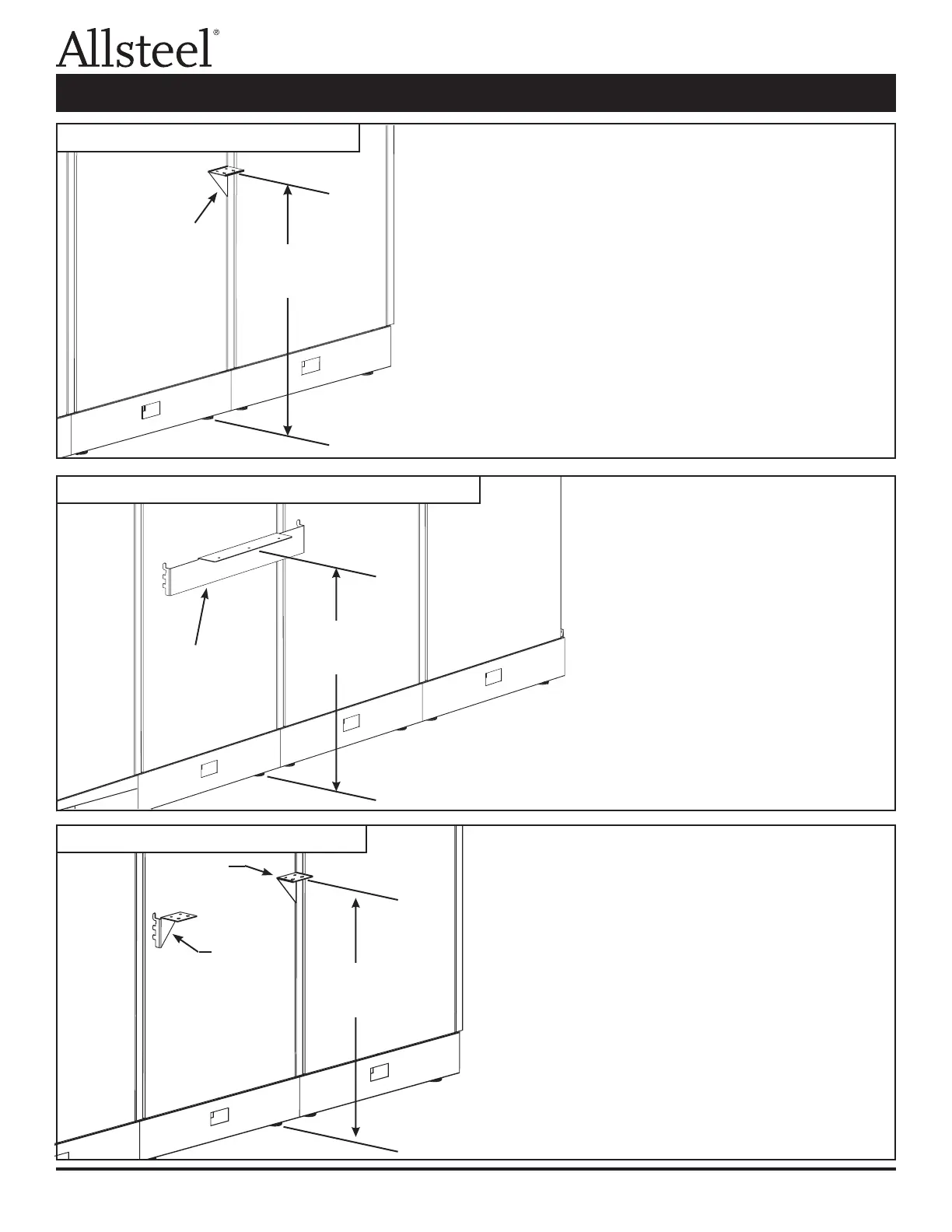
Step 1 - Install right-hand and left-hand brackets onto
panel.
Step 2 - Position and attach worksurface with wood
screws.
Illustration 3: Center Support Bracket
Illustration 4: Worksurface-to-Panel Support Bracket
Illustration 5: Worksurface Bracket Kit
Center support
bracket (insert
in left-hand
side of panel
connection)
Worksurface-
to-panel support
bracket
Right-hand
bracket
Left-hand
bracket
Install at 27¾"
for a 29½" high
worksurface
Install at 27¾"
for a 29½" high
worksurface
Install at 27¾"
for a 29½" high
worksurface
Step 1 - Install worksurface-to-panel
support bracket onto panel.
Step 2 - Position and attach
worksurface with wood
screws.
Note: Use center support bracket with worksurfaces longer
than 62¼".
Step 1 - Install center support bracket onto panel.
Step 2 - Position and attach worksurface with wood screws.
Worksurface Supports Installation



 To Next Page