DE-3000 IOI 7-17
All rights reserved © ALTRONIC, LLC 2017
53
29.0
USB VIRTUAL COM PORT DRIVER UNINSTALLATION
29.1 Administrator access to the computer is required for this uninstallation.
29.2 The FTDI utility CDM Uninstaller
http://www.ftdichip.com/Support/Utilities.htm#CDMUninstaller can be used to
remove FTDI drivers from the Windows 7, 8, 10 PC. The utility is available on the
FTDI web site.
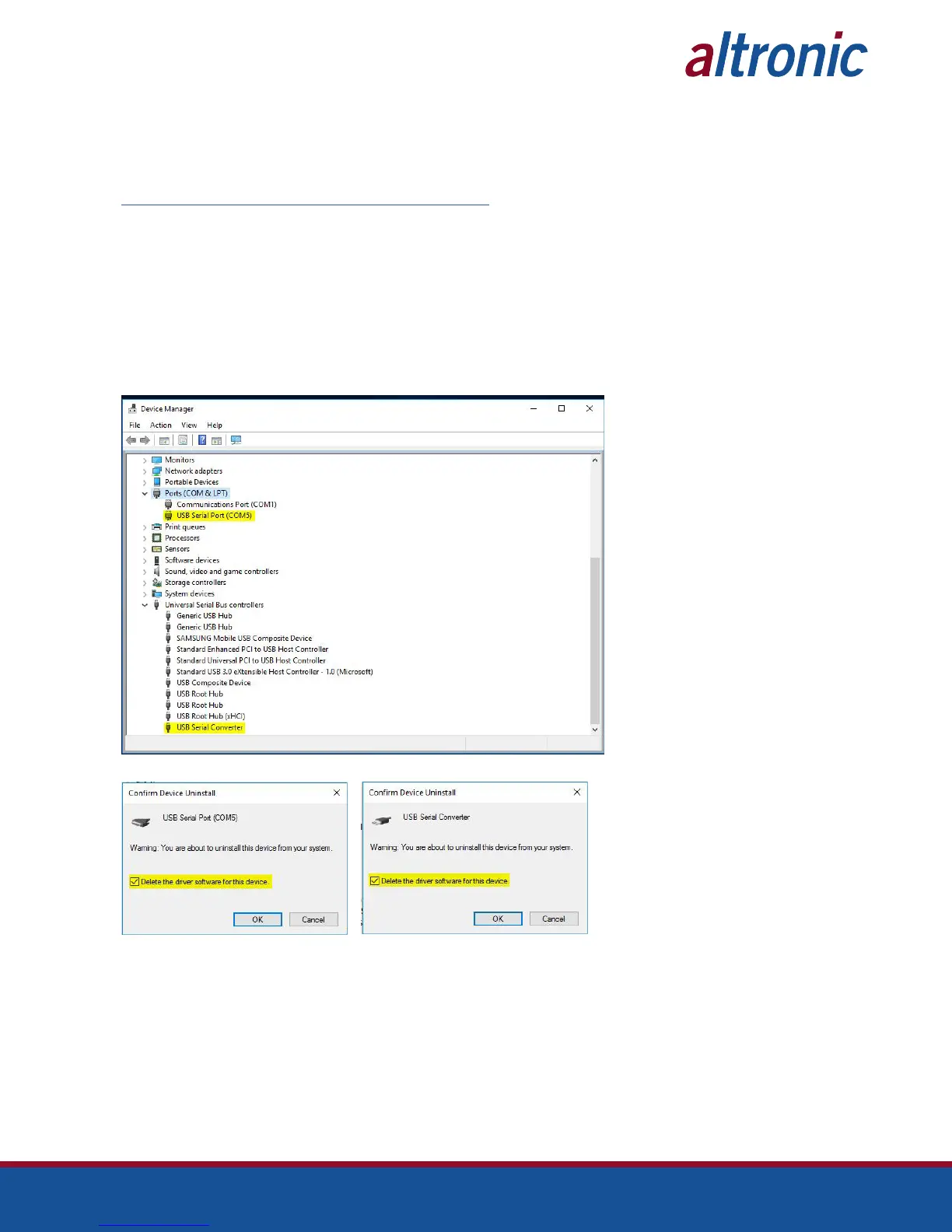
29.3 Alternately devices can be removed using the Device Manager by simply right click-
ing on the mouse and selecting “Uninstall”. This will delete the associated registry
entries for that device only. Windows™ 7, 8, and 10 provide an automatic method
to delete driver files via a check box to “Delete the driver software for this device”
on the uninstall dialog box.
29.3.1 The COM port driver should be uninstalled before the bus driver. If the bus
is removed first, the COM port will no longer appear in the Device Manager.
This stage is done twice. Once for the device under Ports (COM & LPT) and once
for the device under Universal Serial Bus Controllers.
29.4 Windows XP does not have this check box, so driver files and OEM INF and PNF
files must be removed manually or by using a custom application.



 To Next Page