Operating Instructions (18-0015) AM-48 Test Set
0015-S077-60
Ameritec
PERSONAL TRANSMISSION TEST SET
MODEL AM-48
SEND MEASURE FILTER
ON
ABS
REL
SEND
ON/
OFF
∇
∇
∇
DAMP
∇
∇
OFF
SEL
900Ω
600Ω
∇
∇
∇
SEL
∇
∇
SEL
∇
∇
3K C-MSG
15K PROG
QUIET 1004 VAR
PAR
L/F
PAR3 TONE SWEEP
NOISE NOISE S/N
HOLD
TONE
IMPLS ØJTR JTR TRANS
∇
∆
•
•
MON RCV
MON SND
TALK
∇
TERM
∇
BRDG
∇
∇
•
4W
•
TONE
PULSE
ON HK
∇
∇
•
MF
DTMF
SHIFT
ETR/NEXT
ETR/PREV
CANCEL
STOPSTART
4W/2W
SND
4W
RCV
+
/
-
∇
∇
∇
∇
∇
2W
4W REV
MIC
VOL
PRT EAR
DC
9V
∇
∇
∇
•
SF SKP
NOR
X TONE
∇
RCL/STO
∇
∇
•
PRINT
∇
21 A3
54 B6
87 C9
0
*
D#
Set QUIET
<SEND>
SWITCH SETUP
<SHIFT>
3K C-MSG
15K PROG
QUIET 1004 VAR
PAR
L/F
PAR3 TONE SWEEP
NOISE NOISE S/N
HOLD
TONE
IMPLS ØJTR JTR TRANS
∇
∆
QUIET darkened
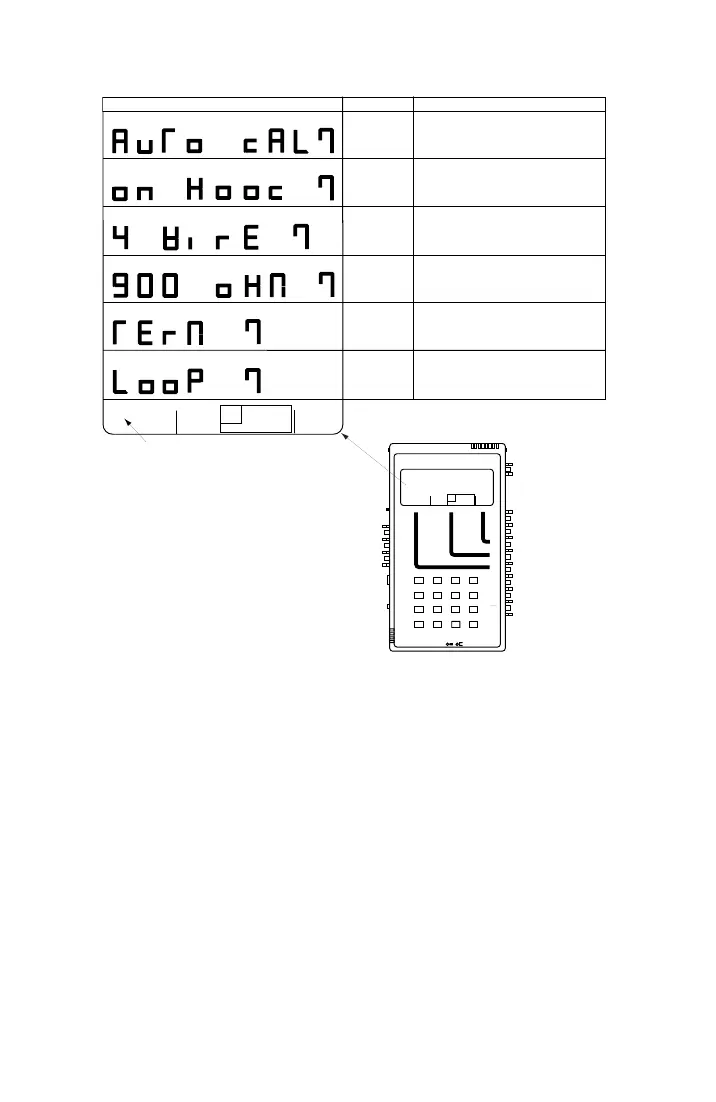
DISPLAYS
NAME
CONDITION TO CHECK BEFORE PROCEEDING
AUTO CAL?
Press [ETR/NEXT] to proceed with Auto Calibrate.
Press [CANCEL] to abort.
Be sure holding circuit is on hook (Switch 12 in <ON HK>).
Be sure Switch 10 is in <4W. (or <4W REV>).
Be sure Switch 11 is in <900Ω>.
Be sure Switch 13 is in <TERM>.
Be sure a cable is installed to loop back the send pair
to the receive pair (see Figure 5-1 for possible connection).
After each prompt, check that the indicated setup
is made before pressing [ETR/NEXT] to proceed.
Press [CANCEL] at any time to abort Auto Calibrate.
ON HOOK?
900 OHM?
4 WIRE?
LOOP?
TERM?
•
•
•
Figure 7-15. AM-48 Auto Calibrate Prompts



 To Next Page