Standalone Interface Mode
!
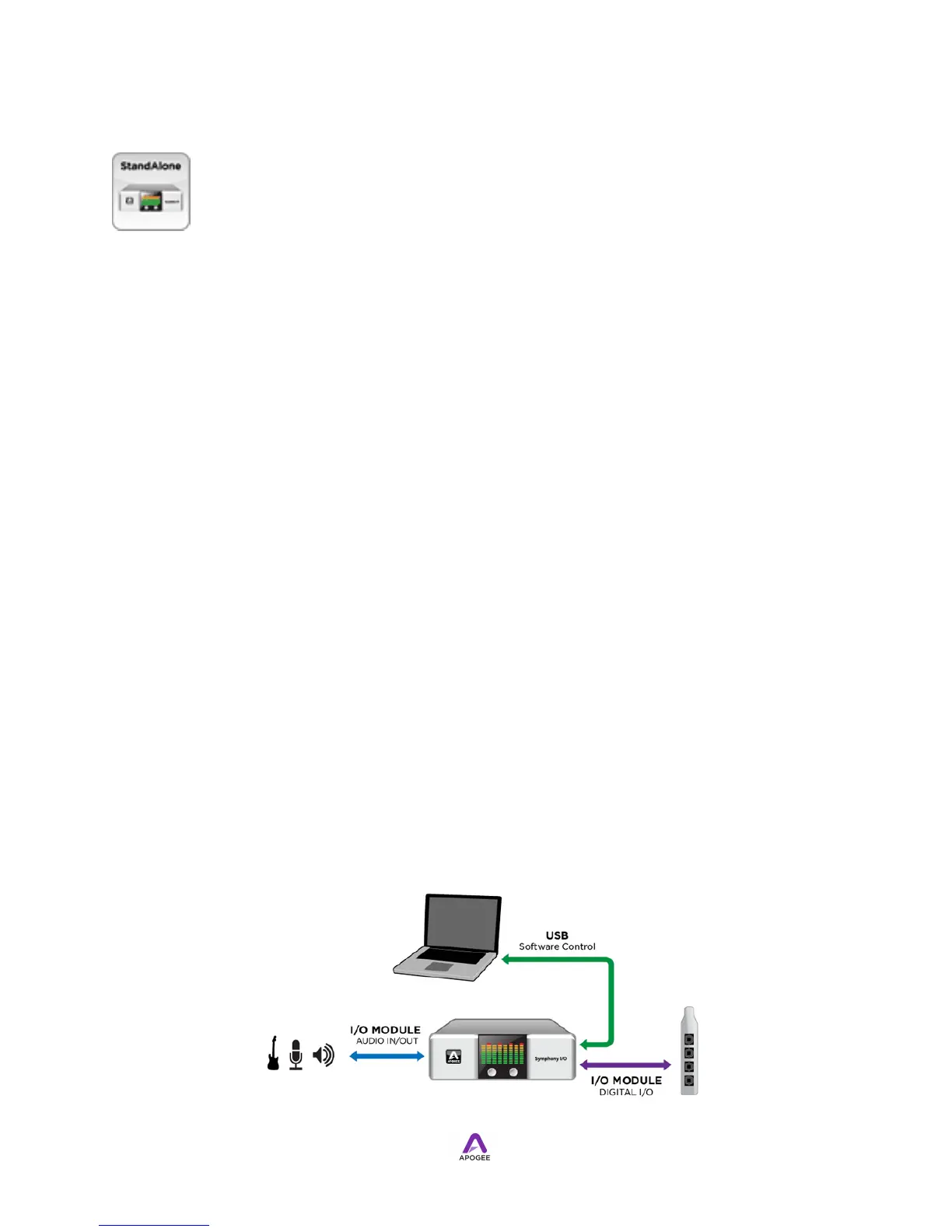
In the case where the digital host system isn't computer-based (or is a computer-based
system that interfaces with Symphony I/O using standard digital I/O such as AES or
Optical), Symphony I/O's Standalone mode offers the ability to route any I/O Module
input to any I/O Module output. The most common Standalone application is the use of
Symphony I/O as a standalone A/D - D/A converter, where analog inputs are routed to
the I/O Module's AES or Optical outputs and AES or Optical inputs are routed to analog
outputs. Software control data between Symphony I/O and Apogee Maestro software is
transmitted via a USB connection.Connect Symphony I/O's USB port to a USB port on
your Apple Mac to set these parameters in Maestro:
•
Calibration
•
Meter Configuration
•
Digital I/O format
•
Mic Pre settings such as phantom power, high pass (if a Mic Pre I/O Module is
installed)
Once settings have been completed, USB may be disconnected, as it's not required
for Standalone operation.These Symphony I/O parameters may be set using the front
panel encoders:
•
Sample rate and clock source
•
Speaker and Headphone Output Levels;
•
Mic Pre Input gain (if a Mic Pre I/O Module is installed).
When Audio Interface Mode is set to Standalone, the basic signal flow of Symphony I/O
is shown here.



 To Next Page