Chapter 4 Run the Experiment
Enable the Notification Settings (Optional)
Applied Biosystems 7500/7500 Fast Real-Time PCR System Getting Started Guide for Standard Curve
Experiments
60
Notes
Run Guidelines
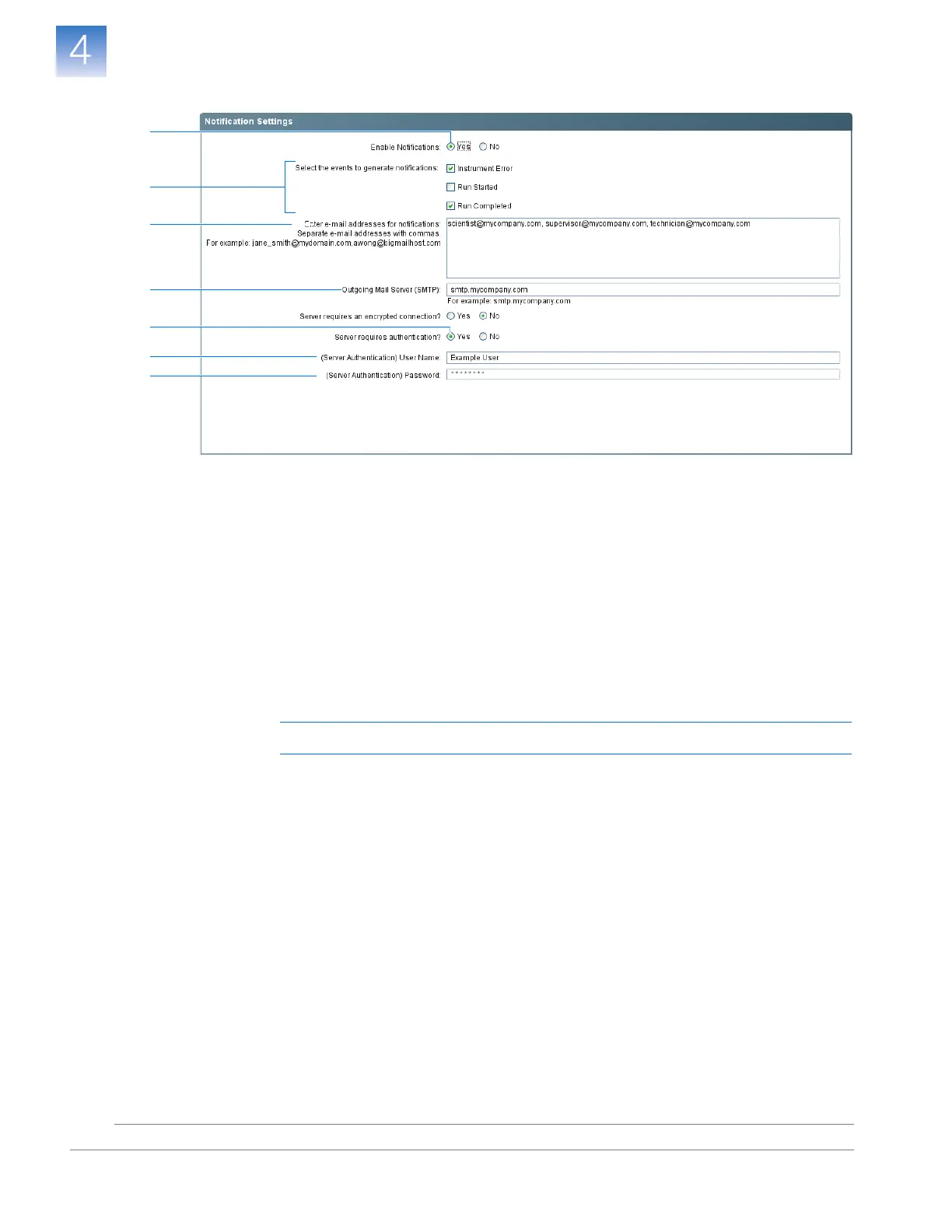
When you set up the 7500/7500 Fast system for automatic notification:
• Your system must be set up for network use. Refer to the
Applied Biosystems 7500/7500
Fast Real-Time PCR Systems Maintenance Guide
.
• Select the events for which you want to receive e-mail notifications. Select:
– Instrument Error – To notify recipients by email of all errors encountered by
the instrument during each run.
– Run Started – To notify recipients by email when the instrument starts a run.
– Run Completed – To notify recipients by email when the instrument completes a
run.
• Obtain e-mail addresses to receive notifications.
IMPORTANT! Separate addresses with a comma (,).
• Contact your systems administrator or information technology department if you
need:
– E-mail addresses for users who will receive notifications
– A network address for a simple mail transfer protocol (SMTP) server on the LAN
– A user name and password for the server, if required for access
– The Secure Sockets Layer (SSL) setting of the server (on or off)
3
5
6
7a
4
7b
7c












 To Next Page