Chapter 2 Design the Standard Curve Experiment
Set Up the Standards
Applied Biosystems 7500/7500 Fast Real-Time PCR System Getting Started Guide for Standard Curve
Experiments
26
Notes
Set Up the Standards
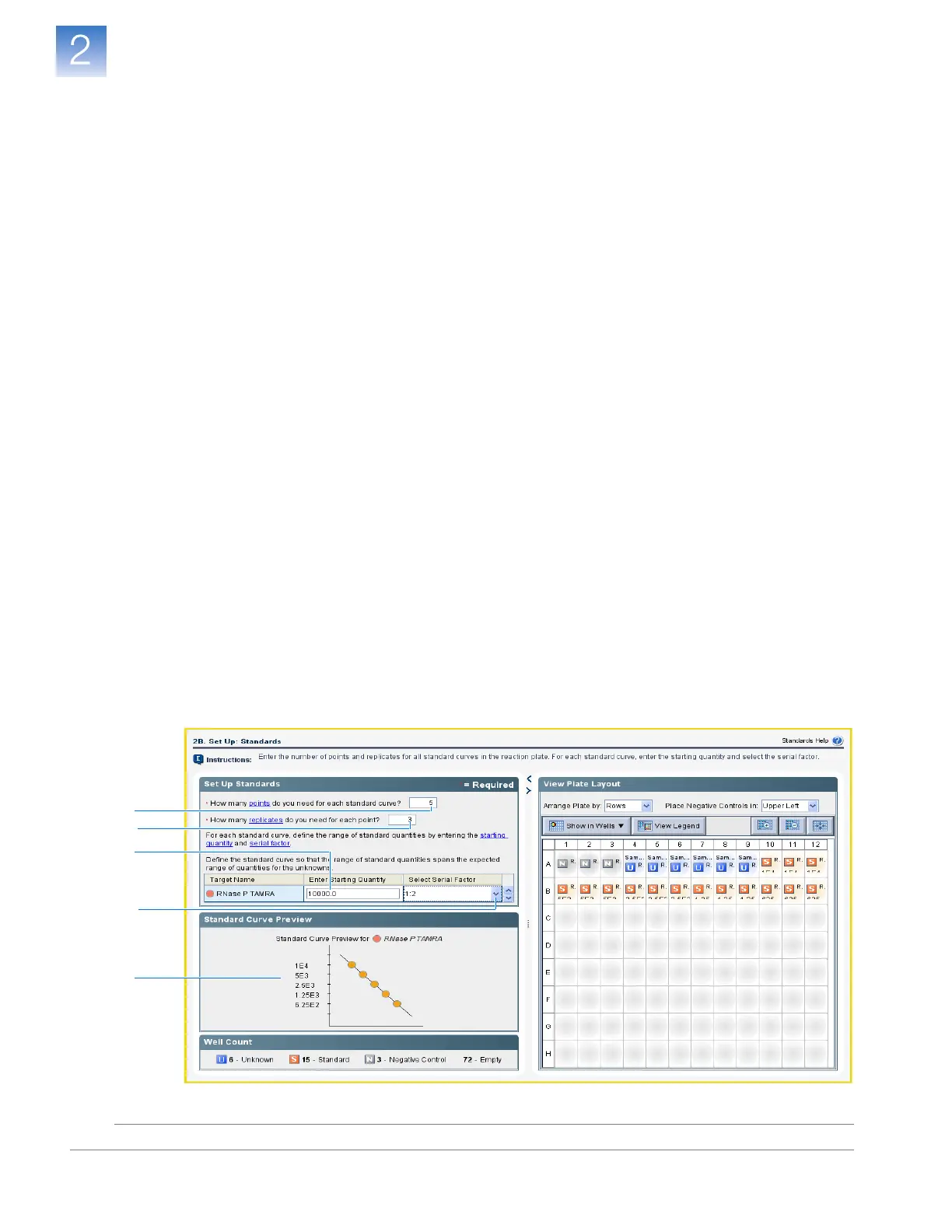
In the Standards screen, enter the number of points and replicates for all standard curves
in the reaction plate. For each standard curve, enter the starting quantity and select the
serial factor.
About the
Example
Experiment
In the standard curve example experiment:
• One standard curve is set up for the target (RNase P). The standard used for the
standard dilution series contains known quantities of the RNase P gene. Because a
single gene is being studied, only one standard curve is required.
• Five points are used in the standard curve.
• Three replicates are used for each point. Replicates are identical reactions,
containing identical reaction components and volumes.
• The starting quantity is 10,000 copies, and the serial factor is 1:2.
Complete the
Standards Screen
1. Click the How many points do you need for each standard curve? field, then
enter 5.
2. Click the How many replicates do you need for each point? field, then enter 3.
3. Define the range of standard quantities for the RNase P experiment:
a. Click the Enter Starting Quantity field, then enter 10000.
b. In the Select Serial Factor drop-down list, select 1:2.
4. Review the Standard Curve Preview pane. The standard curve has the following
points: 10000, 5000, 2500, 1250, and 625.
5. Click Next.
1
2
3a
3b
4












 To Next Page