Arkel ArLine User Manual V1.24
• The battery failure is automatically reported to the rescue service/personnel (ARKEL Cloud shows the battery failure,
the battery alarm is sent as a SMS message to the number which is assigned for technical alarms).
• The BAT LED on the Arkel ArLine-M is set to turning on or flashing according to the alarm status.
• The Arkel ArLine-M programmable relay function 'BATF - Battery alarm' is active.
After a successful automatic battery capacity test, the battery alarm is reset and the above-mentioned fault conditions return to
normal.
It is automatically notified to the rescue service/personnel that the battery failure is terminated (ARKEL Cloud is shown to end
battery failure, and it is sent as SMS to the phone number entered for the technical alarm). However, if the battery capacity
problem is not resolved, the same fault condition will repeat in the next automatic battery capacity test.
15 minutes after the power cut, the rescue service/personnel is informed of the power cut. When the battery voltage falls below
a certain level, the battery is disconnected and the Arkel ArLine-M shuts down to prevent deep discharge damage of the battery
in the event of a power failure. Before the switch-off, if there is no active alarm call, the rescue service/personnel is informed
that the device will be switched off. The device will restart automatically when the power is restored.
20.3. Replacing the Battery
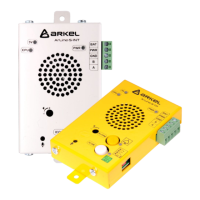
The replacement phases of the battery in the Arkel ArLine-M unit are as follows:
• Disconnect the Arkel ArLine-M unit support. Then press and hold the button for 5 seconds to cut off the internal battery
supply and turn off the unit completely.
• Remove the top cover of the unit by removing the 4 screws.
• Remove the battery connector on the Arkel ArLine-M pcb.
• Disconnect the Arkel ArLine-M pcb from the box by removing 4 plastic distensions. The battery will appear under the
pcb.
• Remove the black-red cable connected to the battery.
• The battery is fixed to the top box with a metal plate. Release the battery by unscrewing the plate. Carefully remove the
faulty battery.
• Place the new battery in the same position. Install the fixing plate screws.
• Install the battery cables with paying attention to +/-.
• Secure the Arkel ArLine-M pcb back into the box with the aid of plastic distances.
• Replace the Arkel ArLine-M top cover and replace the screws.
• Connect the supply to the Arkel ArLine-M unit.
‼ Warning: Only 12V / 1.2Ah dry type maintenance-free battery of the same size as the original battery should be used.
‼ Warning: The battery must be replaced every 3 years to guarantee the operating time from the battery.
‼ Warning:
‼ Warning: The temperature during use has a significant effect on the service life and capacity of the battery. Ambient
temperatures between 10-25°C and operating temperatures from 20 to 40°C are ideal. Do not store or operate the Arkel
ArLine-M in temperatures above 40°C!
‼ Warning: There is an effect of GSM signal level on the battery operating time. Set the GSM signal level to the highest
possible level.
21. ARKEL Cloud System
ARKEL Cloud is a web-based user interface for ARKEL's Internet-connected devices. With this interface users can make device
recordings, settings, view all their devices and perform remote monitoring of lifts.
Users can access to the ARKEL Cloud system from the 'cloud.arkel.com.tr' address.
21.1. Setting the Primary User and Adding Users
ARKEL Cloud users must firstly share their main user e-mail address and company information with ARKEL authorities.
Support should be obtained by calling the phone number '0216 540 67 24'. With this information, the administrator (Admin)
account will be opened by ARKEL and the password required to login to the system will be forwarded by e-mail.
After the first administrator account has been created, new users can be created with this user. To create a new user, click the
users tab in the main menu and enter the user insert page by clicking the 'Add New User' button at the top left. The user
information and authorizations are entered on the page and the new account is created.
Make sure that the faulty battery is disposed of in accordance with local regulations.


 To Next Page