Arkel ArLine User Manual V1.24
7.3. Arkel ArLine-S-TP/Arkel ArLine-S-INT Connections
Supply + from Arkel ArLine-M PWR terminal
Supply - from Arkel ArLine-M PWR terminal
B
line via Arkel
ArLine-M
For car top/bottom alarm unit: Arkel ArLine-M CAR A-B terminals
For pit alarm unit: Arkel ArLine-M PIT A-B terminals
For machine room/control panel intercom unit Arkel ArLine-S-INT: Arkel ArLine-M FF A-
B terminals
BAT connector is not used, must be left blank.
The PWR-GND power supply via Arkel ArLine-M is battery-backed. 24V DC when there is electricity, 12V DC when there
is no electricity.
All cabin units are connected in parallel to the same line.
For the unit to be placed at the bottom of the lift shaft, 4 cables will be required in the pit installation.
See Figure 6 for connection with Arkel ArLine-M unit.
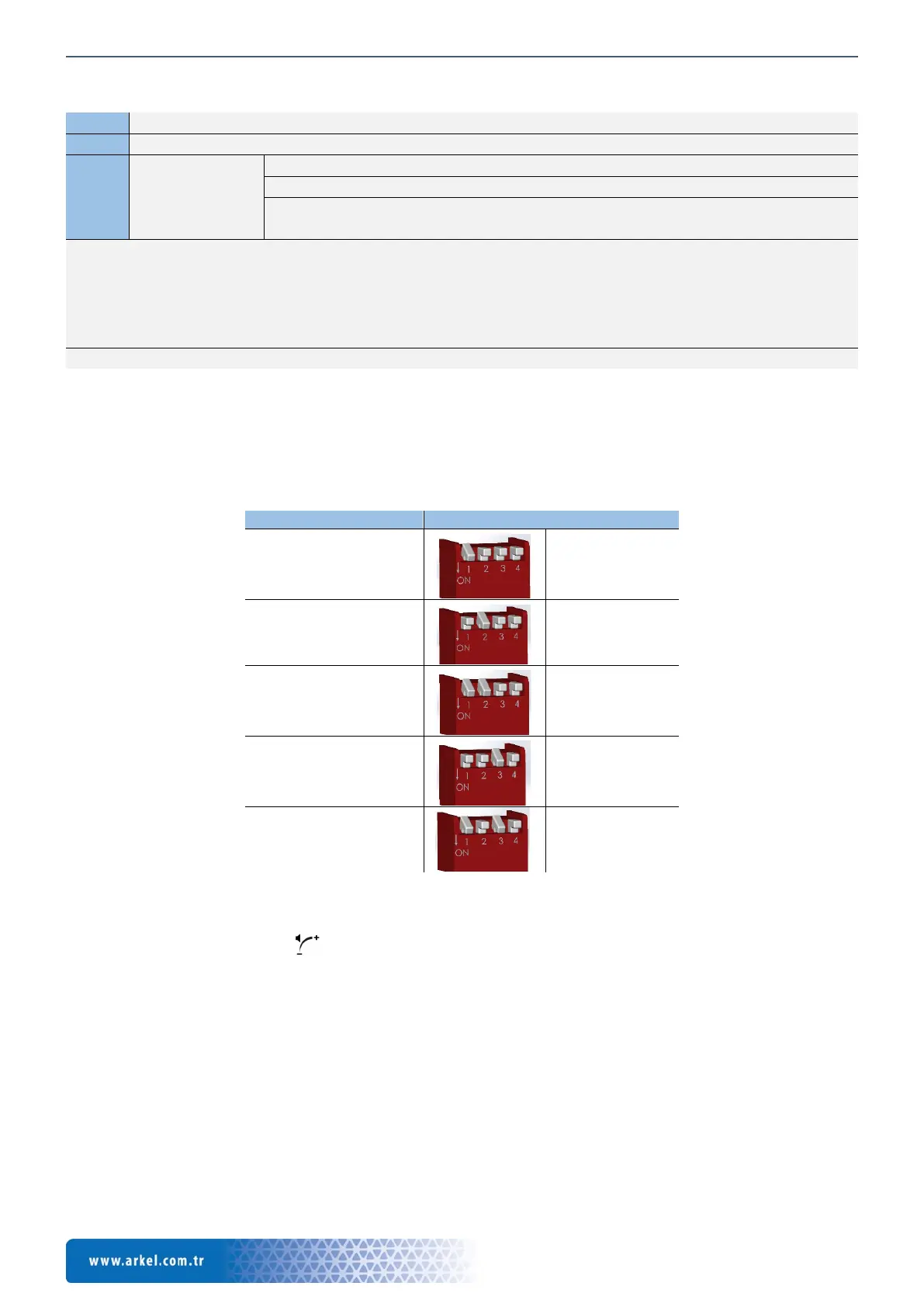
8. Arkel ArLine-S-TP/Arkel ArLine-S-INT Dip-switch Settings
An identification setting (ID) should be made for the Arkel ArLine-S-TP and Arkel ArLine-S-INT units according to their
intended use. Dip switch on the product is used for identification.
Each Arkel ArLine-S unit connected to the communication line must have a different identity. The units with the same ID do not
work. The ID of the Arkel ArLine-S-COP unit is accepted as "00". The ID setting for the other Arkel ArLine-S units is described
below.
Identification with dip-switch (ID)
ID: 01
ID: 02
ID: 03
panel intercom
ID: 04
ID: 05
9. Arkel ArLine-S Sound Adjustment
It is possible to adjust the volume of the Arkel ArLine-S speech units with the trimpot on them.
Trimpot is shown with this symbol: . The trimpot is rotated clockwise to increase the volume and rotate counterclockwise
to reduce the volume.
The loudspeaker sound during the alarm call must be set to comply with the site conditions.
After the alarm button is pressed and the alarm is acknowledged, the acoustic signal given until the voice communication is
established should be set to a sound pressure level between 35 dB (A) and 65 dB (A) at a distance of 1m from the speaker.
10. Using the Button on the Arkel ArLine-M
The user button on the Arkel ArLine-M is used for the following operations:
• If there is a triggered alarm, the alarm is terminated by pressing it for 3 seconds.
• When the input power supply (24V) is cut off, to close the device which is feeding from the internal battery completely,
it is kept pressed for 5 seconds. If the alarm condition continue or in case of device freezing, the shutdown is performed
by holding down for 20 seconds.
• Use for device sofware update. For details, see the “21 Remote Update” section of this manual.


 To Next Page