Arkel ArLine User Manual V1.24
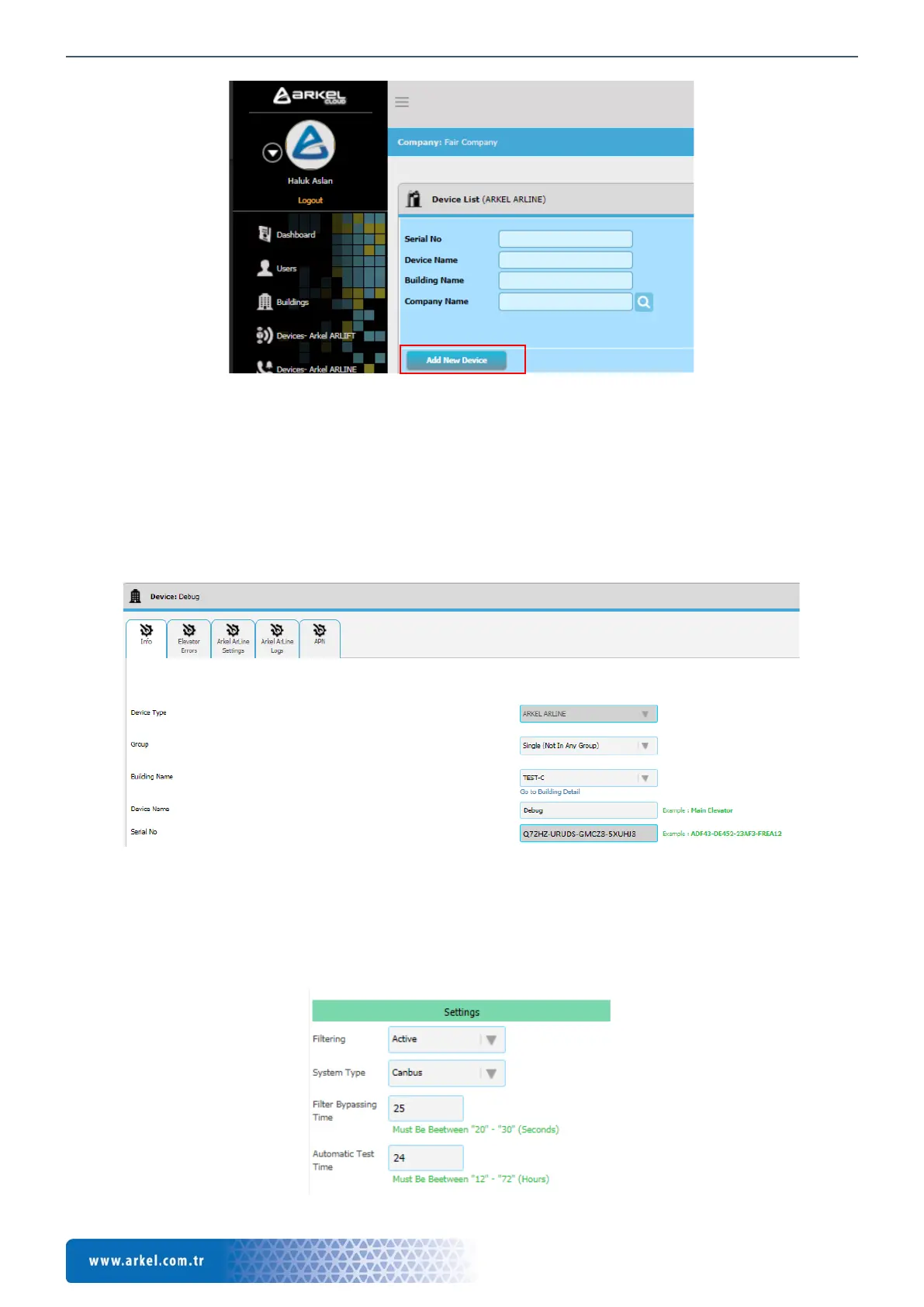
Figure 18 ARKEL Cloud, Devices (Arkel ArLine)
22. ARKEL Cloud Arkel ArLine Interface
All Arkel ArLine related settings are made via ARKEL Cloud. To access the Arkel ArLine menu, all Arkel ArLine devices
connected to the company can be displayed via the 'Devices (Arkel ArLine)' tab in the main menu. Click on the device name to
access to the device details.
22.1. Information
On the device page, under the 'Information' tab, device model, building name, device name and serial number are displayed. The
device name can be changed on this page.
Figure 19 ARKEL Cloud, Arkel ArLine device information based on lift
22.2. Elevator Errors
Under the 'Elevator Errors' tab; if the Arkel ArLine device is connected to CANbus via a compatible ARKEL lift control system,
error records of the lift control system are displayed. For devices without CANbus connection, no information will be displayed
under this tab.
22.3. Arkel ArLine Settings
Figure 20 ARKEL Cloud, Settings tab


 To Next Page