Arkel ArLine User Manual V1.24
22.4. Event Logs
The event logs of the device are displayed retrospectively under the 'Event Logs' tab. The start and end dates and details of the
events are recorded. Events and descriptions are as follows.
Displayed when the alarm is accepted.
Displayed when the call is in progress.
Displayed when the call is answered.
Displayed when the speaking is finished.
Displayed when the alarm is terminated on the Arkel ArLine Cloud.
Displayed when the alarm is terminated via ARKEL Cloud.
Error
Displayed when the connection cannot be established during the
automatic test period.
Displayed when the device is connected again.
Displayed when the battery is not inserted.
Displayed if the weekly battery test fails.
Displayed if the weekly battery test is successful.
Displayed when the battery is inserted.
It is displayed in case of connection with CANbus connection is
selected and broken.
Arkel ArLine-S Units Not
Connected
It is displayed when the necessary Arkel ArLine-S units are not
connected.
22.5. Adding Emergency Call Recipients
The phone numbers to be dialed in the event of an alarm are entered via ARKEL Cloud. To do this, first enter the "Buildings"
tab and the buildings connected to the company are displayed.
Under the 'Buildings' tab, the building to which the number assignment should be made is selected.
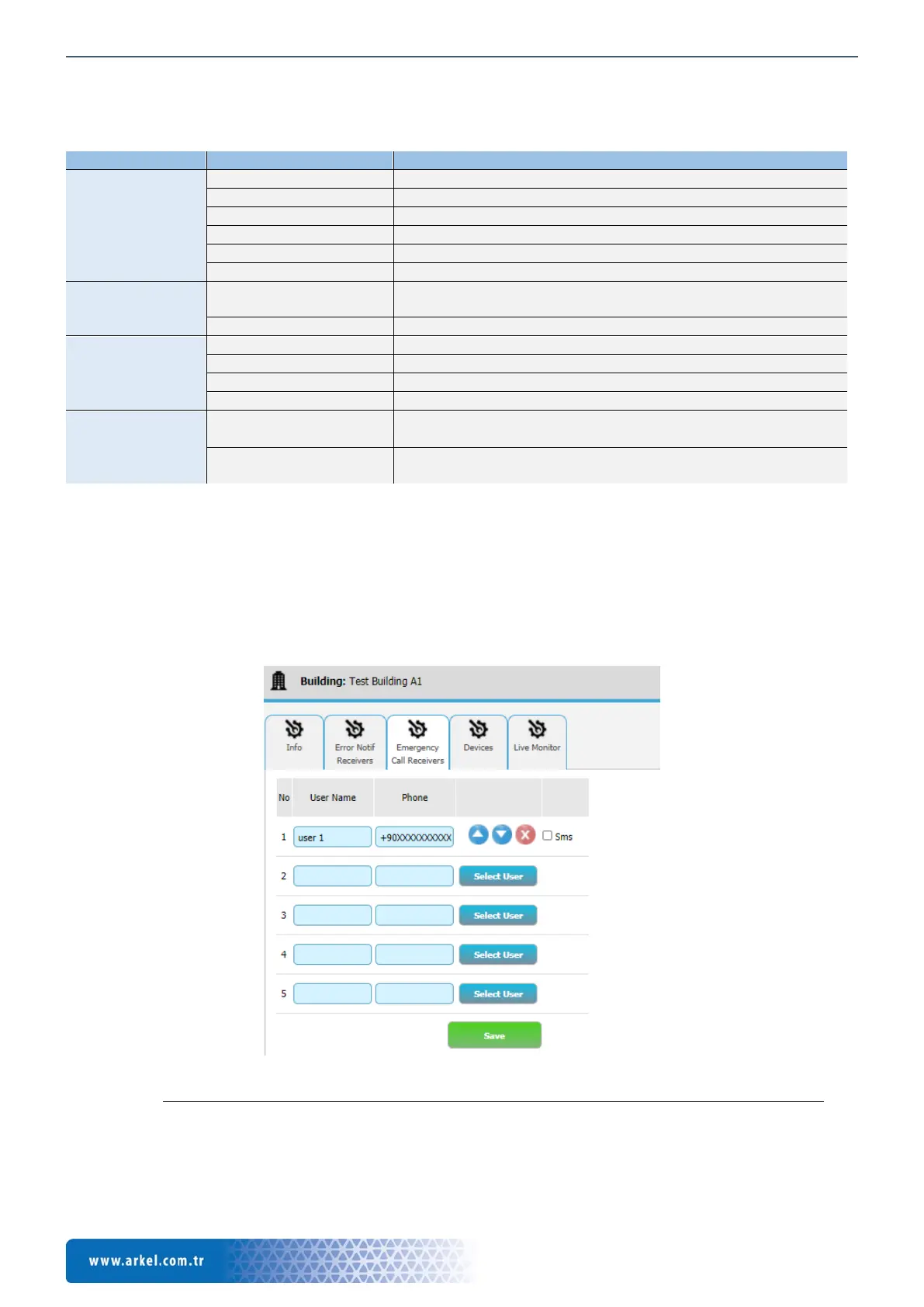
In the 'Emergency Call Receivers' tab, you can enter a number by two different methods:
• To assign a defined user in ARKEL Cloud, press” Select User“ button and user is selected from the screen.
• To add a number manually, enter the contact name in the 'User Name' section and the 'Phone' section and confirm with
the 'Save' button. The phone number entered must be in '+ 90XXXXXXXXXX' format.
Figure 25 ARKEL Cloud, Emergency call recipients page
‼ Warning: If a voice mail service is used in the phone numbers defined for the emergency call, it must be deactivated. How
to cancel the answering machine can be found on the operator's website.


 To Next Page