Arkel ArLine User Manual V1.24
SMS parameters and Definitions
1. Emergency phone number
2. Emergency phone number
3. Emergency phone number
System Type
Alarm Filtering System Type
Set as “Canbus” or “Parallel”
SystemType:Canbus
SystemType:Parallel
Alarm Filtering
Alarm Filtering Option
Set as “Active” or “Passive”
AlarmFiltering:Active
AlarmFiltering:Passive
Auto End of Alarm
Automatic Alarm Termination
Set as “Active” or “Passive” and insert duration as hour.
AutoEOAOpt:Active-Time:5
AutoEOAOpt:Passive
24. Setting Parameter with AREM
In order to set parameters over AREM, Arkel ArLine-M board must be connected to CAR CANBUS line.
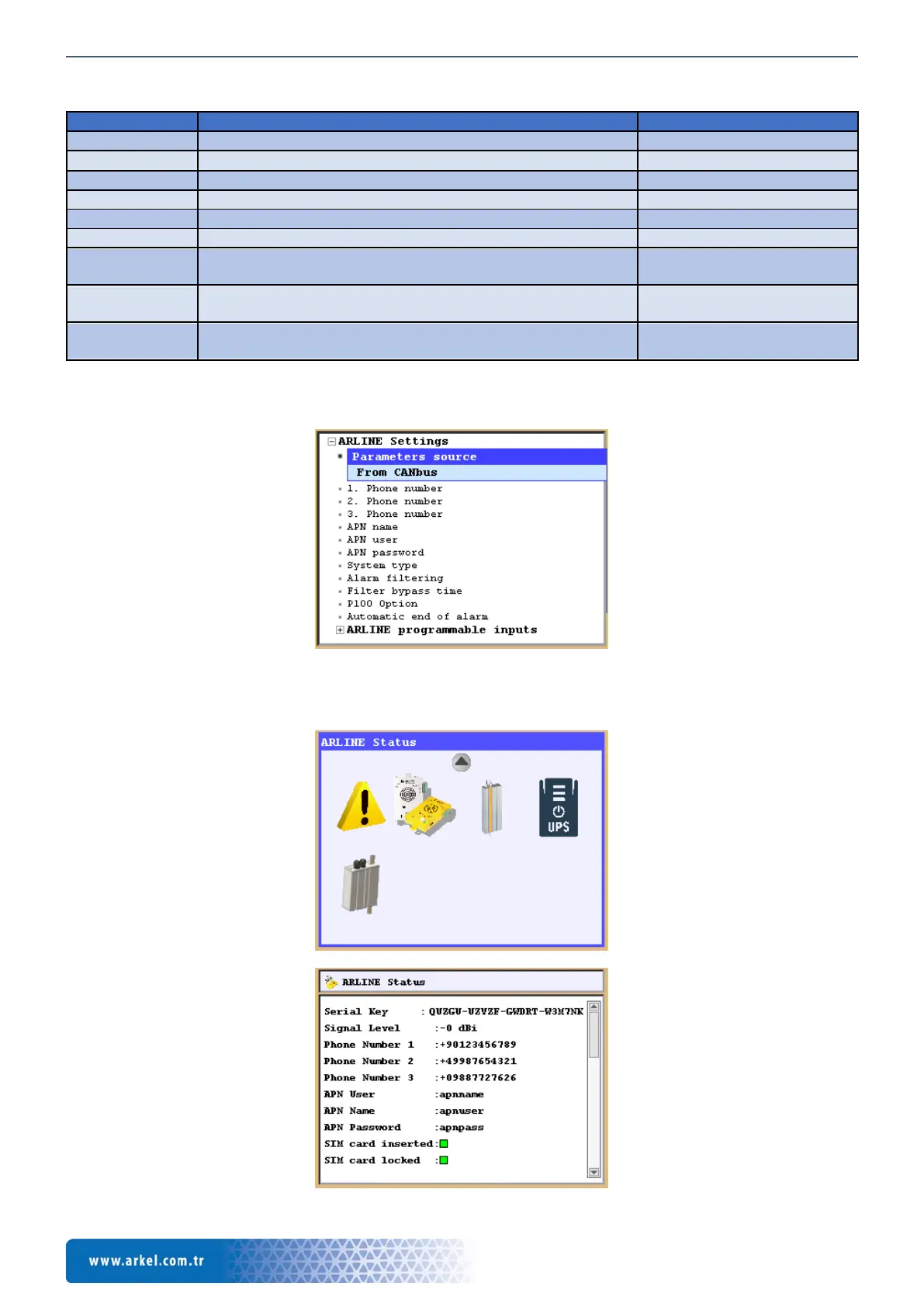
By entering “Tools -> Device Parameters -> ARLINE Settings” menu, parameters can be changed.
In order to monitor the parameters and Arkel ArLine-M status;
Related informations can be checked from Info -> ARLINE Status


 To Next Page