32 Lens mount/filters
8.2 Changing a lens
NOTICE
Protect the sensor: Always keep a lens or protective cap on the empty lens mount.
Change lenses in dry, dust-free environments only.
Never exceed the maximum lens dimensions.
Have every lens properly shimmed as prescribed by the manufacturer.
Note: Please use a lens support system for EF lenses above 2 kg/4.4 lbs.
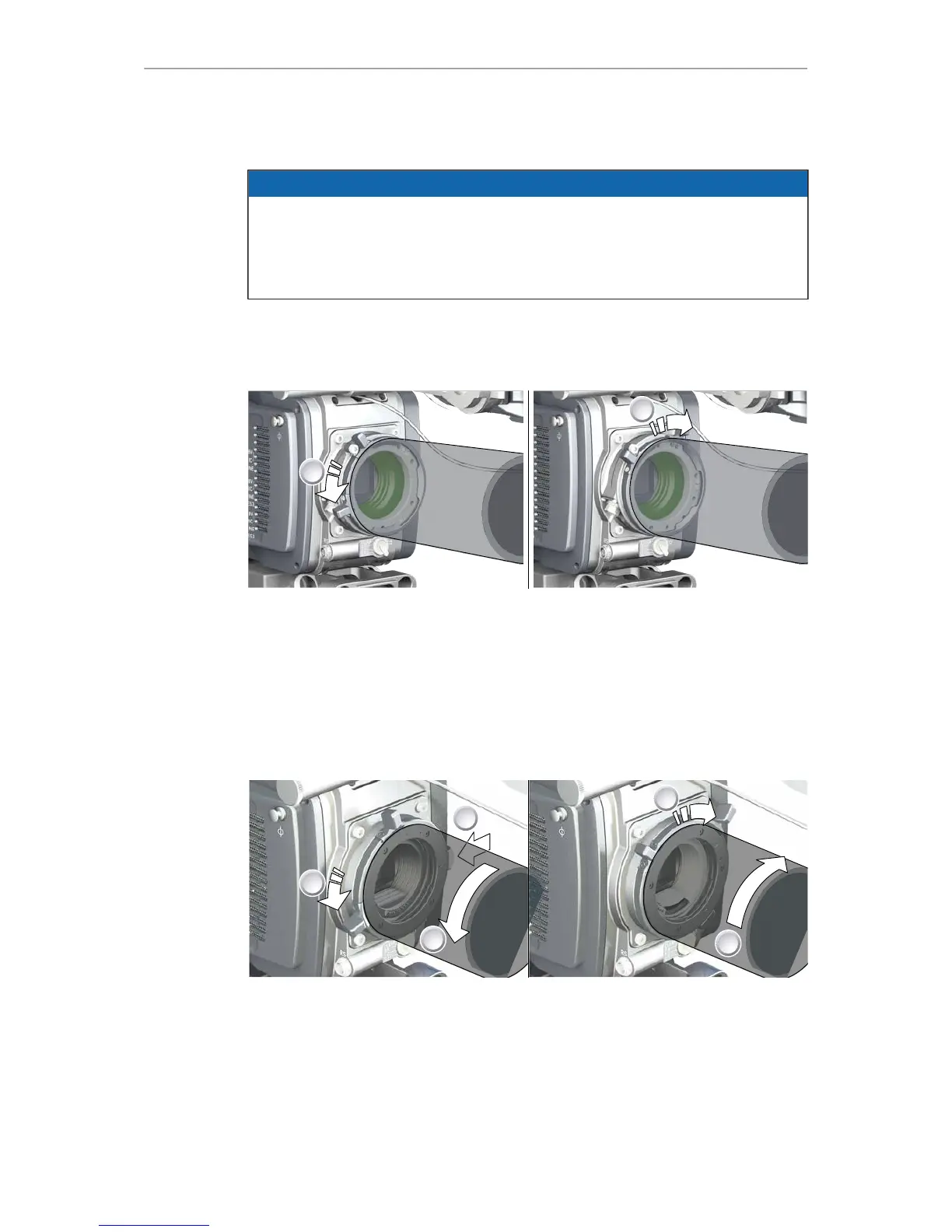
PL mount
1. Observe maximum lens dimensions.
2. Unlock the lens mount counter-clockwise (1) and remove the lens or cap.
3. Never touch the sensor.
4. Either: Mount the next lens and lock (2) the lens mount clockwise.
5. Or: Always cap and lock (2) an empty lens mount clockwise.
EF mount
1. Observe maximum lens dimensions.
2. Turn the lever counter-clockwise (1) to unlock the mount.
3. Either: Unscrew the cap.
4. Or: Press and hold the button (2) to unlock the lens.
5. Counter-clockwise, unscrew the lens (3).
6. Never touch the sensor.
7. Either: Mount the next lens:











 To Next Page