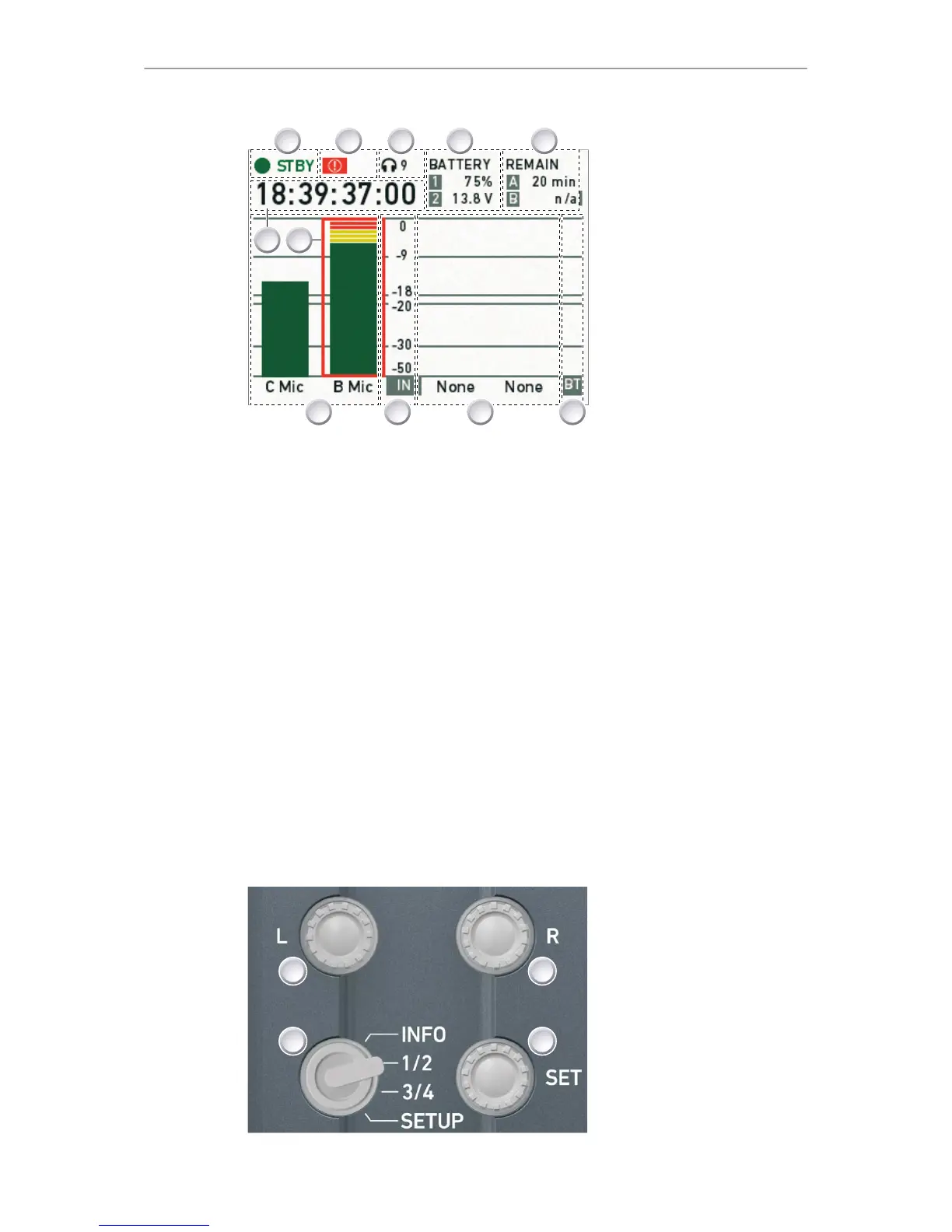
1 Camera status
2 ALERT (!) status
3 Headphone volume level
4 BAT 1 & 2 power status
5 CARD A & B remaining
time or status
6 BT level
7 CHANNEL 3 & 4 input
mapping and levels
8 dB FS scale
9 CHANNEL 1 & 2 input
mapping and levels
10 TC Timecode
11 Clipping indicator
INFO shows the audio levels, the input channel mapping, and the most important
camera parameters:
•
Camera status (1): STBY (ready for recording). REC (recording). PLAY
(playback). None (card missing, full or not yet formatted).
•
The alert (!) icon appears (2) whenever alert messages are available. See
page 63.
•
Headphone volume (3) from level 1 (= off) to 64 (= maximum).
•
Power status (4): BATTERY 1 (onboard). BATTERY 2 (BAT IN). Can be set to
percent or volt, depending on battery. See page 133.
•
Remaining card capacities (5), in minutes.
•
Audio levels (7 and 9) for all four channels and BT (6), in dB FS.
•
Reference scale (8) for audio levels in dB FS.
•
Current timecode (10). TC settings are accessible via user monitor. See
page 73.
•
Clipping indicator: If the channel shows a red frame, the audio signal is
clipping. If the audio meter is not at its peak, the input signal itself is clipping.
10.2 AUDIO > 1/2











 To Next Page