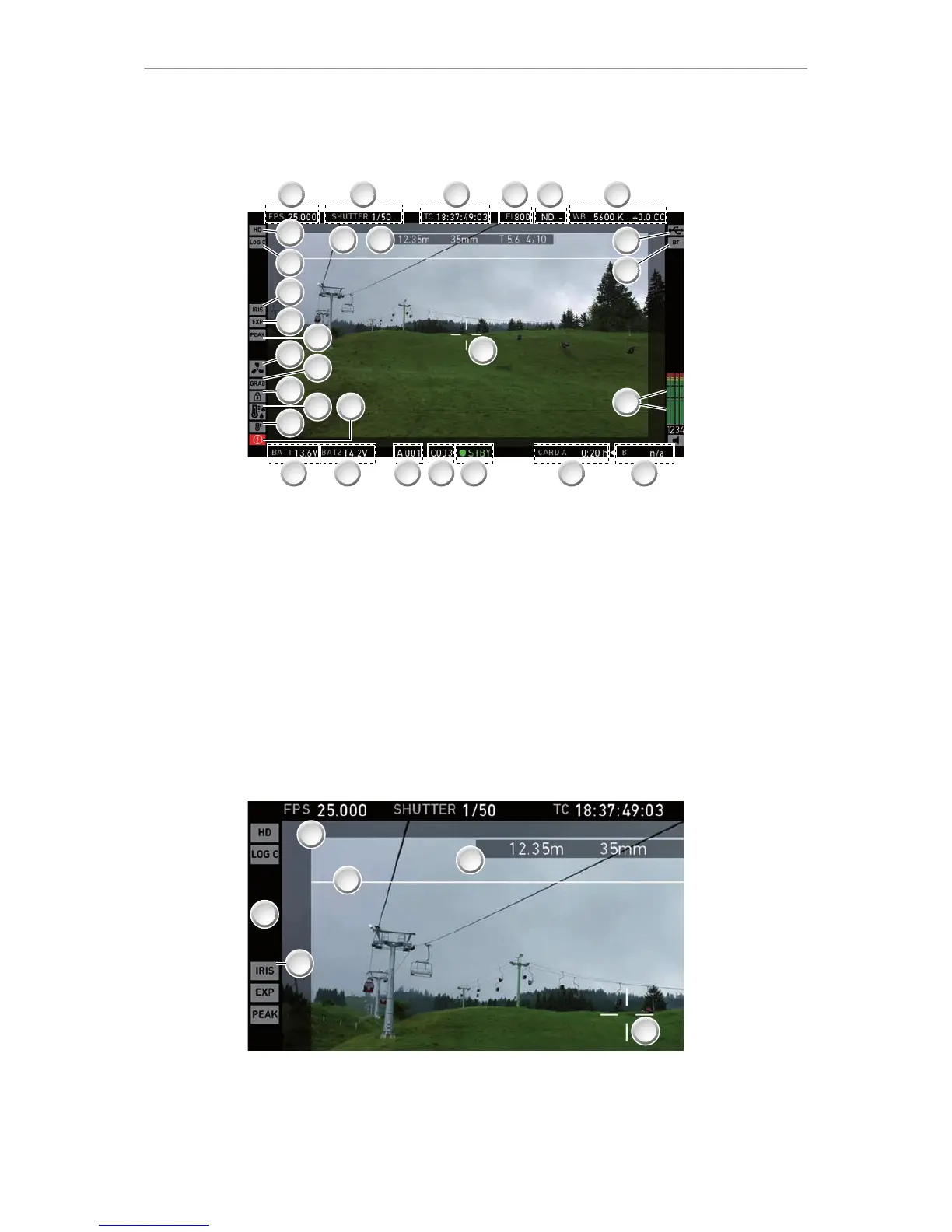
Main controls and viewfinder 47
Note: In Overlay mode (see below), all status bars appear on the active viewfinder
image.
1 Sensor FPS 16 BAT1 onboard battery status
2 SHUTTER status 17 ALERT (!) status
3 TC Timecode (if enabled) 18 Camera temperature warning (warning=red)
4 EI Exposure index 19 High humidity mode (if active)
5 Internal ND filter (if active) 20 Camera lock (if active)
6 WB White balance 21 Image grab (if active)
7 USB connection status 22 Fan mode (has been changed by camera)
8 Bluetooth 23 Peaking (if active)
9 Audio meters (if active) 24 Exposure tool (if active)
10 CARD B status (arrow = active) 25 Auto iris adjustment (if active)
11 CARD A status 26 Gamma setting
12 Camera status 27 Recording image format
13 Clip index & counter 28 Frameline
14 Camera index & reel counter 29 Lens data overlay (focus distance, focal
length, iris value)
15 BAT2 power input status 30 Center mark
1 Auto iris adjustment (if active) 4 Frameline
2 Black frame (indicating safe mode) 5 Lens data overlay
3 Surround mask 6 Center mark (here: cross)
In Safe mode, all status bars appear in a black frame (2) outside the active viewfinder
image.











 To Next Page