Chapter 6:
STANDARD 365-095-33577 Revision x.1 IPC4100 Release 1.0 Installation and Operation Guide
17
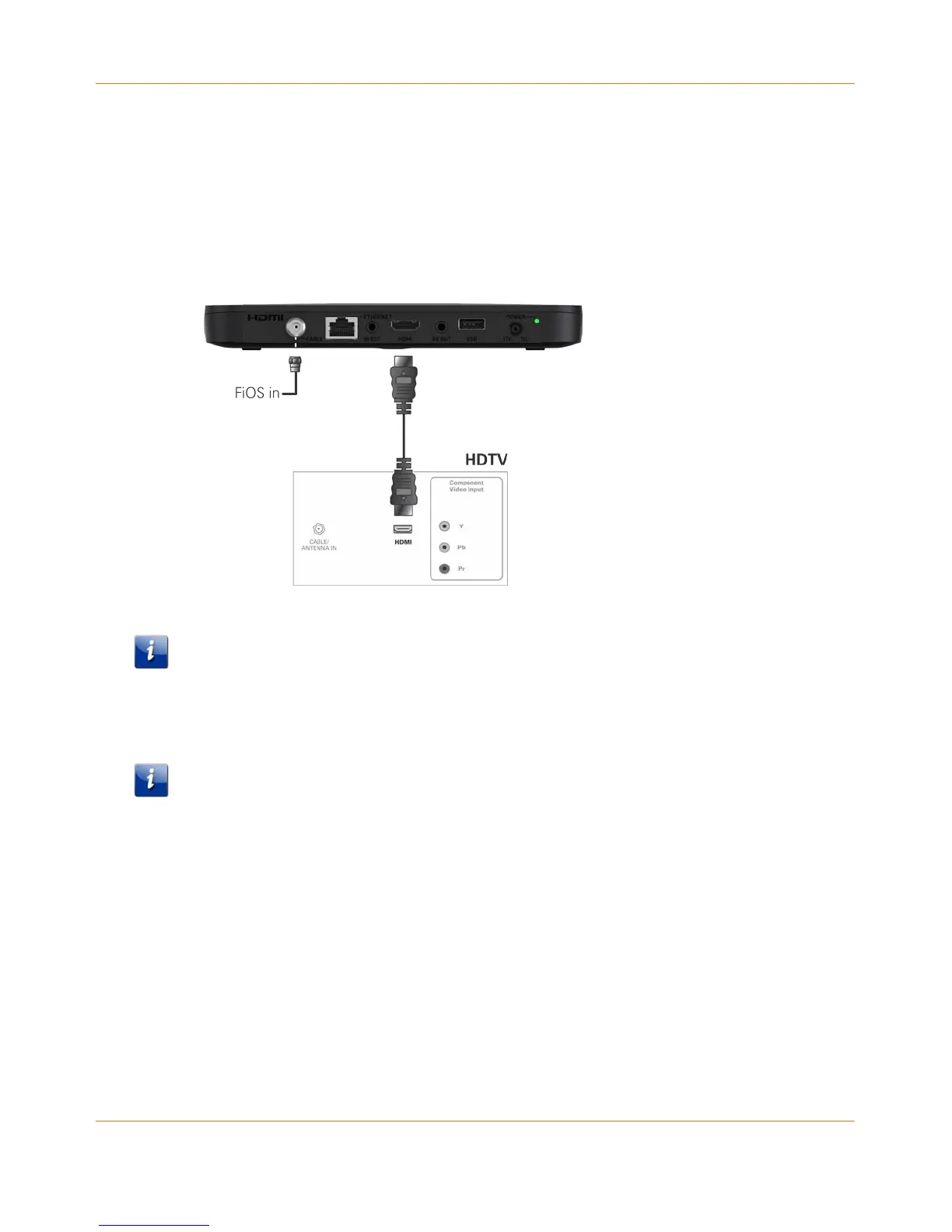
Connecting a High-Definition TV (HDTV) for video
Do the following for the best possible HDTV video quality:
1. If the TV has an HDMI input, connect it to the HDMI output on the IPC4100.
2. If the TV has a DVI input, connect it to the HDMI output on the IPC4100 using an
HDMI-to-DVI converter cable or adapter.
Figure 3: High-Definition TV (HDTV) for Video Connection
Note: Because HDMI provides both video and audio output, no additional audio connections
to the TV are required.
Connecting an HDTV and an A/V receiver for video
Note: If the A/V receiver includes an HDMI input and output, the IPC4100 HDMI output can
be connected directly to the A/V receiver’s input and the A/V receiver’s HDMI output
directly to the TV. Because HDMI provides both video and audio output, no additional audio
connections to the A/V Receiver and TV are required.



 To Next Page