ARTURIA – SPARK CREATIVE DRUM MACHINE – USER’S MANUAL
• With the 1-8 / 9-16 button lit you can play notes from current instrument pitch
upward to +7 semi-tones.
You can offset the starting pitch by moving the Jog Dial when you are in Tune mode.
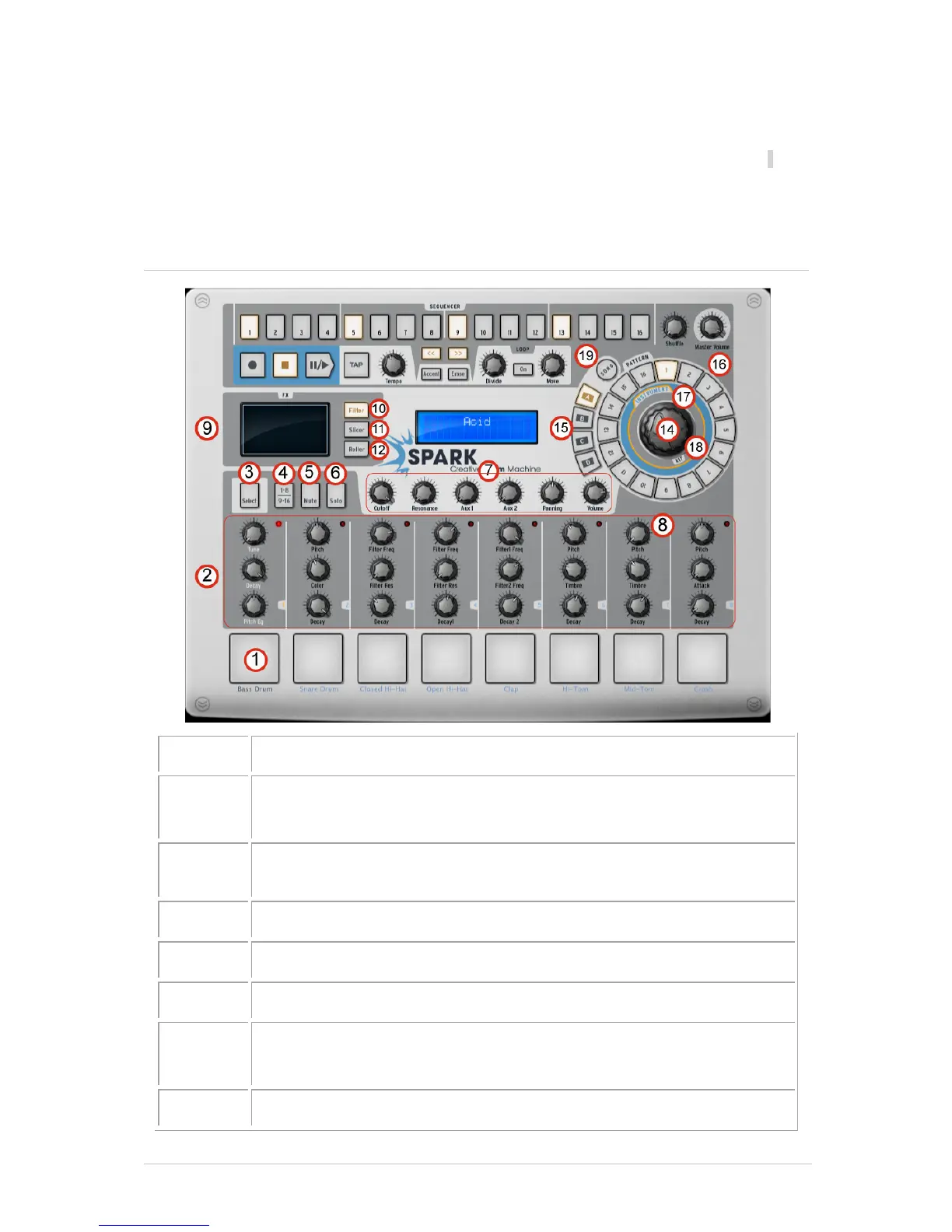
5.3 THE MAIN PANEL (SPARK CREATIVE)
Play instruments with pads (right-click: edit the instrument)
Instrument parameter knobs
(right-click: edit motion/disable motion)
Instrument Select / Shortcut Select button (Hold select, then press an
instrument pad or sequencer step pad)
Instrument page button (Instruments 1-8 and 9-16)
Mute button (Click Mute, then select one or more instruments)
Solo button (Click Solo, then select one or more instruments)
FX – Aux 1 and 2 – Pan and volume Knobs
(right-click: edit motion/disable motion)
Click within a zone to select instrument track



 To Next Page