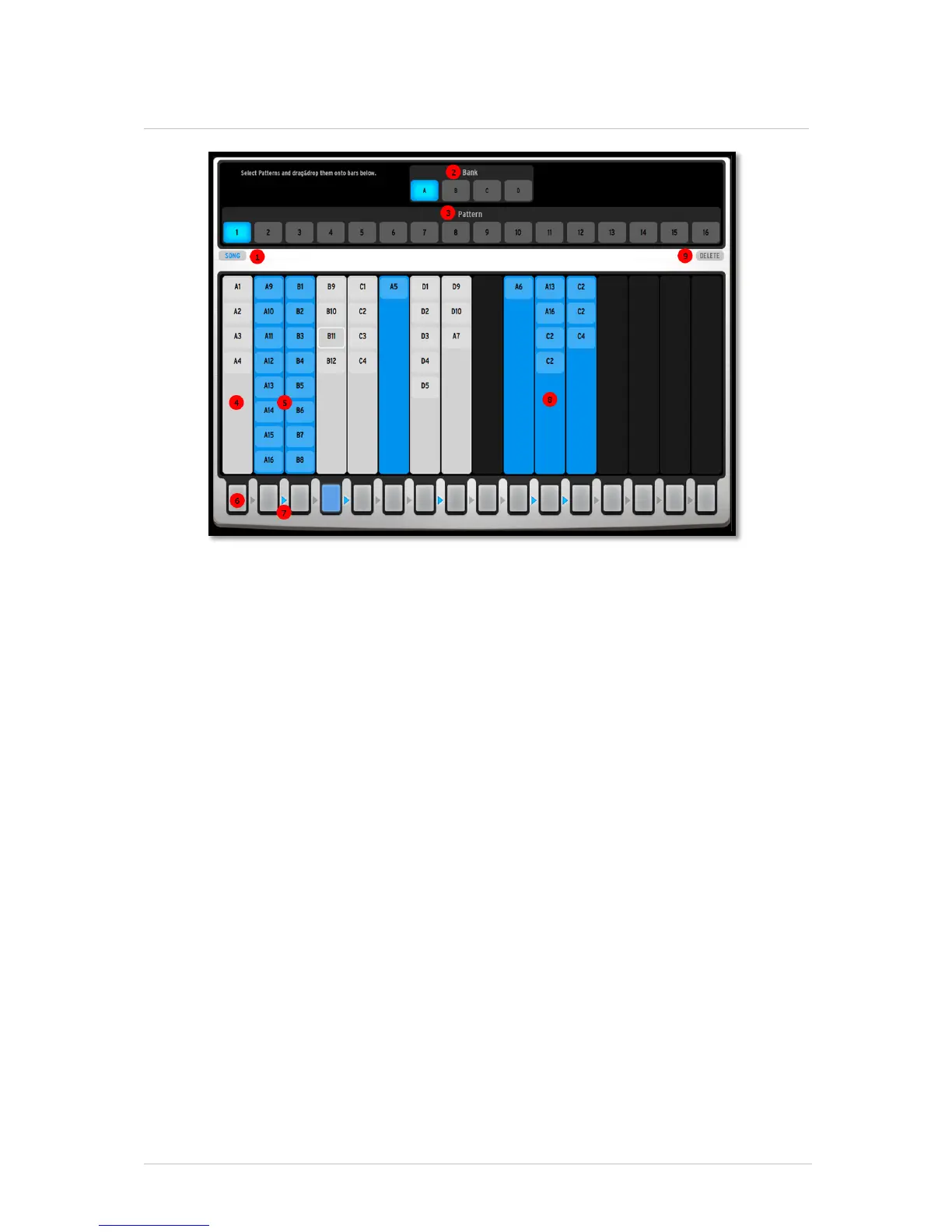
5.5 THE SONG PANEL
The Song panel allows you to chain patterns together to create longer sequences, or a
full song.
Activate the Song mode by clicking on the button found In [1]. Alternatively, you can
use the Song button found on the Main panel.
The Song mode contains 16 chains. Each of these chains can contain up to 16 patterns.
The patterns used in a chain are the ones you create in the Sequencer panel, or in the
Main panel. To add patterns to a chain, first select a bank from the four slots found in
[2]. Then you can select a pattern from the 16 slots found in [3], and drag and drop it
in one of the 16 chains found for example in [4], [5] and [9]. If a chain already
contains patterns, you can drop new patterns anywhere in the chain. Previously
contained patterns will move to show you where the pattern will be placed.
A chain will play from top to bottom, starting with the first pattern contained in it, up to
the last one. It will then jump back to the first pattern in the chain.
Chains can be triggered using the 16 buttons at the bottom of the interface [6]. When
you click on one of these buttons, the corresponding chain will start at the end of the
previously playing pattern. Alternatively, you can trigger the chains from the Main panel,
using the 16 step buttons. Step buttons on both Spark CDM and SparkLE will trigger
chains as well when Song mode is active.
Consecutive chains can also be linked together. This is done by clicking on the arrows
found between the chain [7]. In this example, chain 2-3 are linked together, so are
chain - 4, 7-8, and 10-11-12 [9]. Indeed, you can link as many consecutive chains as
you want, up to the 16 chains. Note that chain 16 and chain 1 can not be linked
together. When chains are linked together, they will play one after the other, from left to
right. In this example, when chain 2 finishes playing, chain 3 will play. When chain 3
finishes playing, chain 2 will play again.



 To Next Page