13
Practice Using your Keypad
You may want to try out your Keypad while the mount is set up at home. We suggest that you don’t put the mounting
plate, counterweights, counterweight shaft or telescope on the mount since you won’t be truly polar-aligned and calibrating
precisely. If your telescope is attached, you may cause it to hit the pier. Read the following instructions as you use your
Keypad to simulate an observing session.
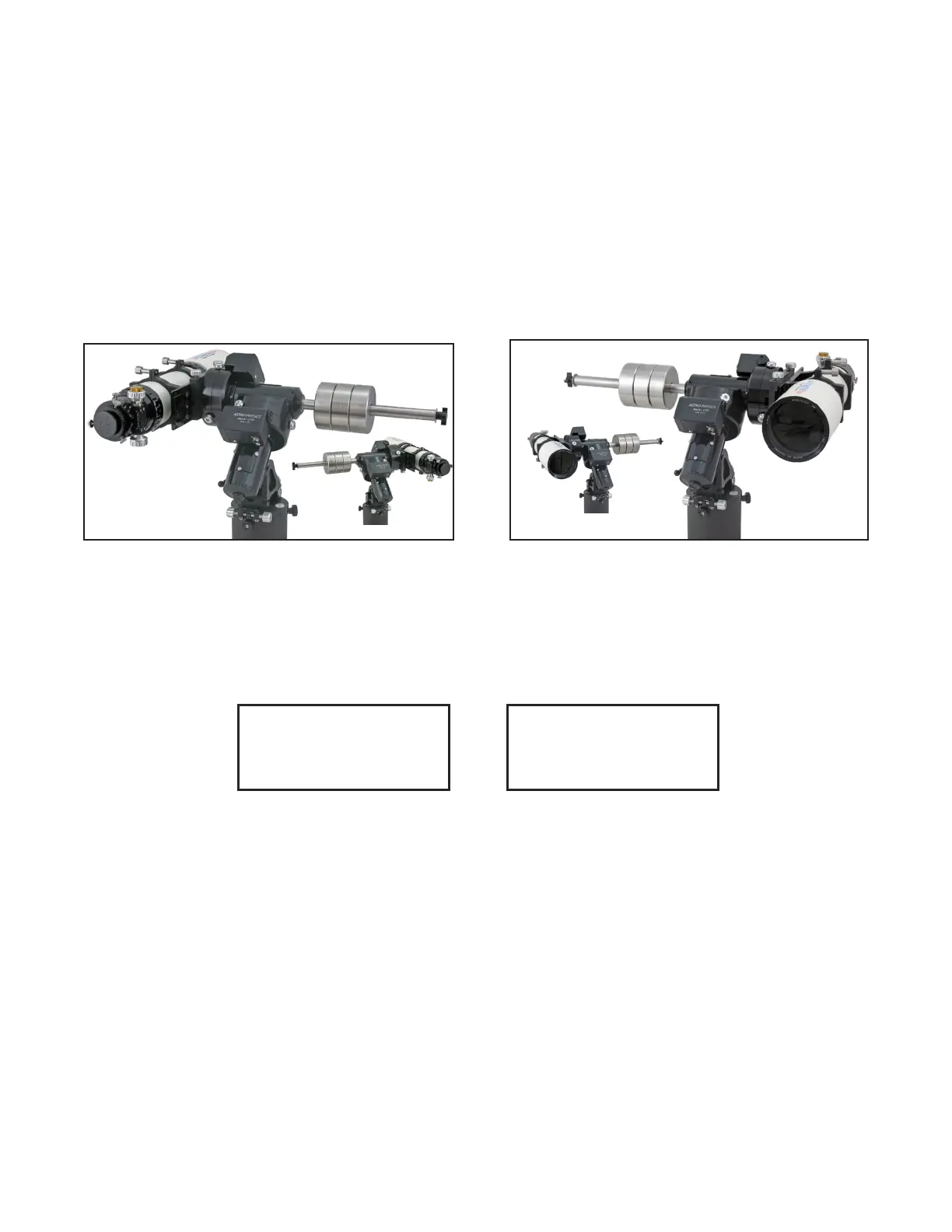
1. Use the clutches and physically move (with your hands) your mount to the Park 1 or Park 4 position as shown in the
photos (note the northern and southern hemisphere differences below). Set both axes to be level with the ground.
Although a bubble level would be important in a real observing session, for this purpose, a rough position is ne.
NOTE: For the southern hemisphere, the picture is mirror reversed (left to right). Also, be sure that the north / south
switch on the GTOCPx control box is set correctly (the GTOCP4 does not have an N/S switch).
2. When you plug in the cable of your Keypad, the words Astro-Physics and the version number of the rmware will ap-
pear briey. Then, the Location Selection screen will display since you have set Auto-Connect to NO in the procedure
above. Please select your location by entering the desired number and press GoTo.
3. From the next screen, select “4=New Setup”. The new setup screen will open and allow you to choose either Park 1,
2, 3 or 4 as your reference position. Choosing either Park 1 or Park 4 will allow you to reasonably level your mount by
eye. With this information, you can reasonably simulate an observing session.
4. Proceed to the information on the Objects Menu or other topics of interest as discussed later in the manual.
5. When you are nished with your session, be sure to leave your Keypad in the “AutoConnect: NO” setting.
PARK 1
Northern
Hemisphere
Southern Hemisphere
PARK 4
Northern
Hemisphere
Southern Hemisphere
New Setup
Start From
Park Position:
Press: 1, 2, 3, 4
New Setup Menu
1=Star-Sync
2=Polar Alignment
3=ResumeLastPosition
4=New Setup
Sync, Align, Resume, New Setup



 To Next Page