2-9
ASUS RS700A-E9 Series
Ensure to unplug the power supply before adding or removing DIMMs or other system
components. Failure to do so may cause severe damage to both the motherboard and the
components.
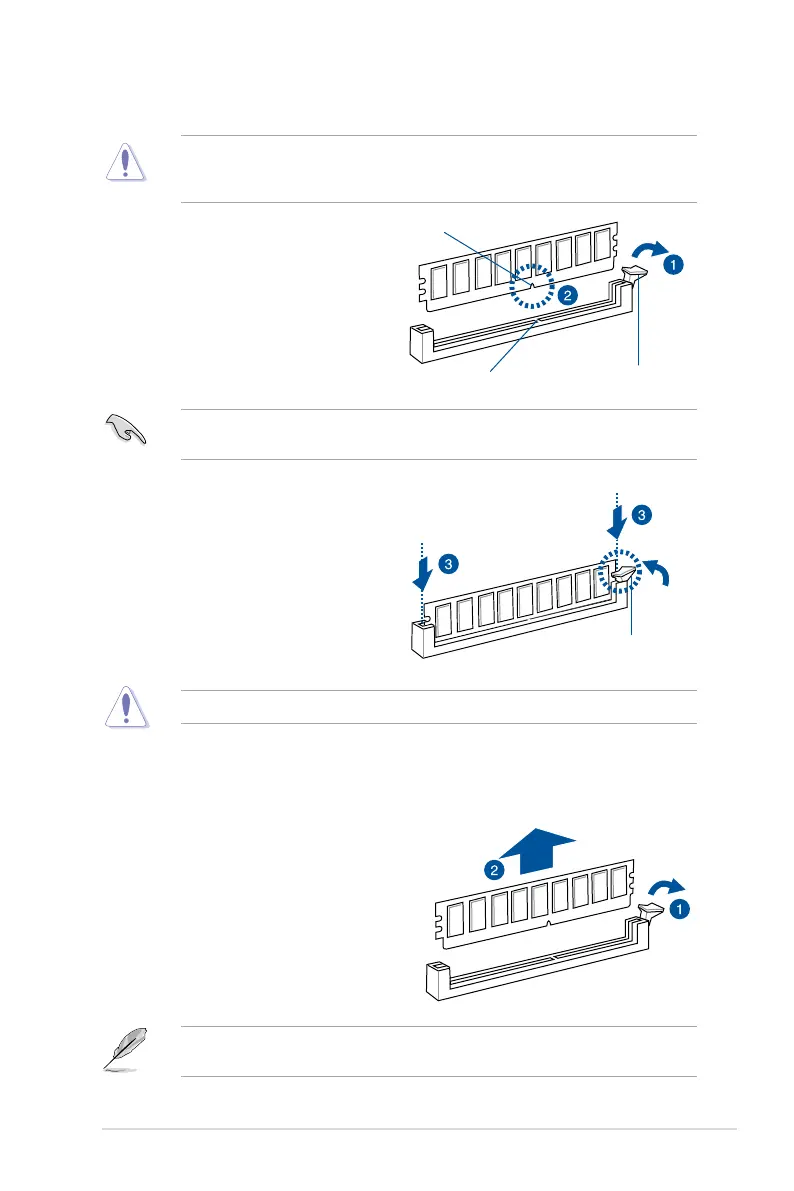
2.3.3 Installing a DIMM on a single clip DIMM socket
3. Hold the DIMM by both of its ends
then insert the DIMM vertically into the
socket. Apply force to both ends of the
DIMM simultaneously until the retaining
clip snaps back into place and the
DIMM cannot be pushed in any further
to ensure proper sitting of the DIMM.
Locked Retaining Clip
1. UnlockaDIMMsocketbypressingthe
retaining clip outward.
2. Align a DIMM on the socket such that
the notch on the DIMM matches the
DIMM slot key on the socket.
Unlocked retaining clip
DIMM notch
DIMM slot key
1. Press the retaining clip outward to
unlock the DIMM.
2. Remove the DIMM from the socket.
2.3.4 Removing a DIMM from a single clip DIMM socket
SupporttheDIMMlightlywithyourngerswhenpressingtheretainingclips.TheDIMM
mightgetdamagedwhenitipsoutwithextraforce.
Always insert the DIMM into the socket vertically to prevent DIMM notch damage.
ADIMMiskeyedwithanotchsothatittsinonlyonedirection.DONOTforceaDIMMinto
a socket in the wrong direction to avoid damaging the DIMM.


 To Next Page
 Loading...










