Chap. I - Gas Analyser
Gas-manual-en.docx — 28 —
19. INFORMATION WITH F1
After the initialisation of the emission programme,
pressing "F1" or "I" (information) displays
information about the device – analyser module, .dll
communication library etc. Information is split into
logical blocks and displayed on multiple screens for
clarity.
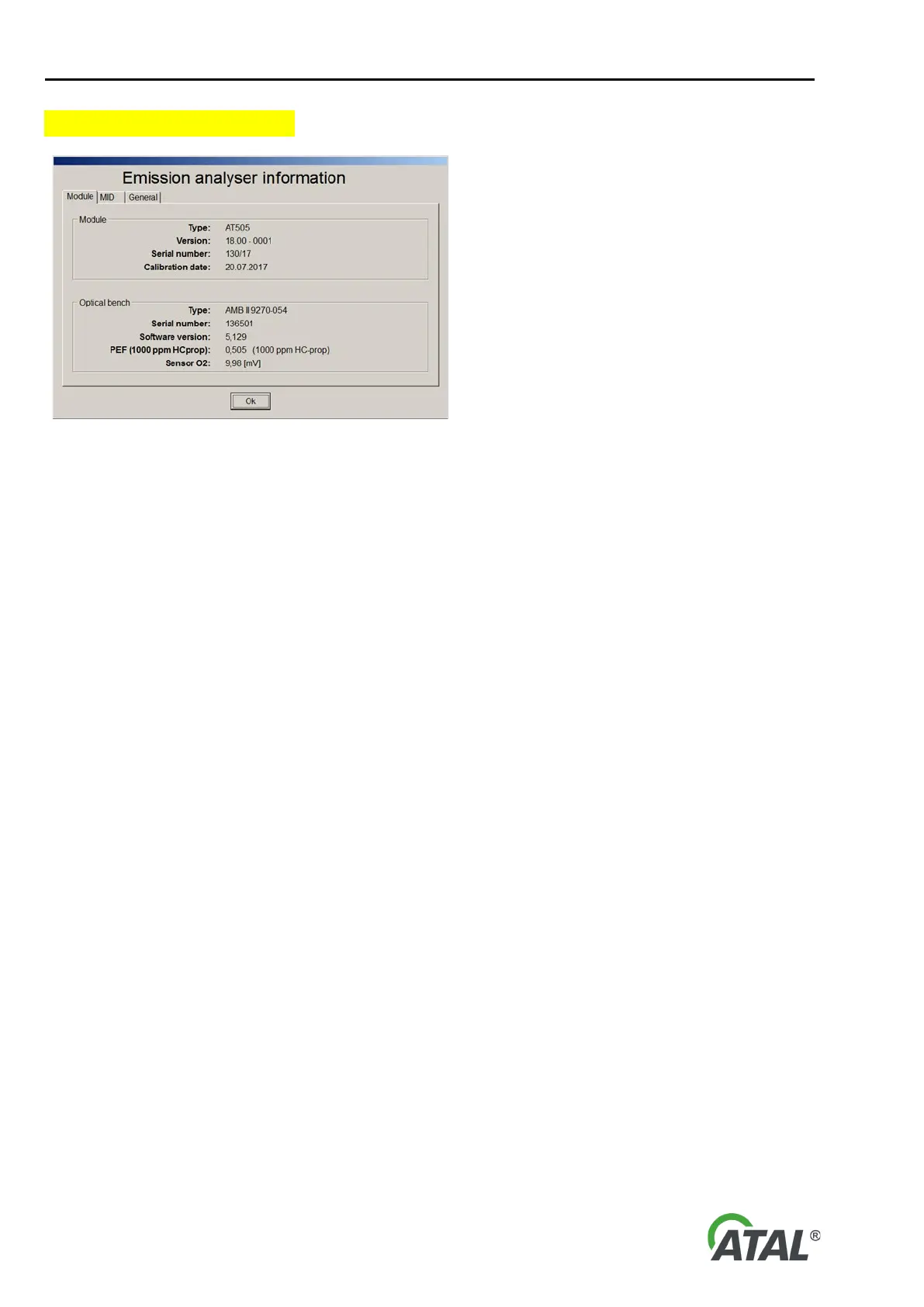
Fig. 51 – Displaying information in the emission programme
Displaying information about analyser module and optical bench.
Module Block – Information about Analyser Module
• Type – type of analyser module.
• Version – hardware configuration of the module, information for servicing. The format is AA.BB – CCCC, where:
o AA is the year of MID approval (current 18, previous 08)
o BB is sub-version (in case of potential changes and revisions)
o CCCC is bit information of the given configuration. E.g. the zero bit of the last Byte indicates whether
the pneumatic valve is in original connection (0) or whether the functionality is reversed (1).
• Serial number – module serial number
• Calibration date – date of last calibration of the module
Bench Block – Basic Information about the Measuring Optical Bench
• Type – bench type.
• Serial number – bench serial number
• Software version – version of bench's internal programme
• PEF – PEF value
• Sensor O2 – voltage value on the oxygen sensor
Displaying application (exe programme) information, communication library and hw key check status for relevant legal
inspection.
Application Block – Information about the Running Application (exe Programme)
• File name – name of the running application
• Software version – programme version of the running application
• Digital signature – information from tests of application's digital signature
o Verification – result of digital signature test (Valid / Invalid)
o Signer name – name of certificate signer that is being checked
Measuring DLL Block – Information about DLL Measuring and Communication Library
• File name – name of library
• Software version – version of library programme
• Digital signature – information from tests of library's digital signature
o Verification – result of digital signature test (Valid / Invalid)
o Signer name – name of certificate signer that is being checked
o Digest – report summary (print) that is being checked
HW Key Block – Information about the Status of Hardware Key Located in Analyser Module
• Connected – whether key is installed. Not installed for older versions, obligatory for newer versions since 2018.


 To Next Page