Chap. II - Installation of a new hardware device (HW)
Gas-manual-en.docx — 38 —
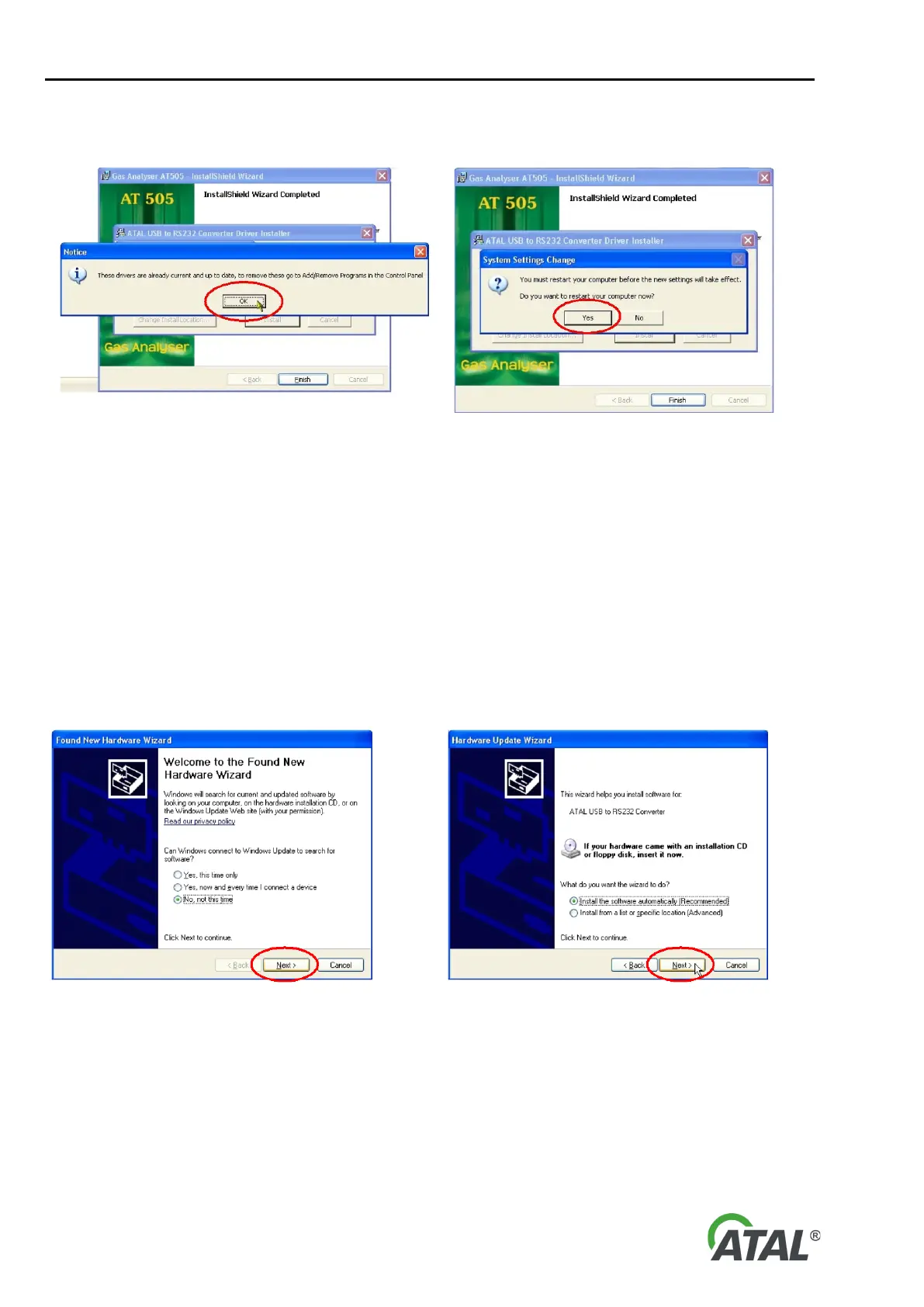
b) If up-to-date drivers are detected, the information about their presence will be displayed (see Fig. 66)
and the Gas Analyser installation will be complete.
Fig. 66 – The result of a search for old drivers (in this case the
drivers are up-to-date
Fig. 67 – A system request for restarting the system – it is
recommended to perform the restart (Yes)
2.2 ADAPTER USB-RS232 FINAL INSTALLATION
1. Initiation of the converter installation is dependent on successful Gas Analyser installation.
2. Connect the converter to the PC (insert it into a free USB port)
3. The device should be detected, see Fig. 58.
4. The hardware installation is straightforward and is guided by the installation wizard on the PC screen.
Note:
The language of the Wizard will correspond to your language version of Windows.
The following series of figures was taken from the installation wizard for the Windows XP operating system. The
wizard for Windows Vista is similar:
68 – New Hardware Found Wizard (Windows XP). Proceed with the installation by clicking “Next”


 To Next Page