Chap. I - Gas Analyser
Gas-manual-en.docx — 9 —
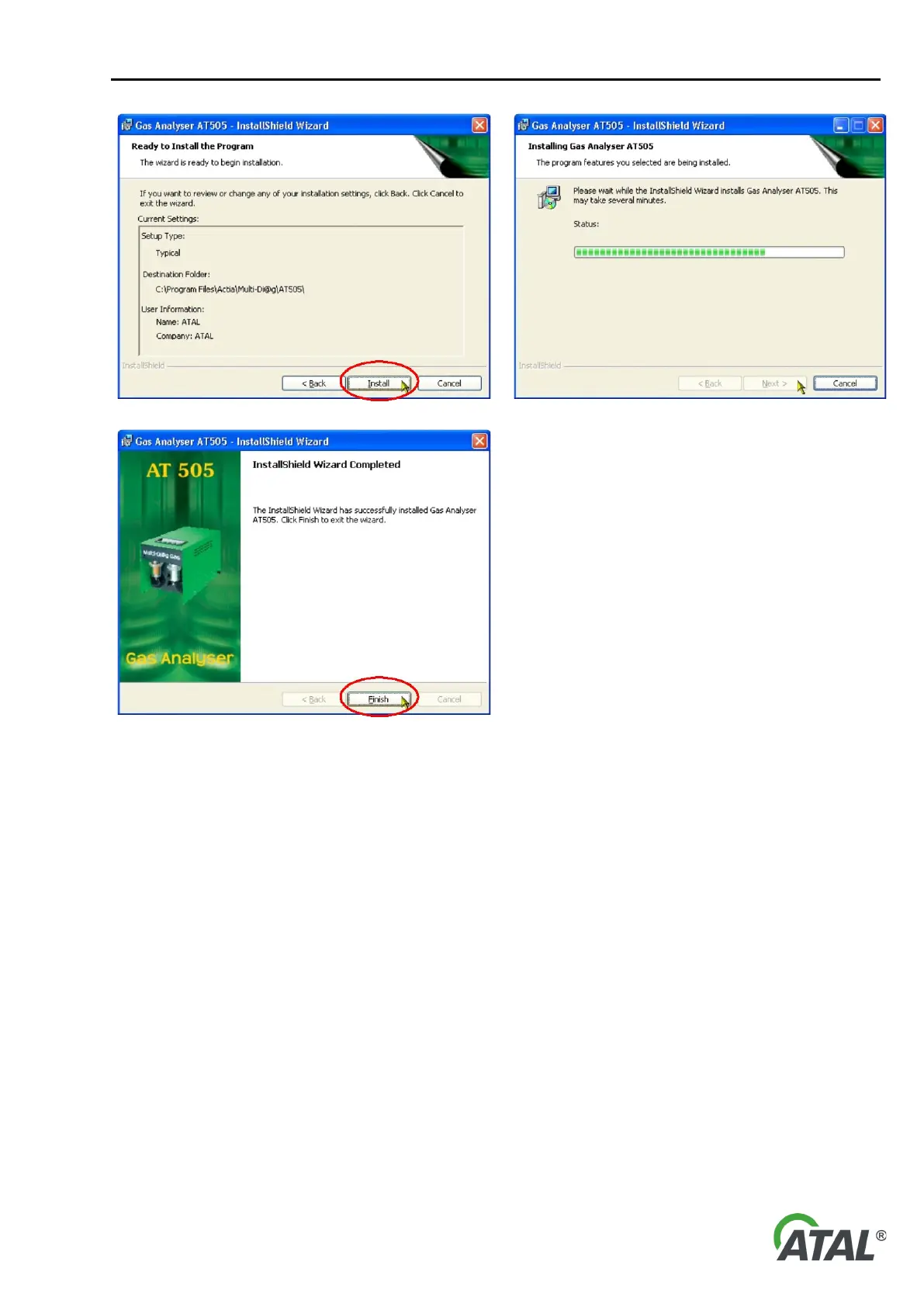
The installation may take several seconds. Click on
“Finish” to complete the installation.
The installation of drivers for the RS232-USB
converter starts after its completion (see Chap. I - 2)
8 – Click on "Finish” to complete the installation
7.2.2 UNINSTALLATION (REMOVAL) OF THE GAS ANALYSER PROGRAM
Note:
The default language of the Wizard is English but it can correspond to your language version of Windows.
To uninstall the program open the installation dialog box. There are two ways of doing this:
a) Click on Add or Remove Programs in the Control Panel. Then click on “Remove” (Fig. 9). Confirm
this choice in the displayed dialog box (see Fig. 10) and the program will be removed promptly and without
further warning.
Note:
Open the Add or Remove Programs by clicking Start, Control Panel and double-clicking Add or Remove
Programs.


 To Next Page