Chap. III - Remote control
Gas-manual-en.docx — 49 —
3.1.2 SETTING THE ADDRESS OF THE REMOTE CONTROL TRANSMITTER
For the correct function of the RC it is necessary to set the address of the transmitter (if there are several RCs in
the workplace, you should assign a unique address to each RC).
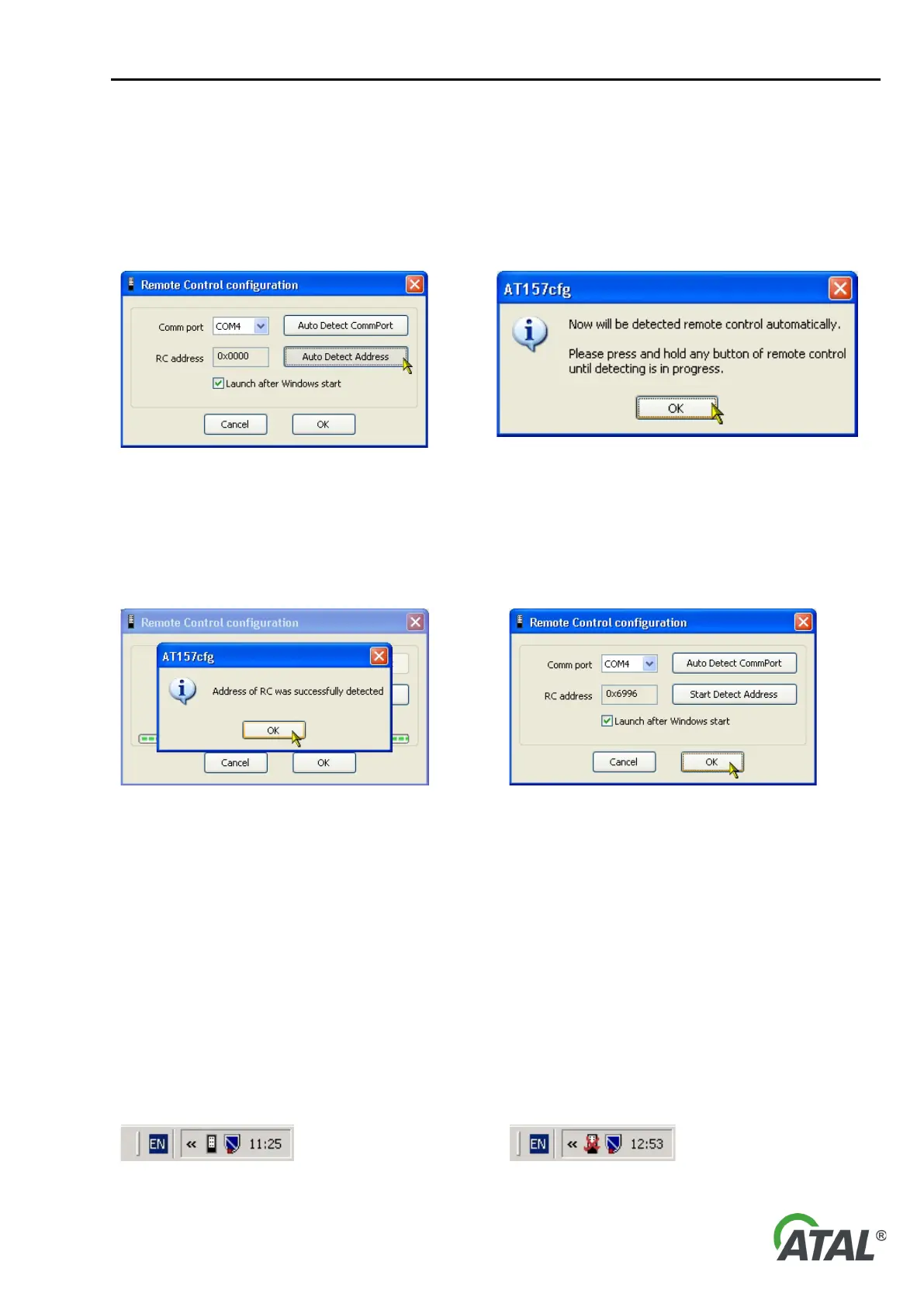
You should proceed by clicking on the “Auto Detect Address“ button (see Fig. 102). The user is informed that
they should click on any button of the RC several times while address detection is in progress (see Fig. 103).
Fig. 102 – Launching auto detection function to determine the
remote control address
Fig. 103 – Information dialog for setting the remote control
transmitter
The user should confirm the information message and then click on any RC button. If the communication port is
set correctly, the address will be detected after pressing any button roughly five times.
The user is informed about address detection by a short message (see Fig. 104).
Fig. 104 – Information dialog about successful auto detection of the
RC transmitter address
Fig. 105 – Save the changes in the RC configuration and exit
If the address is not detected even after several button presses, then the communication port for the RC is
probably incorrectly set or the RC receiver is not connected.
Warning:
1) “Launch after Windows start” should remain ticked.
If it is unticked, the program will not start automatically when Windows starts. Then you will always have to run
the program manually from the Start menu (see Fig. 94).
2) At the end of configuration, always remember to click on the “OK” button! (see Fig. 105).
Thus any modifications are saved. If you click on the “Cancel” button, no changes to the settings are made.
3.2 REMOTE CONTROL TESTING
The RC icon in the system tray changes depending on whether the RC is connected and correctly configured:
Fig. 106 – Remote control is connected and configured Fig. 107 – Remote control is disconnected or wrong
communication port is set


 To Next Page