Chap. III - Remote control
Gas-manual-en.docx — 48 —
You can manually enter the port number which the
RC is connected to.
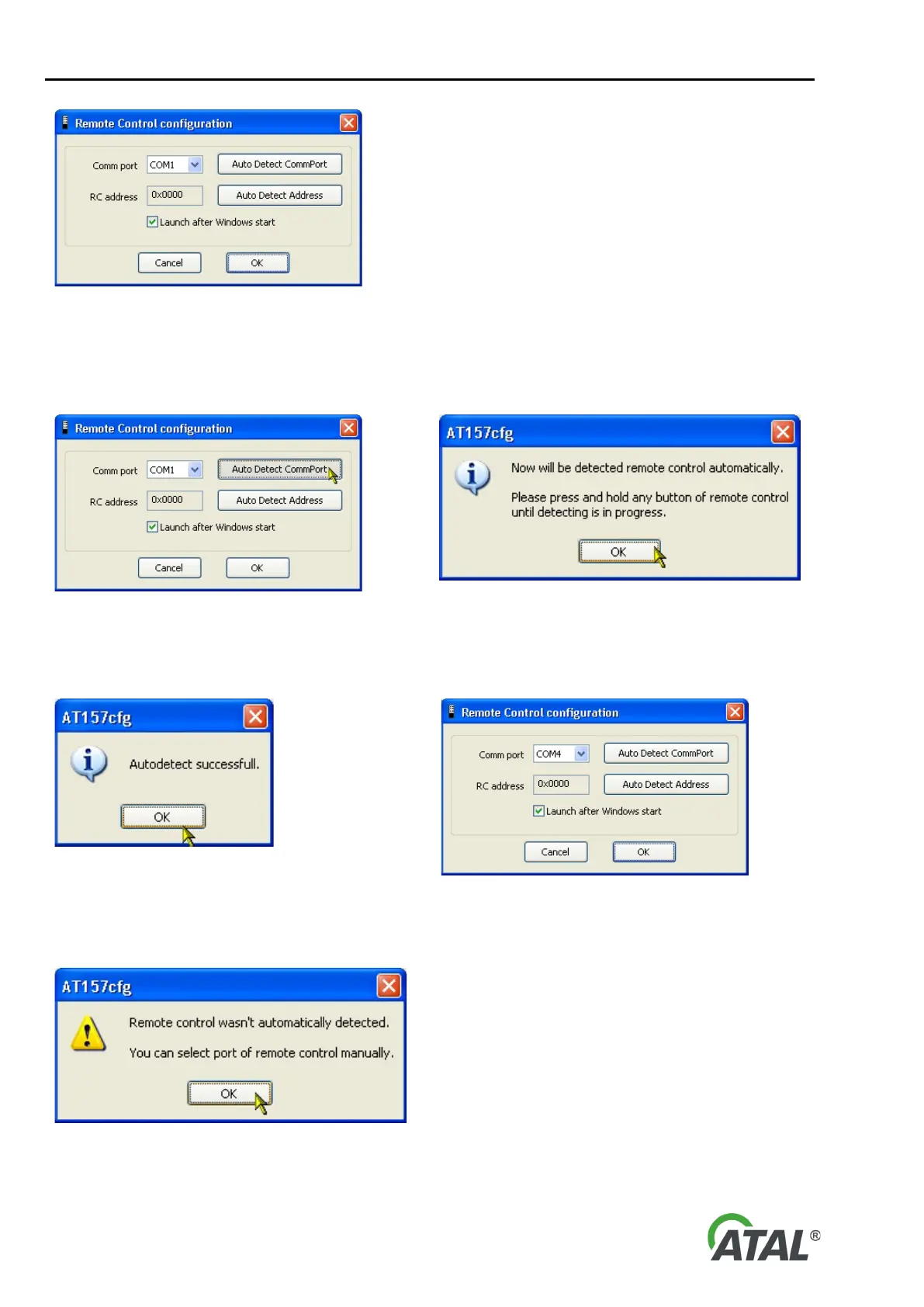
Fig. 97 – Remote control configuration
Recommendation:
If you do not know or are not sure which port the RC is connected to, use auto detection feature by clicking the
“Auto Detect CommPort” button (see Fig. 98). You will then be prompted to hold any button of the remote
control while auto detection in progress (see Fig. 99). Thus the RC can be detected automatically (see Fig. 100).
Fig. 98 – Launching auto detection function to determine the
remote control communication port
Fig. 99 – Information dialog for auto detection of the remote control
port
If auto detection is successful, a message is displayed and the detected port number is automatically filled in.
(Fig. 100).
Fig. 100 – Notification of a successful auto detection of the remote control
Otherwise a warning message about unsuccessful automatic detection is displayed (see Fig. 101).
In such a case it is necessary to check
whether:
1) The RC receiver is connected to the PC
2) Batteries in the RC are OK
3) Alternatively try to set the port manually
However auto detection should work in
the vast majority of cases..
Fig. 101 – Warning message about unsuccessful auto detection of the remote
control


 To Next Page