Chap. III - Remote control
Gas-manual-en.docx — 50 —
Warning!
If you set for instance COM 2 as the existing port, but the RC is physically connected to COM 1, then it will not
work despite the fact that the icon signals functional state. You can check whether the RC is correctly configured
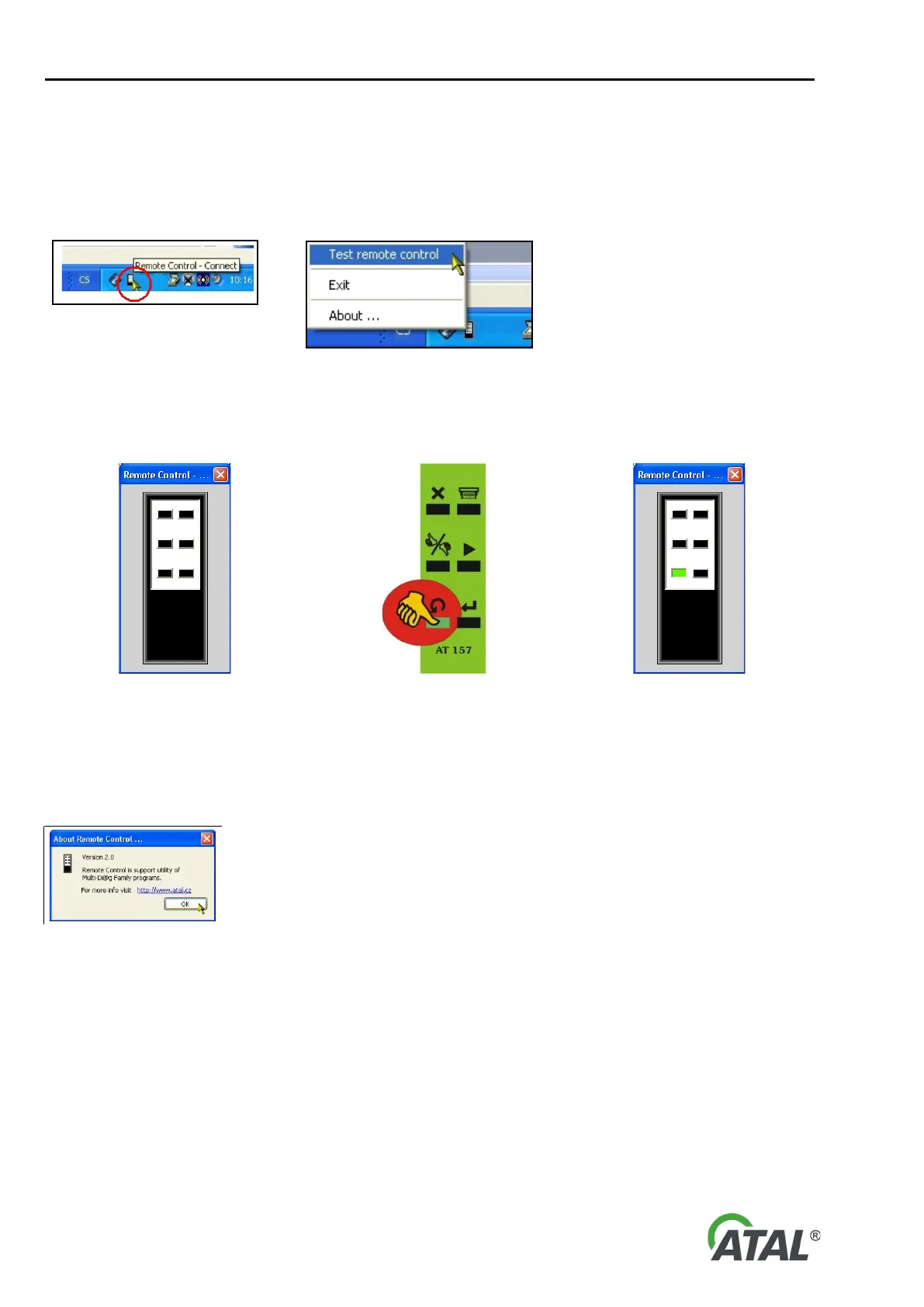
and functioning by selecting the option “Test remote control” in the menu (available by right-clicking on the RC
icon - see Fig. 108).
“Exit” – Exit
the program. The
program automatically ends when
Windows is closed down.
“About …” – about the program …
Fig. 108 – RC context menu
A remote control dialog will then be displayed on the screen (see Fig. 109). Now if you push any RC button (see
Fig. 110), the relative button on the screen will turn green for a short time (see Fig. 111).).
Fig. 109 – Remote control dialog displayed
before operating the test
Fig. 110 – Push a button on the remote
control
Fig. 111 – Evaluation of the remote control
test
4. INFORMATION ABOUT SOFTWARE VERSION
If you click “About …” information about software, version number, etc. is shown (see Fig. 112).
Fig. 112 – Information about software version (your version may be different)


 To Next Page