28
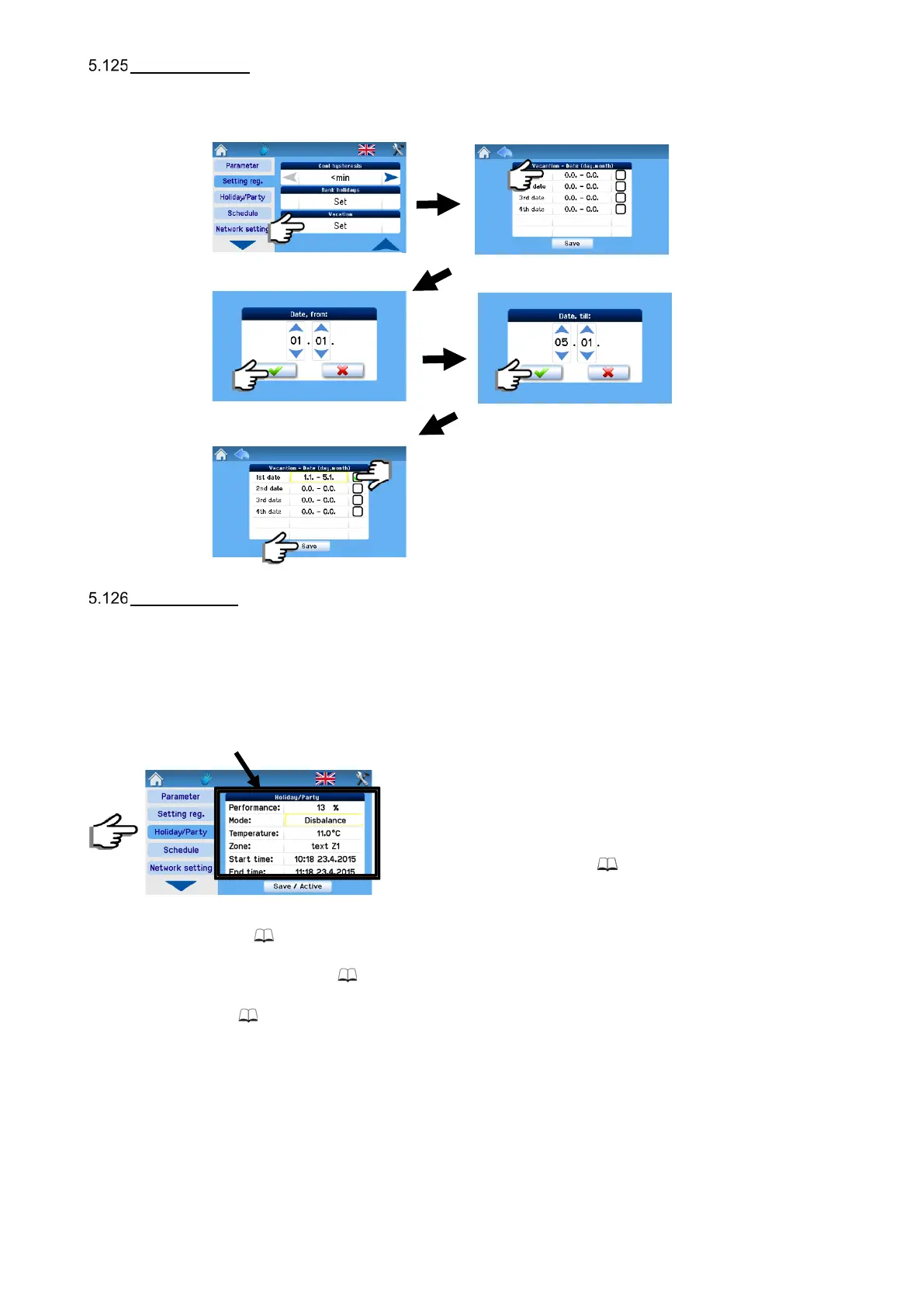
School holidays
Settings as per user requirements; up to four different holiday periods can be set.
School holiday setting steps:
Holiday / Party
This is a mode set for a limited period of time during which the unit’s operation is other than in regular modes, such as when the
unit is normally run according to the weekly program and should be switched temporarily to economy mode for example for a week
when there is no occupancy in the house.
When the parameters set for the Holiday/Party function have been stored, the unit is activated for operation according to these
parameters; these cannot be subsequently modified or the unit’s operation mode changed until the period set expires or the
Holiday/Party function is deactivated manually (Deactivation button).
The settings below apply when the Holiday/Party mode has been activated.
Power: For Power settings see 5.1.
Mode: For Mode settings see 5.19.
Temperature: For Temperature settings see 5.111.
Zone: For Zone settings see 5.112.
Start time: The starting time of the mode may be delayed; the Holiday/Party mode starts according to the start time set.
End time: The Holiday/Party mode ends according to the end time set.
“Store/Activate” mode button: It serves for storing the parameters set. The mode is activated and deactivated according to the
start and end times set. (After pressing, this button changes to the “Deactivate” button).


 To Next Page