30
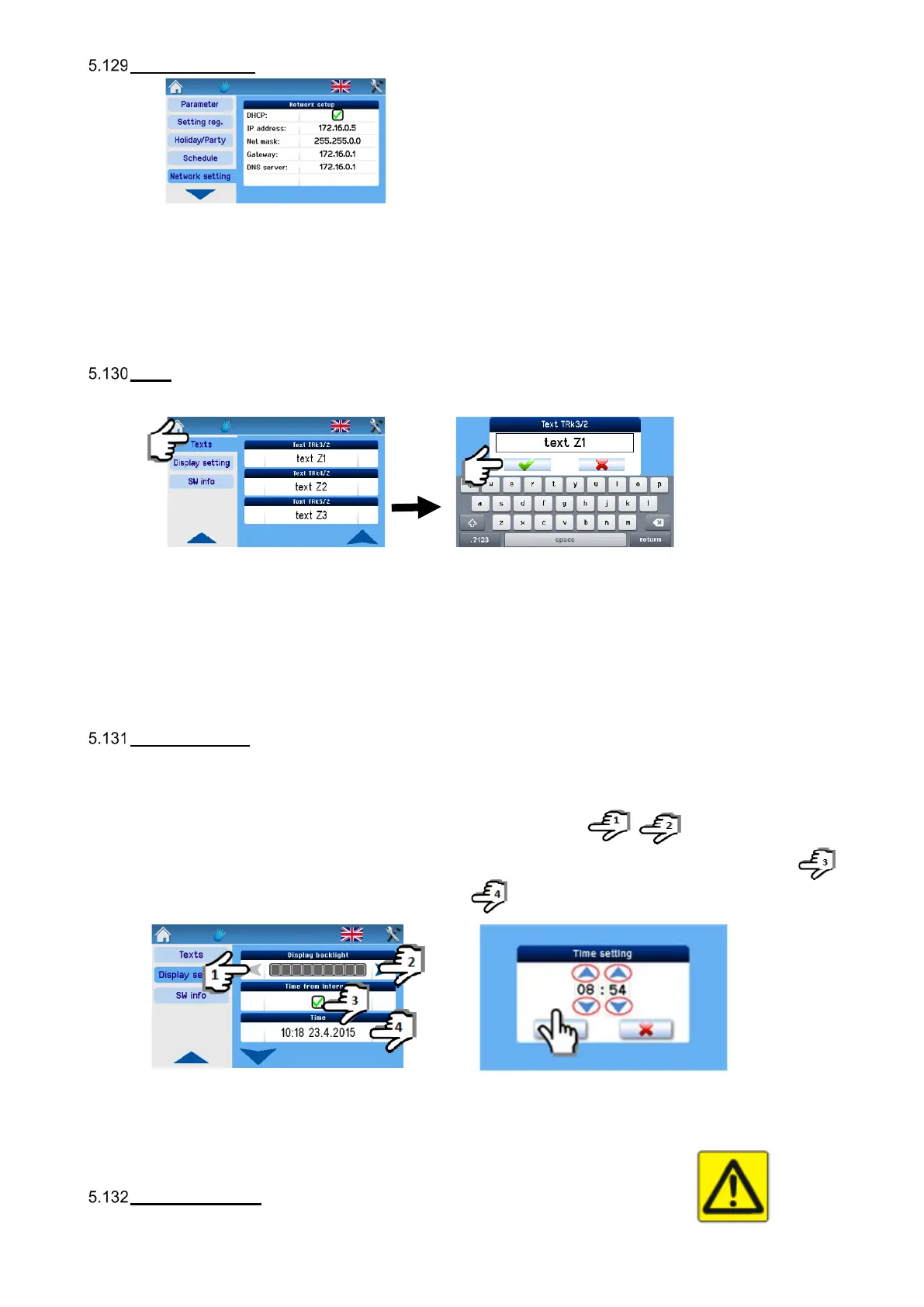
Network settings
DHCP: When checked, the network is automatically set from the internet; if not checked, the network must be set manually.
Note
The “Save” button records the values set and also immediately restarts with new values.
Texts
The” Texts” parameter is used for changing adjustable texts as required.
Note
The texts can be adjusted as required and are the same as those for setting from the web. The respective text is shown in the
“Mode” box of the unit switches to the mode according to this input.
D1–D4, IN1, IN2, Zone 1, Zone 2, Zone 1+2, INk1–INk4, T
Display settings
In this section you can set the basic parameters of the display:
Backlight setting The display backlight is changed using the setting arrows
Internet time sync Time sync with the internet is done by checking the update option, taking place immediately.
Time and date setting The date and time are set by clicking.
In the event of a power cut resulting in wrong time settings it is necessary change the internal battery on the RD-int board.
- The internal power supply battery type is CR 2032; it is located in the control module on the RD-int board.
- Replacement must be performed by a service technician.
Time zone setting
For setting the time zone according to the location of the unit, done by the setting arrows.


 To Next Page