29
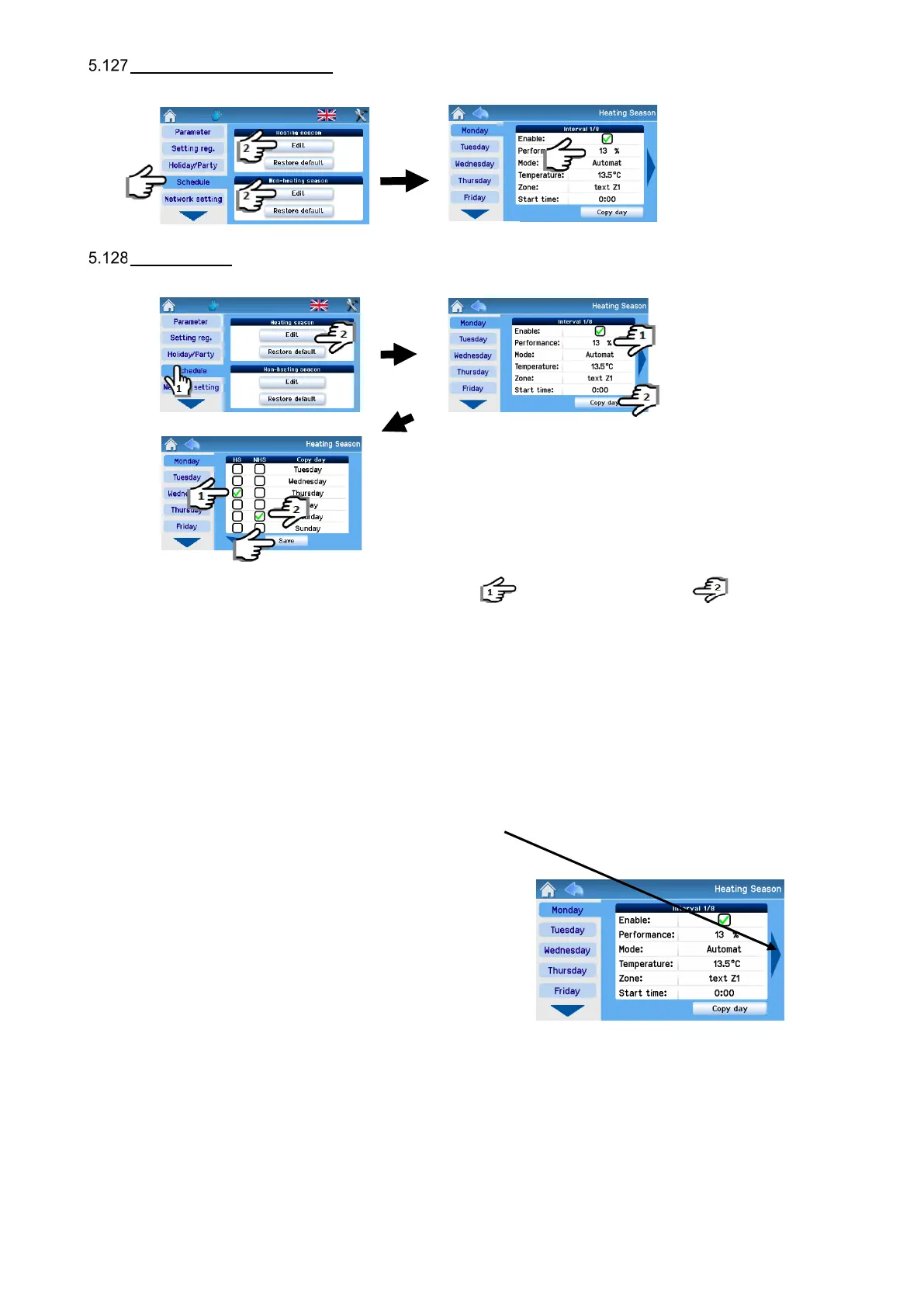
Setting the weekly program
The weekly program is set separately of the heating and non-heating season.
Copying days
Settings may be copied between days as shown below:
Example of copying: When copying, first check Wednesday in HS and then Thursday in NHS , thereby copying all
settings for Wednesday in HS to Thursday in NHS.
Settings for each season provide eight intervals for each day of the week and separate settings for Bank holidays and School
holidays. Each interval allows setting all operating parameters of the AHU and the start time of the interval.
Unless the first interval of a given day starts at 00:00, the unit continues to run with parameters set by the last interval of the
previous day until the first interval start time.
Note
Use the arrows to move between all eight intervals (days)
The weekly program allows copying and pasting the settings of a selected day as follows:
- Into each day of the week
- Into selected days
- Into Bank holidays / School holidays
- Into Heating and Non-heating season days


 To Next Page