43User Manual
5 The HIS Screen
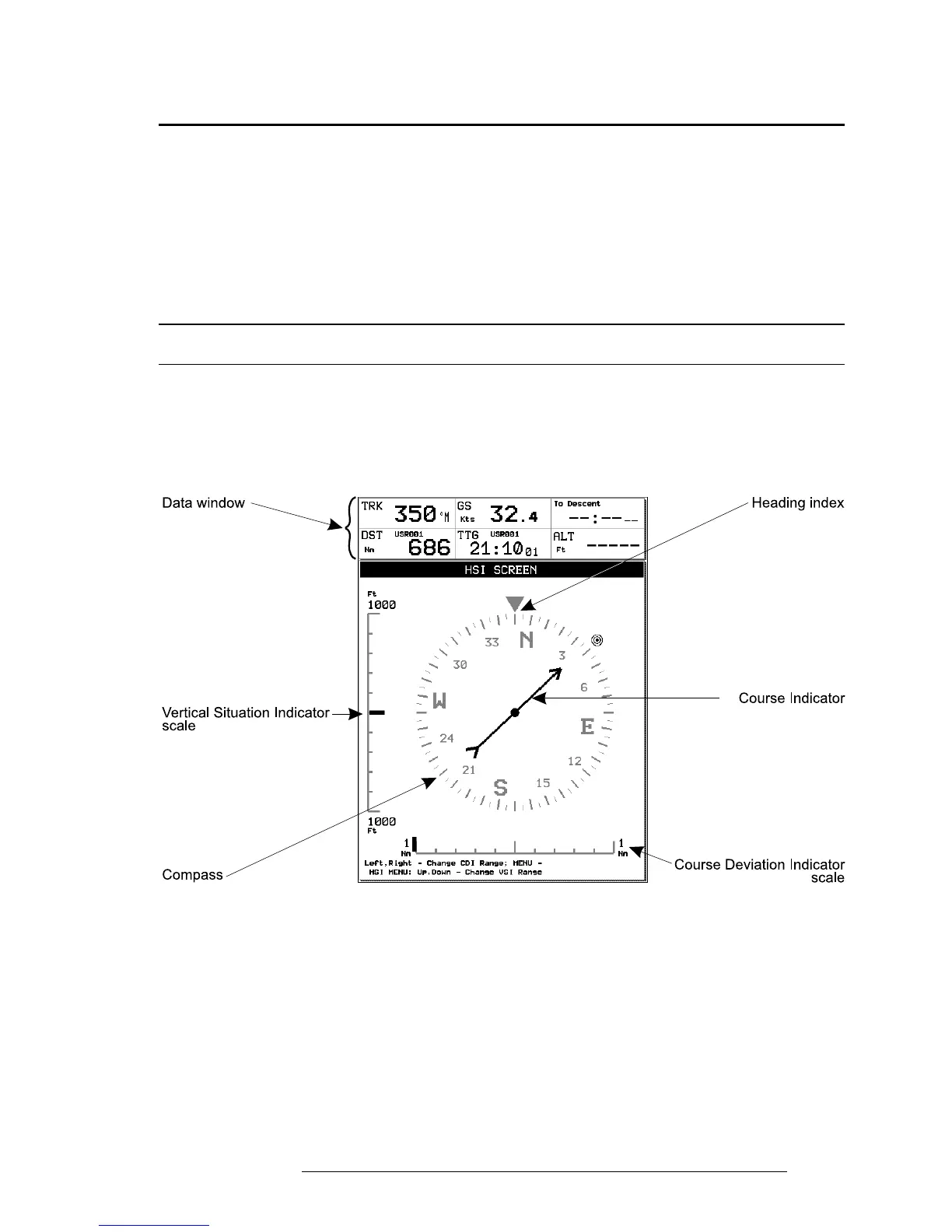
The HSI screen presents the desired course to be flown and the current Track
in a graphical format similar to the Horizontal Situation Indicator of an air-
craft; using the compass rose as the center of the display. From Moving Map:
> ‘MENU’ 1 sec. + “HSI SCREEN” + ‘ENTER’
5.1 HSI DESCRIPTION
The HSI calculates user data (current Flight Plan and VNAV calculator data)
with GPS data to provide the visual display of the parameters of flight. While
flying with the HSI mode, the Heading Index and Course Indicator guide you
to your destination.
Fig. 5.1 - HSI screen
The Vertical Situation Indicator (VSI) scale is displayed on the left side of the
screen, while the Course Deviation Indicator (CDI) scale is displayed at the
bottom of the screen. Use the cursor keys up/down to change VSI scale among
250, 500 and 1000 FT. Use the cursor key left/right to change CDI scale among
0.1, 0.5, 1, 2, 5 and 10 NM.
The units of measure are selected from Units Setup in the System Setup Menu,
(refer to Chapter 14).



 To Next Page