Variants Overview
14 ACU6100 DV64440.03 Issue 09 November 2019
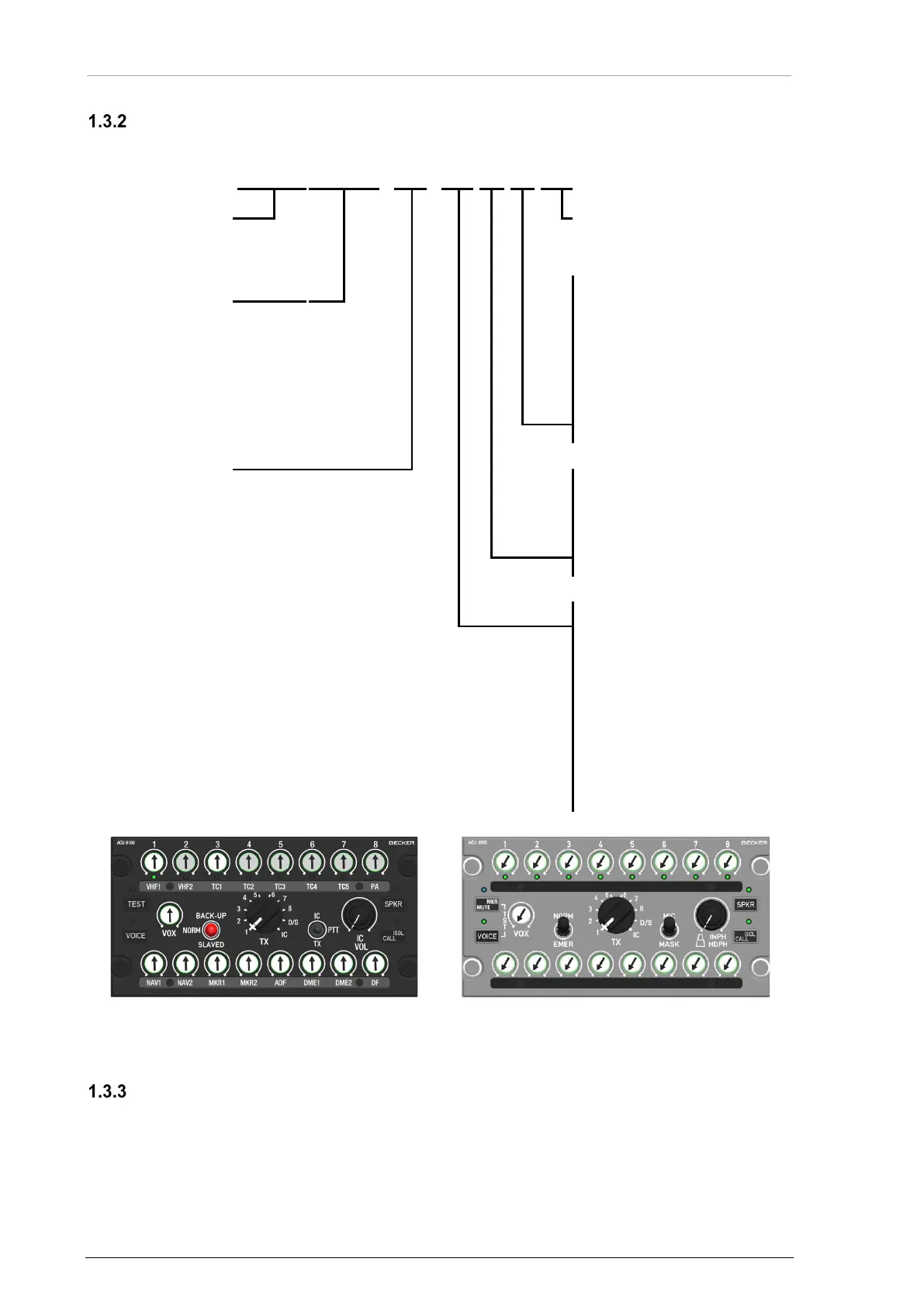
ACU6100-X-(XXXX)
ACU
6100
-
X
-
(X
X
X
X)
0= IC Keying on Panel
5= Fixed Wing Options
0= 0...28 V, green
1= 0...5 V, green
2= 0...28 V, blue white
3= 0...5 V, blue white
4= 0...28 V, warm white
5= 0...5 V, warm white
2= Standard Panel Inlay
3= Blank Panel Inlay
9= Blank Panel Inlay RX only
0= Black Panel
1= Black Panel, NVIS friendly
2= Grey Panel
3= Grey Panel, Blue Status LEDs
5= Black Panel, NVIS compliant
6= Black Panel, Blue Status LEDs
A= Vertical Black Panel
B= Vertical Black Panel, NVIS friendly
C= Vertical Grey Panel
Examples:
Figure 2: ACU6100-X-(XXX0) - Rotary Wing Variant
Figure 3: ACU6100-X-(XXX5) - Fixed Wing Variant
Software Status
Descriptions see "Software/Firmware Status – Functionality", page 28.


 To Next Page