Functions
DV64440.03 Issue 09 November 2019 ACU6100 39
2.7 Configuration
The configuration of the DVCS6100 can be changed and edited by using a personal computer or
laptop with the related software CSW6100.
2.8 Functions
Intercom Circuits
It is possible that some users (ACU devices) are connected to a group(s) = intercom circuit(s). The
user and group selection are done in the configuration.
Intercom circuit (intercom groups):
• Cockpit crew.
• Cabin crew.
• IC ring line (connected to the cabin, cockpit or 3
rd
-IC-circuit; configurable by the
configuration setup*).
• 3
rd
-IC-circuit (controlled by an external switch, refer to the REU6100 manual).
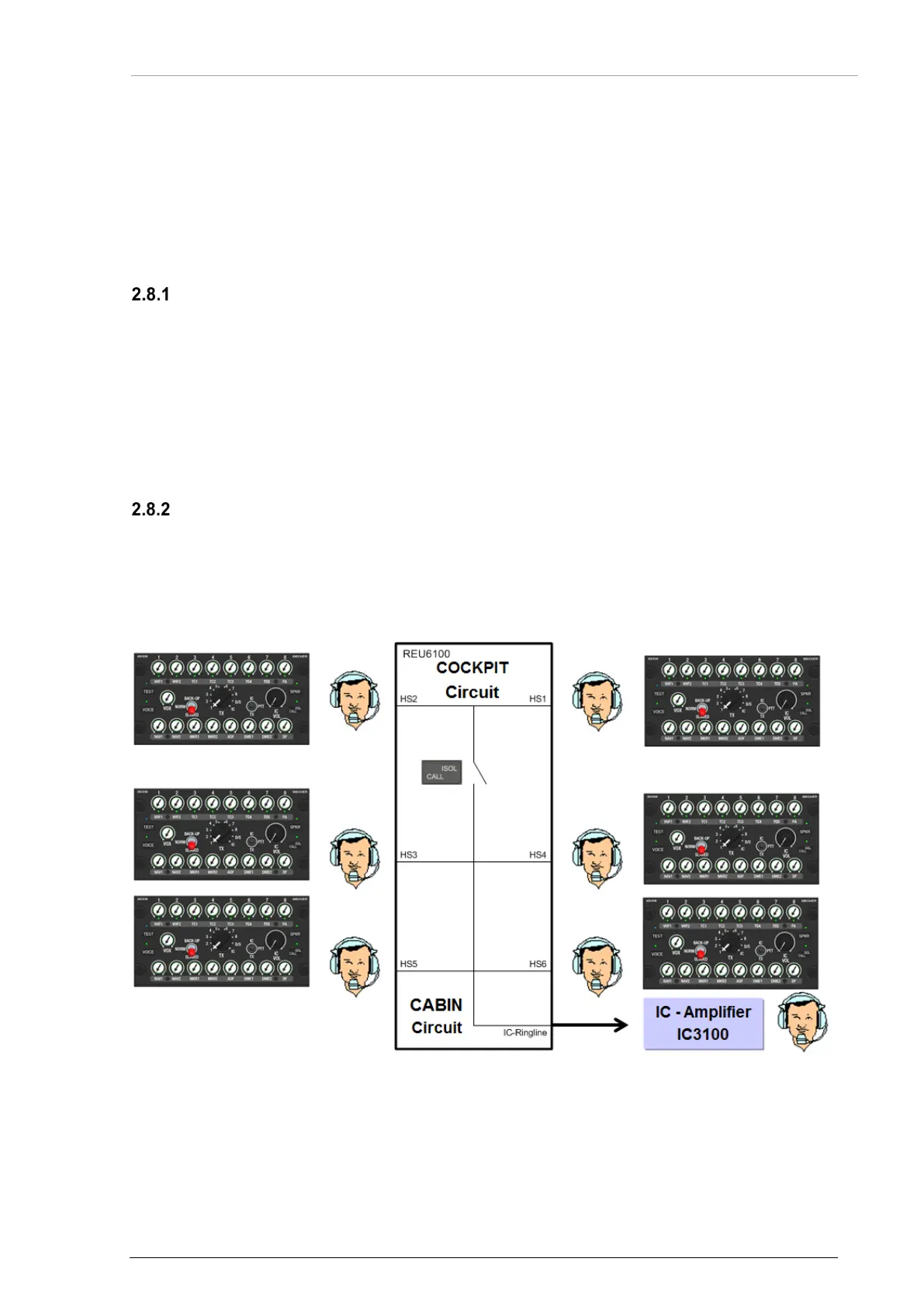
Example: Intercom Extension for Passengers
• With an additional intercom amplifier (e.g. Becker IC3100) passengers can be connected
with the intercom system.
• These passengers are connected with the cabin intercom circuit of the DVCS6100
system.
• It can be disconnected (isolated) by an external switch which is not shown in the diagram.
Figure 13: Operation - Intercom Extension for Passengers


 To Next Page