Installation
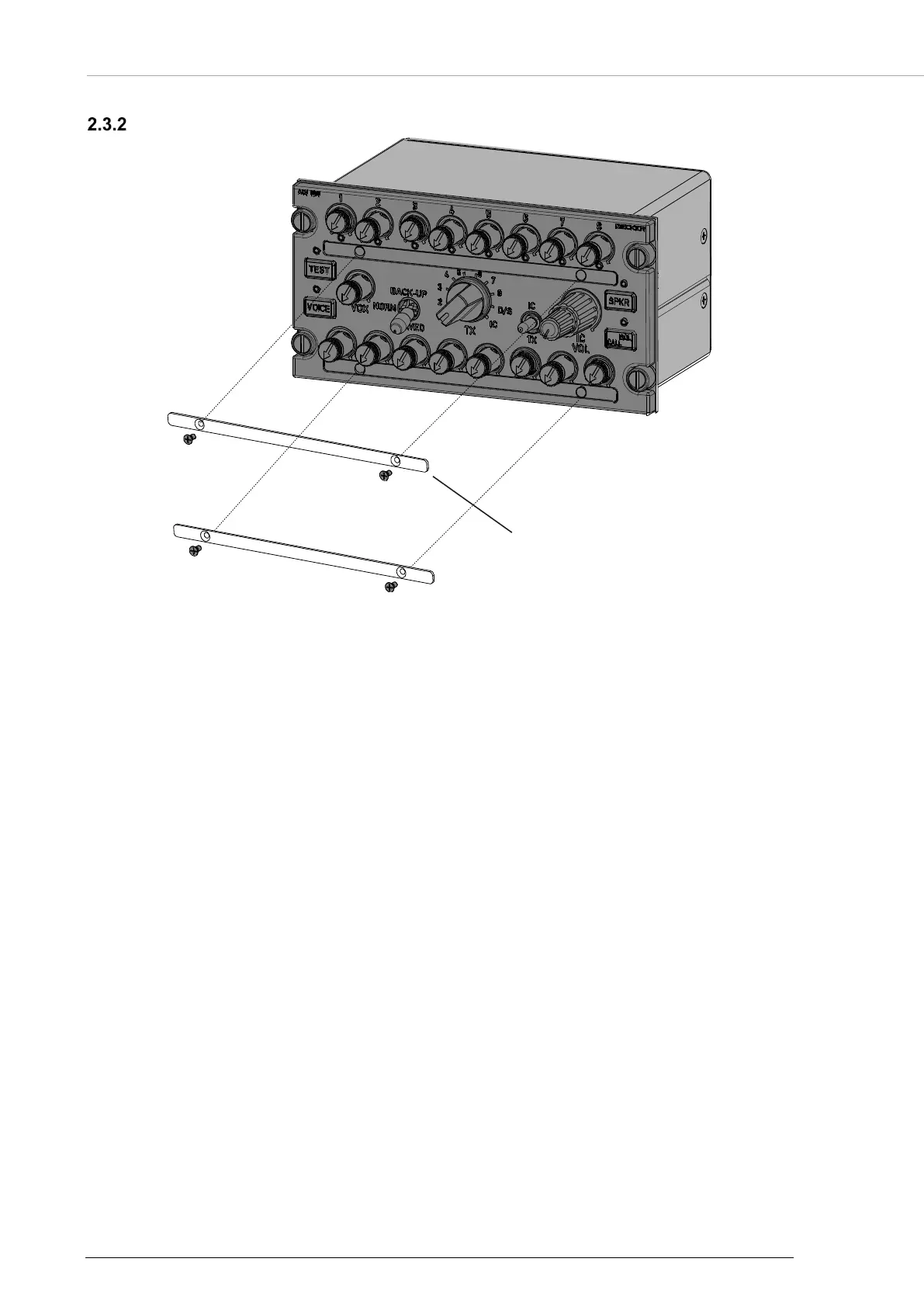
ACU6100 - Laser Plate Installation
30 ACU6100 DV64440.03 Issue 09 November 2019
ACU6100 - Laser Plate Installation
Figure 7: ACU6100 - Laser Plate Installation
Notice:
The laser plate strips which identify the function of TX and RX knobs are prepared for customer
individual configuration, therefore they must be bought separate from the ACU6100.
The ACU6100 comes with installed blank label strips. Before installation of an ACU6100 the blank label
strip must be replaced by the customized laser plate strips.
Procedure:
• Remove the left and right screw from each label strip.
• Replace the blank label strip by the customized label strip.
• Tighten carefully the left and right screws on both label strips.
o Note: Do not exceed a torque of 0.18 Nm.
• Each variant of the label strip has an individual part number for identification.
• For information of available predefined label strips, or new label strips, please contact
Becker Avionics. For department and addresses, please see contact info page 2.


 To Next Page