Selective Call
40 ACU6100 DV64440.03 Issue 09 November 2019
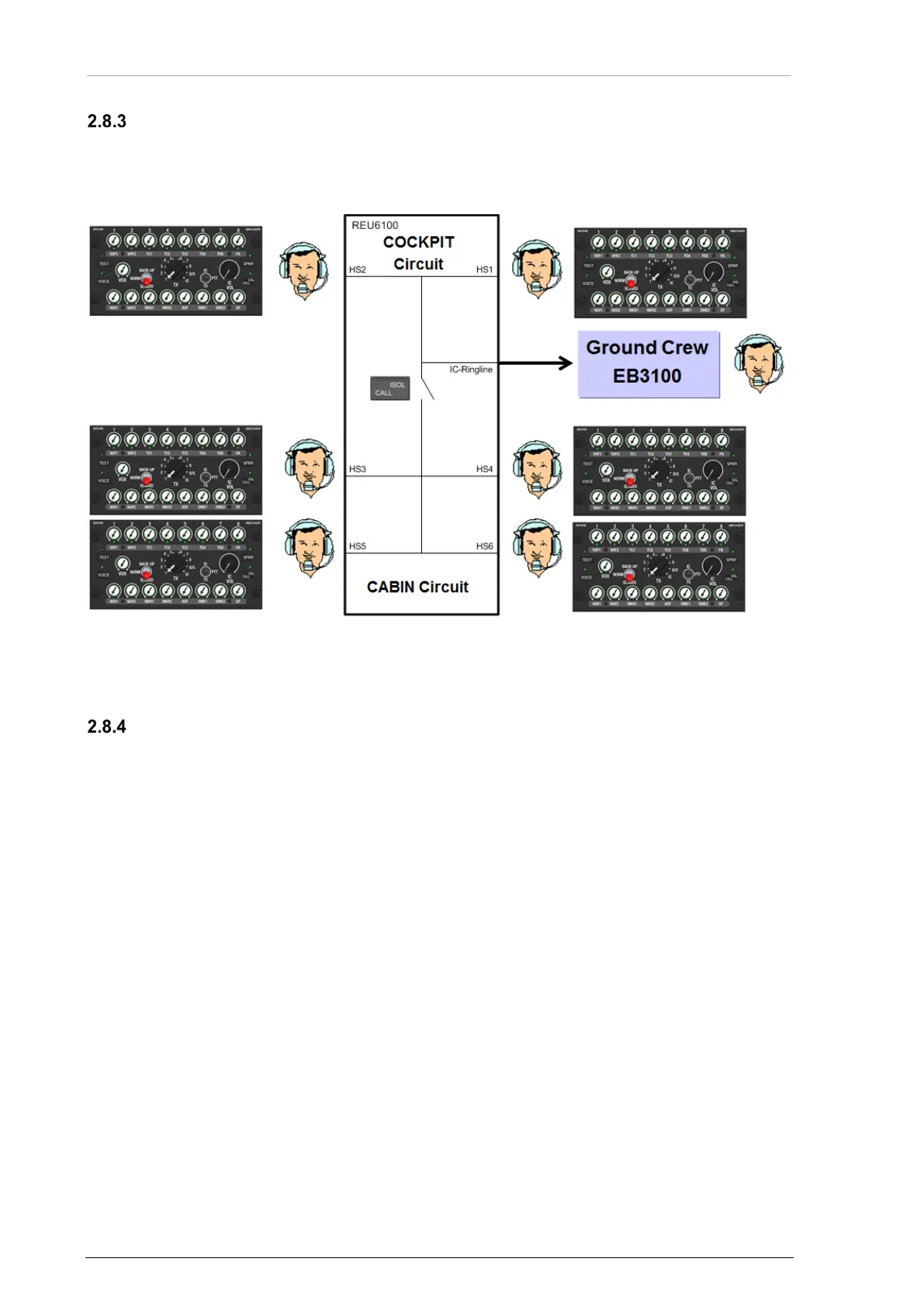
Example: Intercom Extension for Ground Crew
• With an additional ground crew box (e.g. Becker EB3100) ground crew can be connected
with the intercom system.
• That ground crew is connected with the cockpit intercom circuit of the DVCS6100 system.
Figure 14: Operation - Intercom Extension for Ground Crew
Emergency Call (E-Call)
A call for connection can be a "Call" or an "Emergency Call" (E-Call).
To send an E-Call, an external emergency switch is necessary.
• An E-Call tone different to the "Call" tone is audible in the cockpit (depends on
configuration).
NOTICE:
• To send an E-Call, an external emergency switch is necessary.
• The wiring is done through a discrete input.
• The function and settings depend on configuration.
2.9 Selective Call
The function "Selective Call" and forced monitoring for "Selective Call" can be set to one of the eight
TX-channels (configuration).
NOTICE:
• The wiring is done through a discrete input.
• The function and settings depend on configuration.


 To Next Page