Transceiver Operation
52 ACU6100 DV64440.03 Issue 09 November 2019
• Only one user can be selected as a relay operator (configuration*).
• Only two TX-channels can be in relay mode.
o When on one TX-channel a signal is received automatically the other
TX-channel is in transmit mode.
*For more information refer to the software manual "CSW6100... "(www.becker-
avionics.com/downloads/ → Intercom).
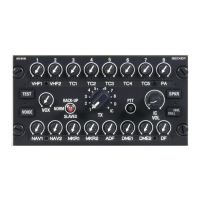
Configuration mode 1, free TX-channel selection:
• Select the mode D (D/S).
• Push and release two TX-channel knobs for relay operation (only two
released knobs permitted).
o The knobs are in the upper position, can be turned, are illuminated.
o The TX-channel LEDs are on.
o The channels are monitored and in relay operation.
• The other TX-channel knobs must be pushed and locked, lower position.
Configuration mode 2, configured TX-channels only:
• Select the mode D (D/S).
• Push and release the two TX-
channel knobs for relay operation where the
LED is on after the related knob is released (only two released knobs
permitted).
o The knobs are in the upper position, can be turned, are illuminated.
o The TX-channel LEDs are on.
o The channels are monitored and in relay operation.
• The position of the other TX-channel knobs is not important.
• All TX-cannels can be used from other users when no signal is received.
The relay mode has priority when a signal is received.
• The relay operator can communicate with other intercom members.
Figure 22: Operation -Relay Mode


 To Next Page