CUBE® CONTROLLER
1MANUL964 Belanger, Inc. * PO BOX 5470 * Northville, MI 48167-5470 * Ph (248) 349-7010 * Fax (248) 380-9681 4-3
Chapter 4 Operator Interface / Standard User Screens
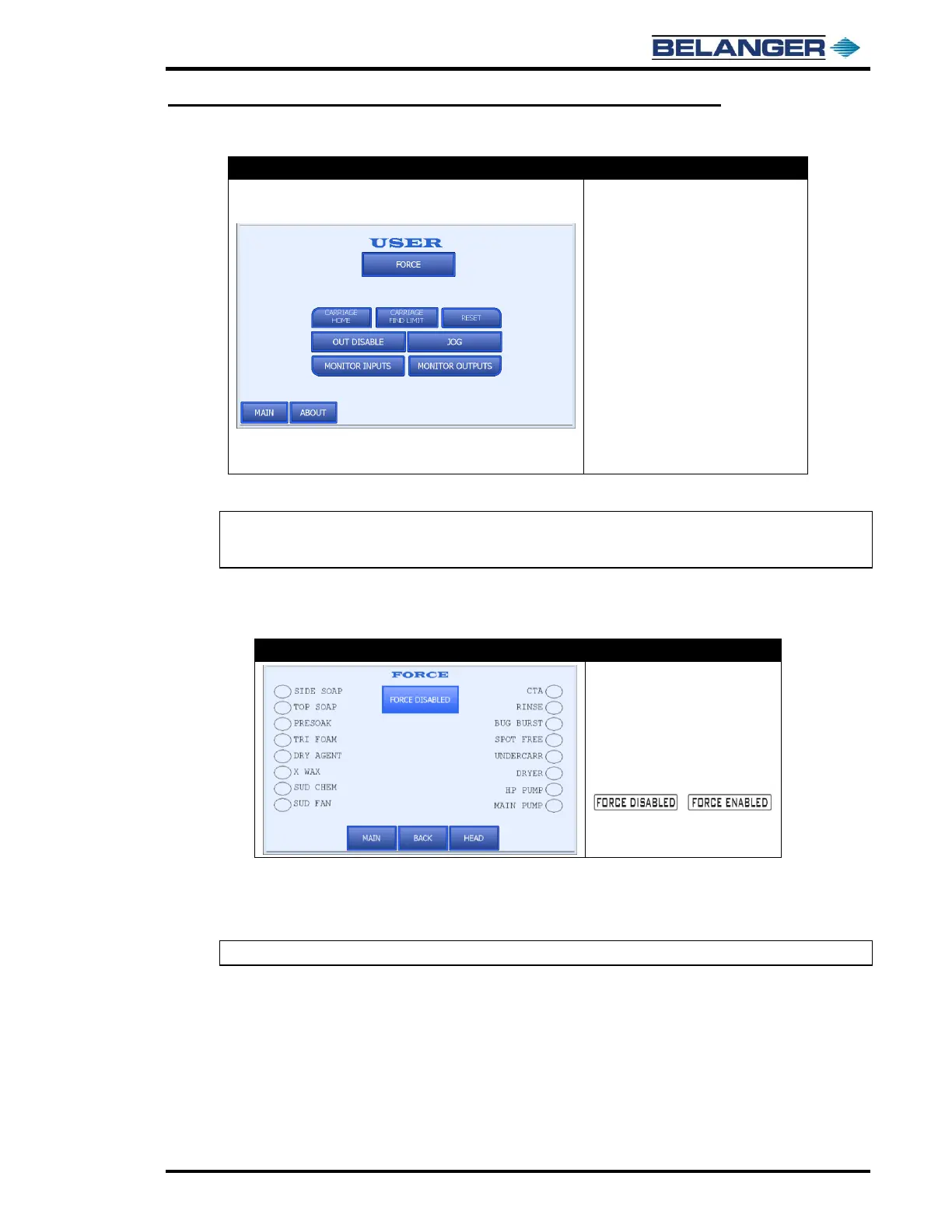
User
• CARRIAGE HOME: Moves the
Carriage to the Home position
• CARRIAGE FIND LIMIT: Causes the
machine to locate Entrance limit
• RESET: Resets and Homes machine
• FORCE: Moves you to the Force
screen
• JOG: Moves you to the Jog screen
• MONITOR INPUTS: Moves you to the
Monitor Inputs screen
• MONITOR OUTPUTS: Moves you to
the Monitor Outputs screen
• OUT DISABLE: Moves you to the
Output Disable screen
• ABOUT: Moves you to the About
screen
Machine MUST be in HOME position to perform a CARRIAGE FIND LIMIT.
Note: The CARRIAGE FIND LIMIT must be performed on a machine that is a new install before any
vehicles are washed. This function typically does not need to be performed again after it has been
completed once.
If pressing the reset button does not reset the machine, check Fault screen for reoccurring fault.
User / Force
• Pressing the FORCE
ENABLED/FORCE DISABLED
toggle button alternates
between the fields shown
below:
/
To force an Output, fill the oval next to the desired output, then press the FORCE ENABLED/DISABLED toggle
button.
To turn off FORCE, press the FORCE ENABLED/DISABLED toggle button.
Note: Force may be left “Enabled” while changing between forced Outputs.



 To Next Page