CUBE® CONTROLLER
1MANUL964 Belanger, Inc. * PO BOX 5470 * Northville, MI 48167-5470 * Ph (248) 349-7010 * Fax (248) 380-9681 6-7
Chapter 6 Operator Interface / Advanced Configuration
Setup / Advanced Configuration
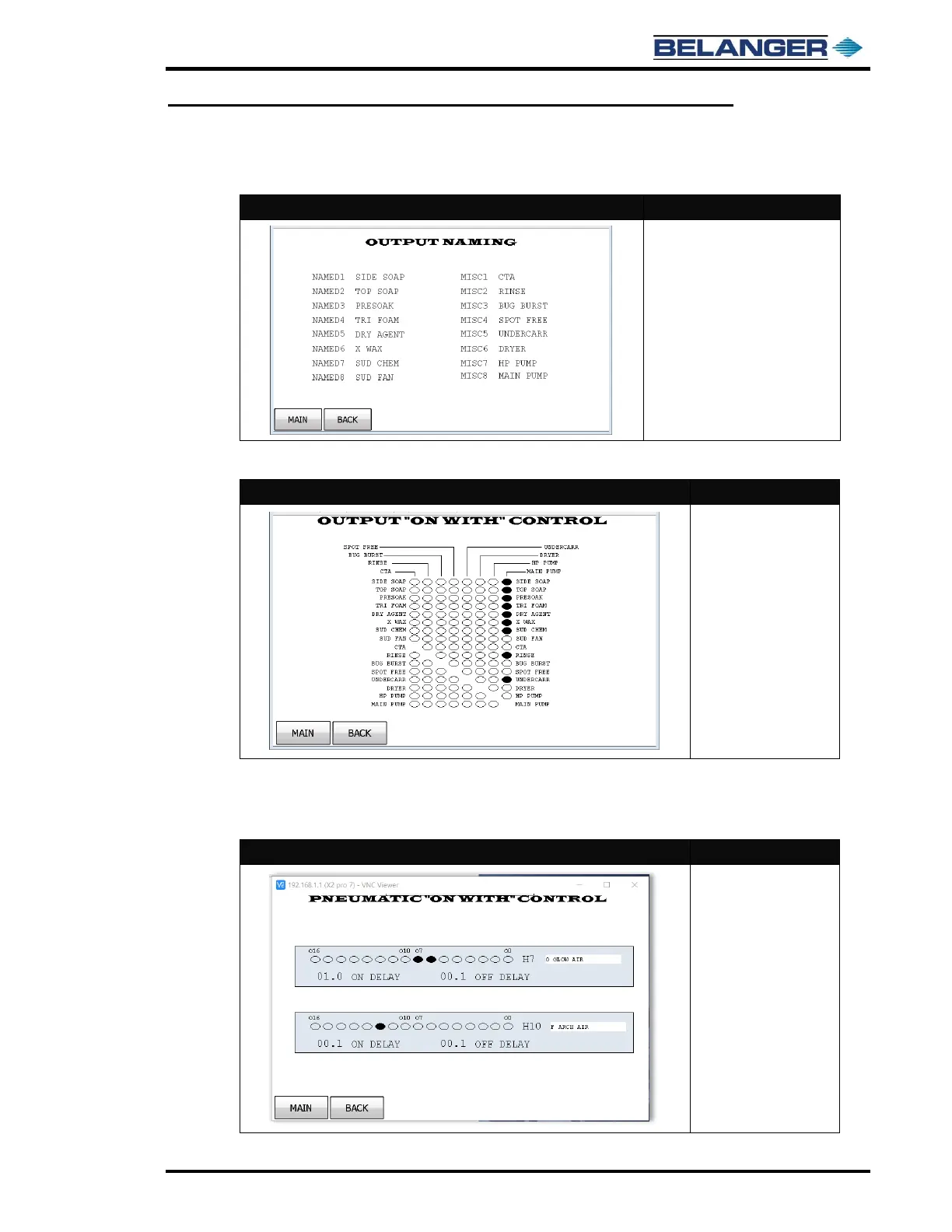
Advanced Configuration / Output Naming
• The field to the right of NAMED
1 through 8 is the name that
has been assigned to that
output
• The field to the right of MISC 1
through 8 is the name that has
been assigned to that output
• Touch the assigned name to
edit the Outputs name
Advanced Configuration / Output “On With” Control
The Outputs at the top of
the screen can be linked
to the various Outputs
shown in the lower
columns by toggling the
ovals to filled
Examples of uses on this screen would be to link multiple applications to a Re-pressurization Pump or to link an
Extra-Service Light to multiple Outputs.
Advanced Configuration / Output “On With” Control / Pneumatic
The corresponding oval
will cause H7 and H10
pneumatic outputs to
turn on with output.
They will delay turning
on by number of
seconds in ON DELAY
They will delay turning
off by number of
seconds in OFF DELAY.
Name H7 and H10 from
this screen.
This screen controls carriage head pneumatics intended for OverGlow™ and Foam Rain.



 To Next Page