CUBE® CONTROLLER
1MANUL964 Belanger, Inc. * PO BOX 5470 * Northville, MI 48167-5470 * Ph (248) 349-7010 * Fax (248) 380-9681 7-3
Chapter 7 Techniques in Programming
OverGlow™ Typical Setup
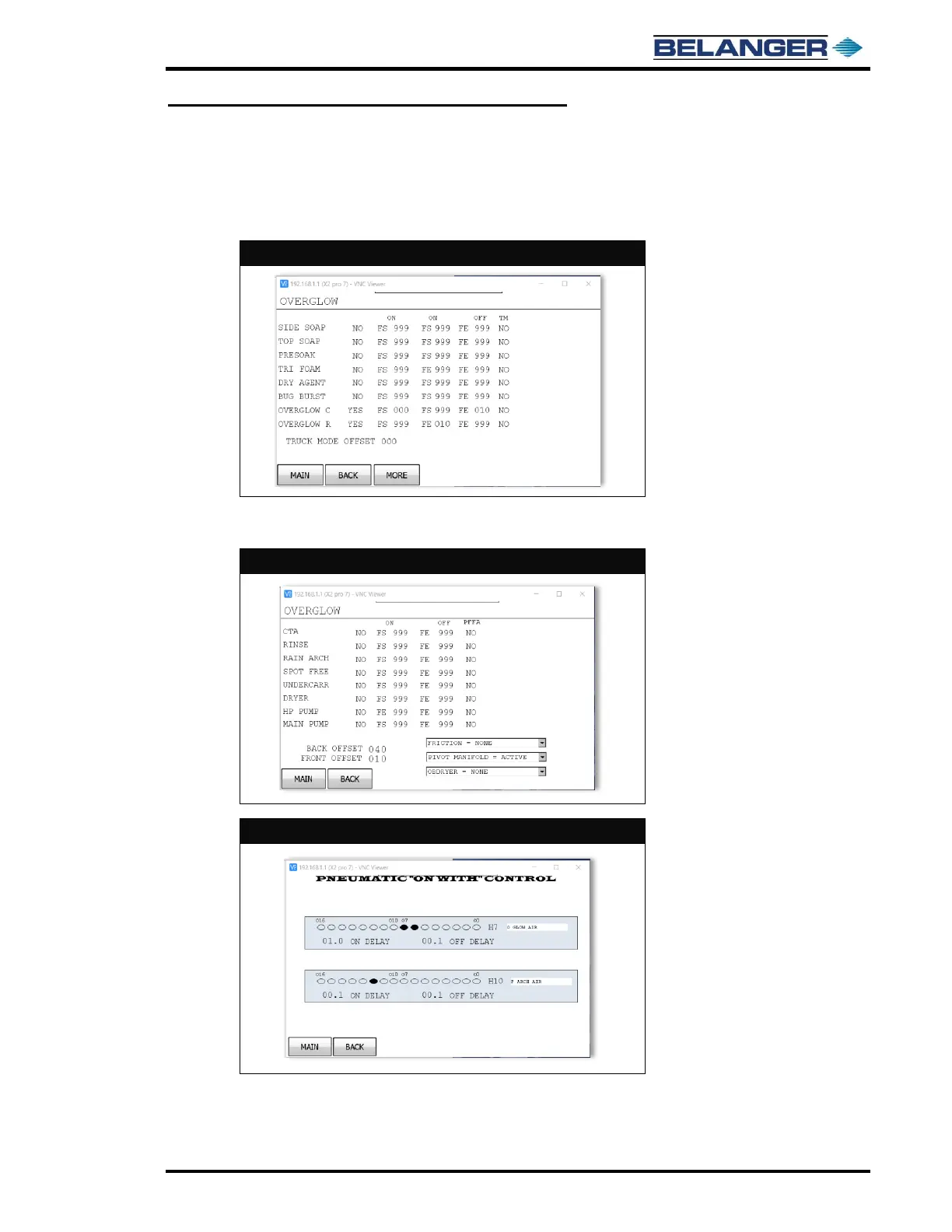
Outputs for OverGlow™ chemical and OverGlow™ rinse should be selected and named from output naming screen prior
to setting up the Application Configuration. Typically, it’s O6 and O7 due to Sudzer® not being available with OverGlow™
on same machine.
The initial Application Configuration should be as follows on screen images:
The OFF (FE 010) and ON (FE 010) are to shift to rinse at end of the application. This removes excess chemical from the
OverGlow™ guidance sheet metal.
Head pneumatic H7 is typically foaming air for OVERGLOW. Set ON DELAY to 0 and OFF delay to 0 seconds for initial
settings. H7 must be programmed to turn on with both OverGlow™ chemical and OverGlow™ rinse.
Head pneumatic H10 is typically foaming air for FOAM RAIN. Set ON DELAY to 0 and OFF delay to 0 seconds for initial
settings. H10 must be programmed to turn on with FOAM RAIN chemical.



 To Next Page