CUBE® CONTROLLER
1MANUL964 Belanger, Inc. * PO BOX 5470 * Northville, MI 48167-5470 * Ph (248) 349-7010 * Fax (248) 380-9681 6-9
Chapter 6 Operator Interface / Advanced Configuration
Setup / Advanced Configuration
Advanced Configuration / Top Wheel Setup
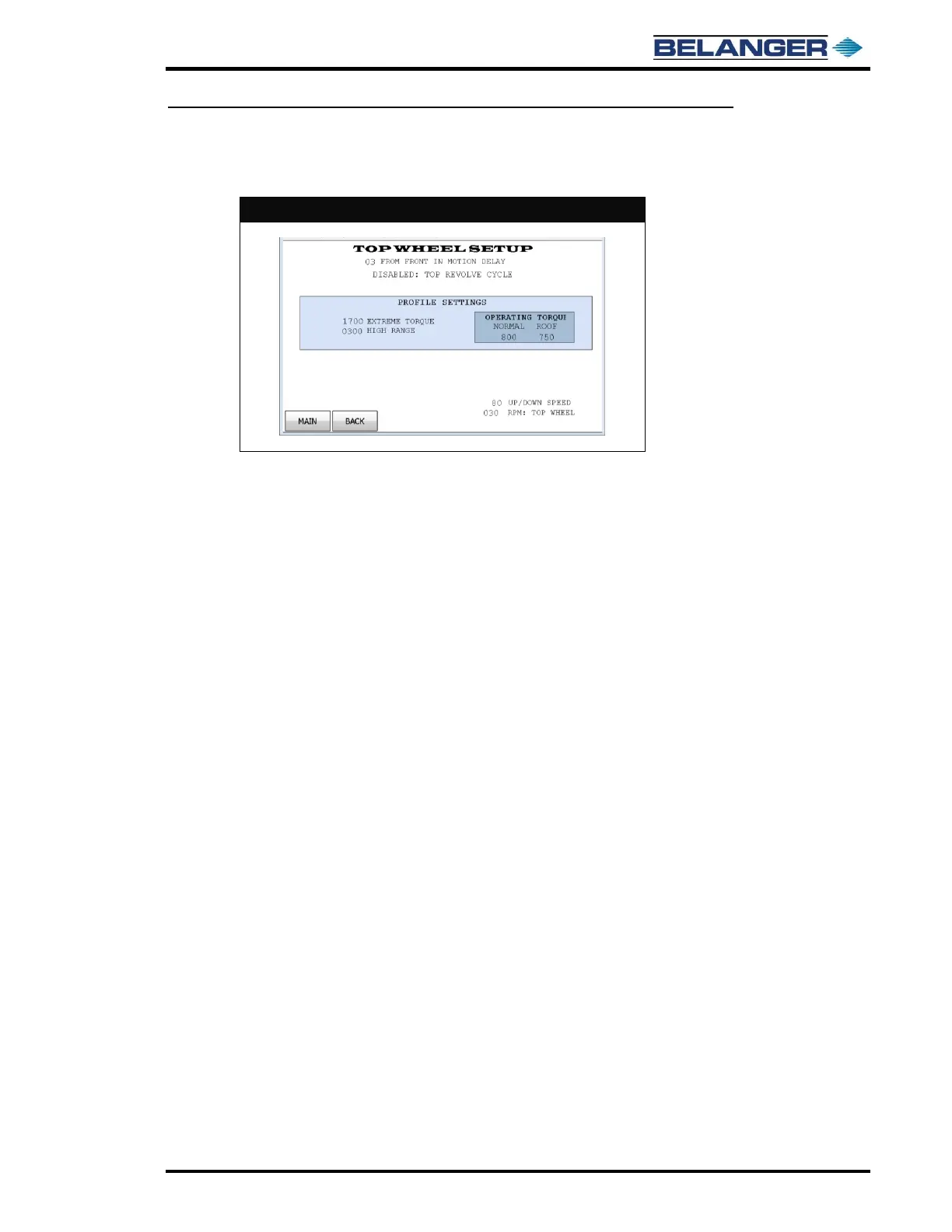
OPERATING TORQUE: This is a relative number referencing the minimum torque as the Top Wheel washes
vehicle, 1000=100%. Torque numbers should not vary much from what is shown in the screen image above.
During initial break in, numbers may be required to be higher. These settings are minimum for the Top Wheel.
HIGH RANGE: This is the differential torque above the minimum that is considered in-range. Normal operating
torque range is between OPERATING TORQUE and HIGH RANGE setting.
EXTREME TORQUE: This is the torque value at which a machine will make more drastic attempts to reduce
torque load. This value must be above operating torque range. Setting too low can make machine have larger
cycle times.
FROM FRONT DELAY: This allows time for the Top Wheel to lower before the Carriage moves.
TOP RESOLVE CYCLE: Typically disabled. Please consult factory before utilizing. Primary use is for machines
installed outdoors.
UP/DOWN SPEED: This is the speed of lifting and lowering the Top Wheel during rapid to position motion.



 To Next Page