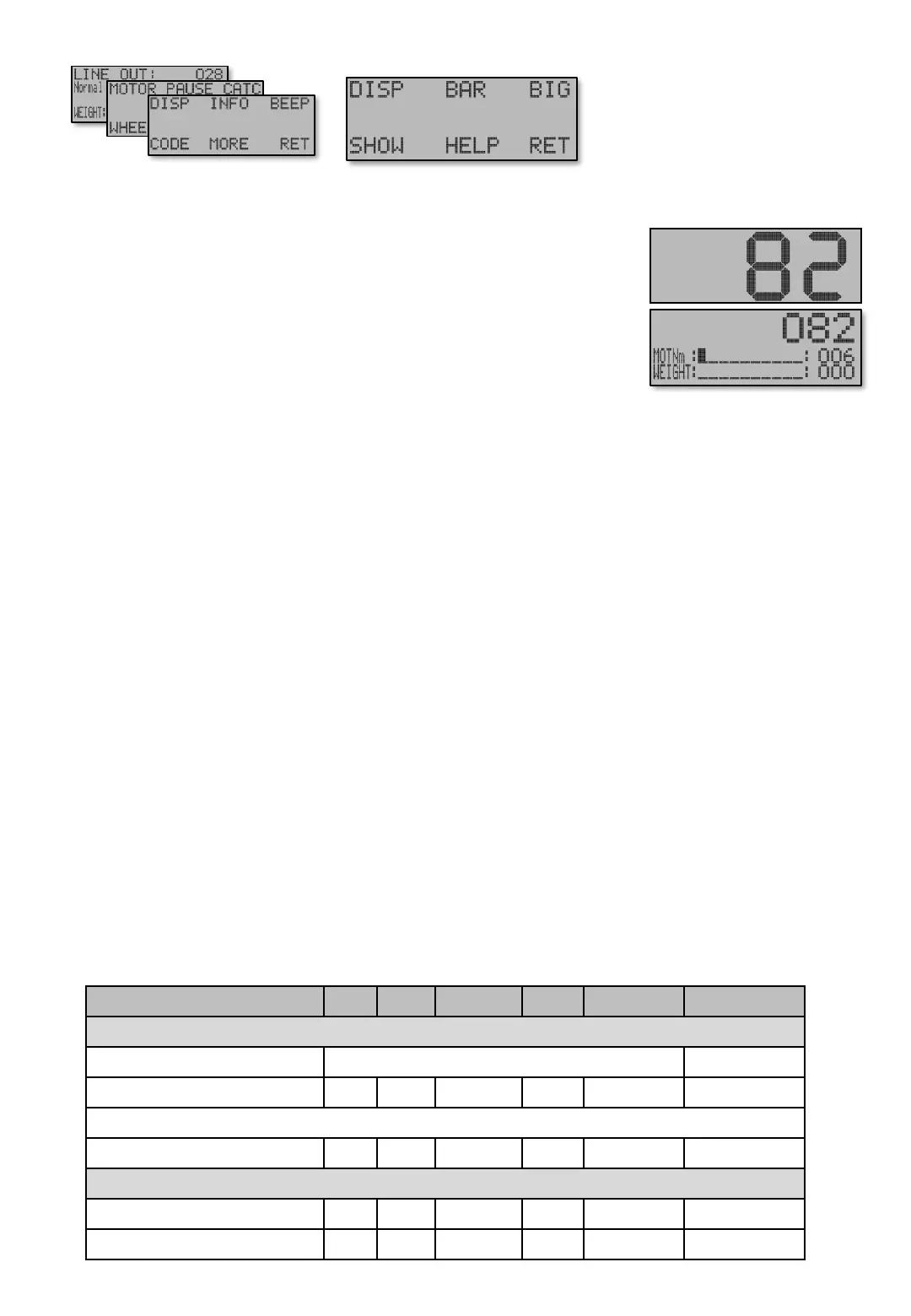
[E613] – [E614] – [E615]
BIG [E613] - SHOWTIME [E614] - HELP[E615]
SHOWTIME [E614] Pressing the [1-6] buttons under the Main screen display shows the DRAG,
CATCH or BRAKE values this time, then returns to Main screen.
HELP – Help text delay [E615] Brings small (font size) help texts to screens if activated. Help texts
pops up after pressing the button in almost every screen when the delay time has passed. Pressing the
buttons [1-6] hides the text for another period. If the text is not desired, set time to "Out“.
Show wheel status [E615 P] can be activated to briefly display different information in Main Screen
(see Status Field on page Machine – 1, Figure 2) for a different status of Catch mode and Wheel. This
can be helpful if you have trouble understanding why or which brake that’s active or why the machine
gets into Catch mode , or not into Catch mode when it should. The following can be displayed.
• “ W " Appears when values are saved to the memory. This symbol can not be disabled and displayed
while writing to memory. Do not turn off the machine while it is displayed.
• “ + " Indicates that the Weight has passed the CATCH value which starts Catch detection. See
Machine - 4 High load for more information.
• “ – " Appears if the motor current is less then with only hook and sinker. See Machine – 4 Low load
for mode information.
• “ S " Appears if Speed brake is activated (braking the wheel).
• “ D " Appears if Depth brake is activated (braking the wheel).
• “ A " Appears if Air brake is activated (braking the wheel).
100%
50%
Figure 1. Font sizes for Linte out.
Screens Min Max Factory Step Unit Navigation
MORE – DISP – DISP – BIG [E613]
BIG [E613] Line out can be displayed with bigger font size after a time after [A]uto button is pressed.
Table shows units and value limits. See [E654] for menu detail level setting. Some screens are not visible if simple view, or normal view are Chosen .
Configuration [E63] There are 3 font sizes that Line out can be
displayed with.
• “100%” shows 32mm large numbers, ie over the entire display height.
The display has no room for other information in this mode.
• “50%” shows 17mm high (half display height) which can
simultaneously display up to two optional values (see previous page)
and the Auto Symbol. Pause before showing
• “Disabled”. Original 25% is used all the time. No change is made.
Pause before showing [E613 P]. The time counted down from when button is press before viewing.
Main screen
Navigate [E6]
Menu [E61]


 To Next Page