[P]8 FISH FINDING PROGRAM
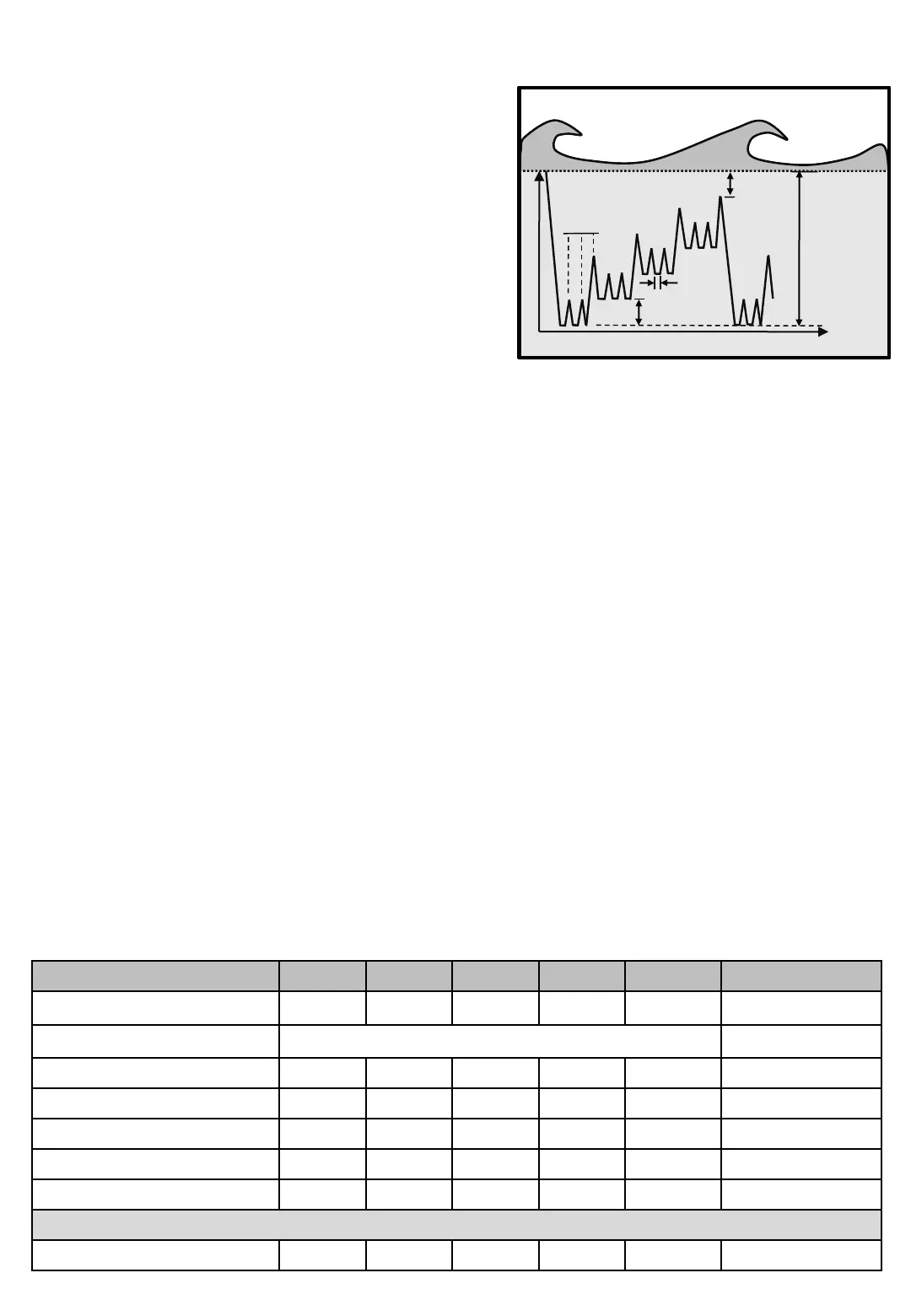
The Fish finding program is the program to use when
searching for fish. It resembles Mackerel fishing with Jig
but with two differences.
• At Fishing depth, Jig length is pulled and returns to
Fishing depth and repeats No. of Jigs. Exactly as in
Mackerel with Jig program. When No. of Jigs ends in
the Mackerel program the line is hauled up to
the Zeropoint, but this program hauls up the Depth
reduction instead. Now No of Jigs restarts. Reduction
of Fishing depth is then repeated until Minimum
depth is reached.
• When Minimum depth is reached, the program restarts
from the original Fishing depth, same as pressing
• [P]rog button.
Diagram 7Fish finding
Time
Depth
Dyp minskning
Minste
depth
[P]8
Screnns Min Max Factory Step Unit Navigation
Line out 0 999 - 1 M/Fm/Ft Main screen
Fish program Makrillfiskeprogram [P]8
Screens in Fish Finding Program
Time
Depth
Depth reduction
Minimum
depth
Depth paus
No Of Jig
Programming Fish finding program…
• Press [P]rog and check that top row shows Fish program. Change with button [3] and [6] to until row 3
shows Fish finding.
• Press [P]rog, set Fishing depth.
• Press [P]rog, set Jig length.
• Press [P]rog, set No Of Jig.
• Press [P]rog, set Depth reduction.
• Press [P]rog, set Minimum depth.
• When done, press [P]rog or [E]nter for Main screen
For available Catch Detection Sensors in this program, see Table 1 on page Machine - 4
The diagram shows theoretically how the sinker is drawing
on an echo sounder image, with the depth of the vertical
axis and the time on the horizontal.


 To Next Page