[P]3 Bottom fishing
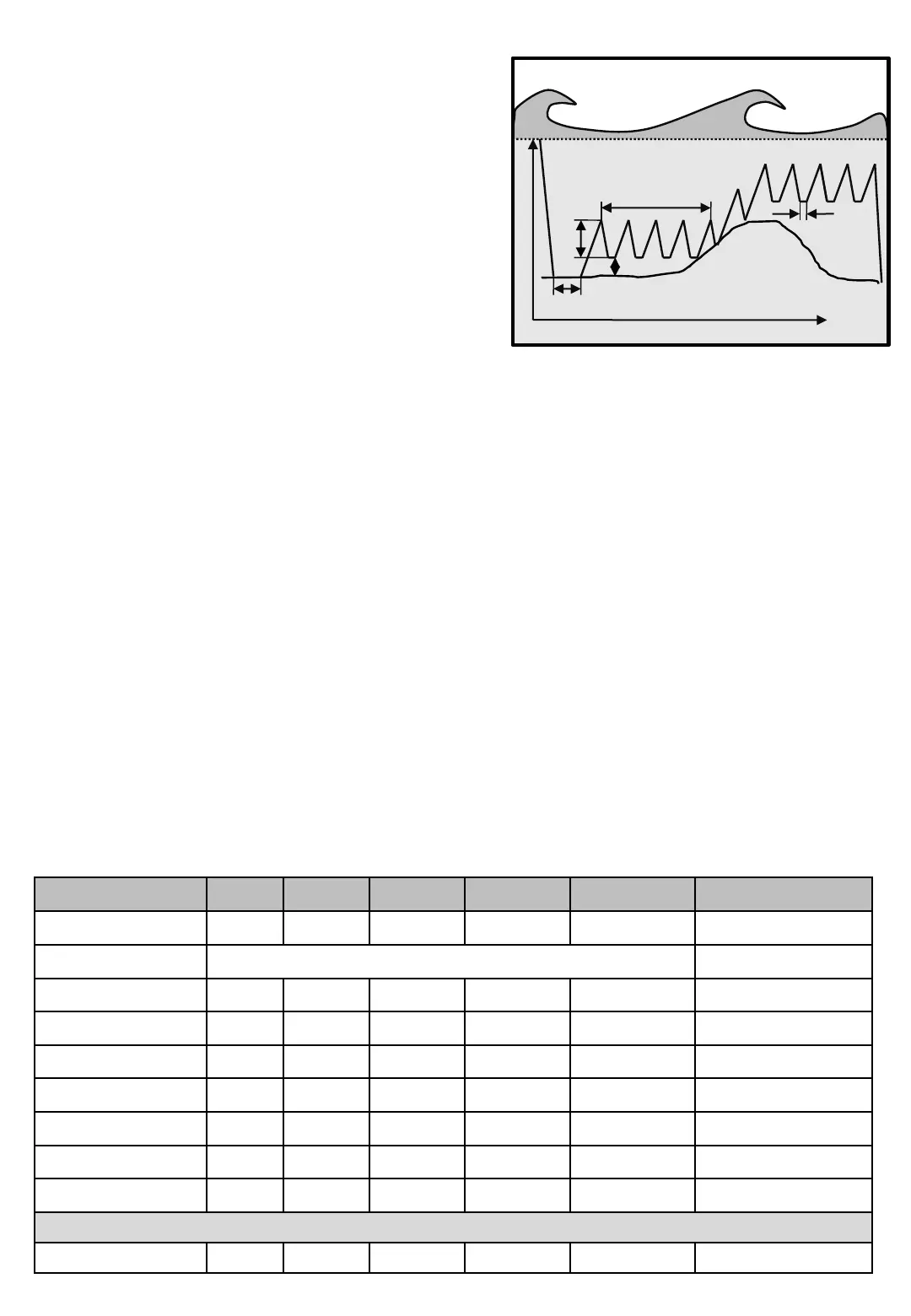
Bottom fishing program makes the sinker automatically
follow the bottom, even though the depth changes.
Fishing depth can still be used and acts as a
Maximum depth of fishing.
The program uses five new features.
• Detect time [P]2[PPP]. Is the time the machine needs
to register the bottom. Time is the time it takes for the
wheel to rotate one lap. When a lap takes longer than
the chosen time, the current depth is recorded as the
bottom.
• Bottom distance [P]2[PPP P] is the distance the
machine holds the sinker above the bottom after each
jig.
Jig
length
Diagram 3
Bottom program
Time
Bottom paus
No Of Jig
Bottom distance
Depth paus
[P]3
Pictures Min Max Factory Step Unit Navigation
Line out 0 999 - 1 M/Fm/Ft Main screen
Fish program Bottom fishing [P]3
Depth 0 999 20 1 M/Fm/Ft [P]3 [P]
Jig length 1 100 2 1 M/Fm/Ft [P]3 [PP]
Bottom pause 0,5 999,9 2,0 0,1 Second [P]3 [PPP]
Bottom distance 0 20 2 1 M/Fm/Ft [P]3 [PPP P]
No of jig 1 25 10 1 St [P]3 [PPP PP]
Maxium depth 1 999 999 1 M/Fm/Ft [P]3 [PPP PPP]
Haul up 1 100 50 1 M/Fm/Ft [P]3 [PPP PPP P]
Menu [E]
Screens in Bottom fishing program.
• No. jigs [P]2[PPP PP] After the machine has repeated pulling the Jig length this amount of times after
last Bottom detection, it restarts searching the bottom again.
• Max depth [P]2[PPP PPP] is a special feature that is only available in the Bottom fishing program to
straighten up the line when used in water with strong current, or when boat drifts away from sinker
location. When Line out reaches this depth, the machine will pause the Bottom fishing program and
haul up to….
• Hauling up [P]2[PPP PPP P] is the amount of line hauled up when Max depth is reached. It’s not
described in meter, but in percent of Max depth. “100 %” will haul up all line to Zeropoint. When
hauled up, the Bottom fishing program will restart.
Programming Bottom fishing…
• Press [P]rog and check that top row shows Fish program. Change Fishing program with button [3]
and [6] until row 3 shows "Bottom fishing“.
• Press [P]rog. Set Fishing depth to limit the fishing depth if desired.
• Press [P]rog, set Jig length.
• Press [P]rog, set Bottom pause
• Press [P]rog, set Bottom distance.
• Press [P]rog, set No. Jigs.
• Press [P]rog, set Max depth for the feature to straighten up the line, if desired.
• Press [P]rog, set Haul up percent for the Max depth feature, if used.
• When done, press [P]rog or [E]nter for Main screen
For available Catch Detection Sensors in this program, see Table 1 on page Machine - 4


 To Next Page