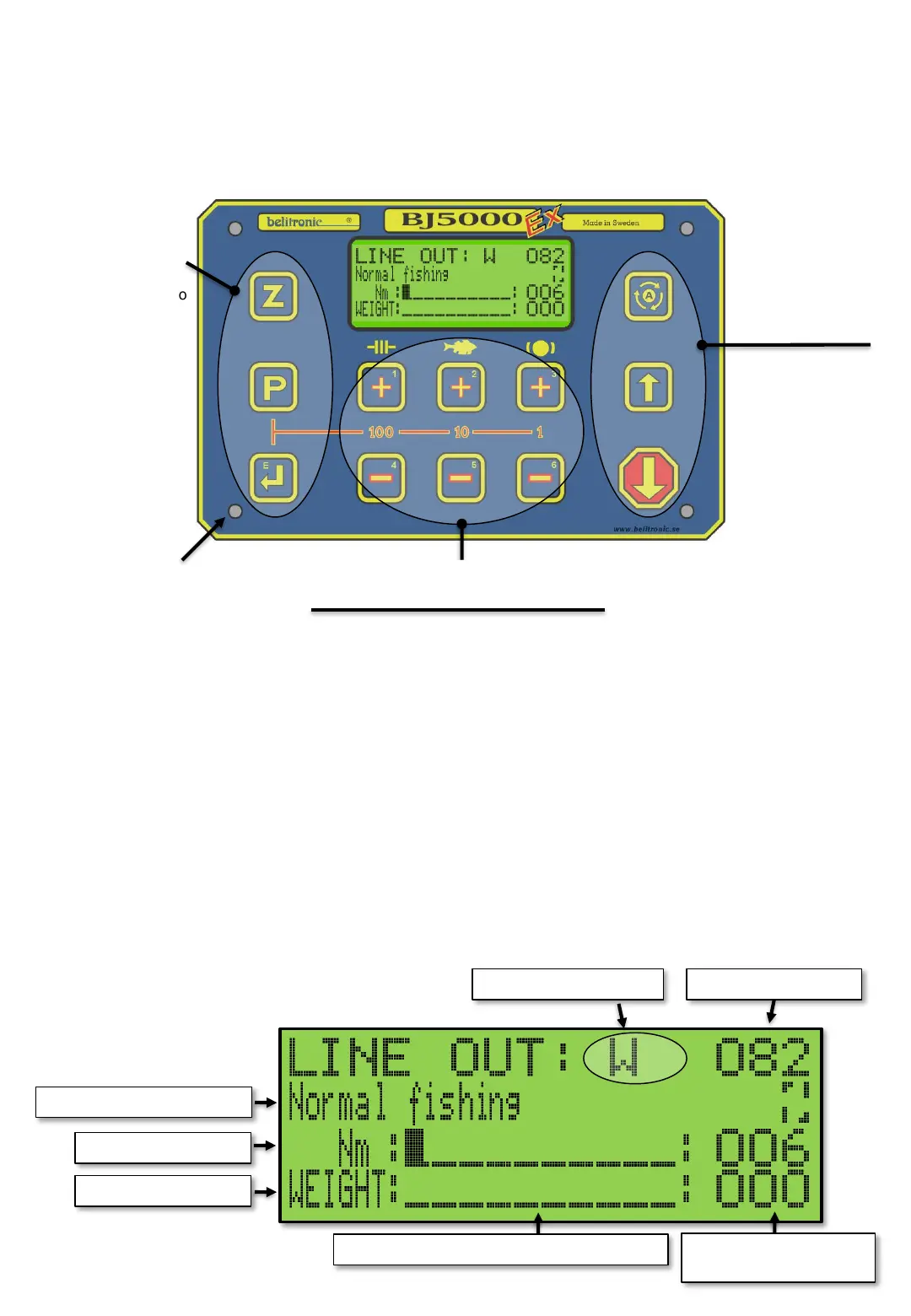
The front panel of the BJ5000Ex (from now on called Ex) is equipped with a graphic display, 12
push buttons, with backlighting, and four red LEDs in the corners for catch indication. All buttons
have more than ONE function. Below are the buttons name and primary function. From now on,
push buttons in the manual will refer to what is inside the characters [ ]. [Z] for [Z]ero, [P] for
[P]rog and so on. Se picture below.
4st LEDs in the corners
indicate catch.
Buttons for Auto or
Manual running Ex
Keys for setting
values, program
selection and
Reset Line Out
Drag +
[1]
[A]uto. For
automatic mode.
[U]p. Start and stop of
motor in Manual mode
and for Pause mode.
[S]top/Down. Stops
motor and Automatic
mode. Returns to
Manual or Pause mode.
[E]enter
[P]prog
[Z]ero
Brake +
[3]
Drag –
[4]
Catch –
[5]
Brake –
[6]
Figure 1. Name of the buttons.
Buttons 1-6 have many functions
depending on what appears in the
display. See Chapter Pushbuttons. Page
Machine 2.
Catch +
[2]
FRONT PANEL
MAIN SCREEN
The display shows the most common text in 4 lines with 16 characters in each row. The Main screen, is
partially configurable and shows multiple information.
• Row 1 shows:
• Status field for various temporarily information. see list of symbols in Chapter [E615].
• Released line length(Line out) in Fathoms, Meters or Feet with minus sign "-" if negative (when
line is above Zeropoint).
• Row 2 shows:
• Selected Fishing program (Chapter [P]).
• Catch depth memory (se machine - 5).
• Machine mode symbols ([E445]).
• Row 3: Can show optional values (See BAR [E612]) in both analog and digital form. This row also
shows the temporary value of DRAG, CATCH and BRAKE when they are changed.
• Row 4: Can show optional values (See BAR [E612 P]) in both analog and digital form.
Figure 2. Main screen
Chosen Fishing program
Chosen upper value
Chosen lower value
Analoge display (Bar) of chosen values
Digital display of chosen
values
Line length payed outStatus field with symbols
Machine - 1


 To Next Page