[P]6 MACKEREL FISHING WITH JIG
This program combines the program Normal fishing [P]1
with Mackerel [P]5. So details about the screens used here
refers to thoose programs. The combination gives a new
behaviour that can been from two ways.
1. Eighter it can be seen as the Normal fishing [P]1
program, that has a limit in number of jigs that ends
with pulling up to Zeropoint, before it returns to
Fishing depth, but now with possibillity to reduce the
Fishing depth, just as in Mackerel program [P5] with
Minimum depth.
2. Or, a Mackerel program, with the possible to perform a
repeted No of Jig [P]6[PPP] before hauling up to
Zeropoint.
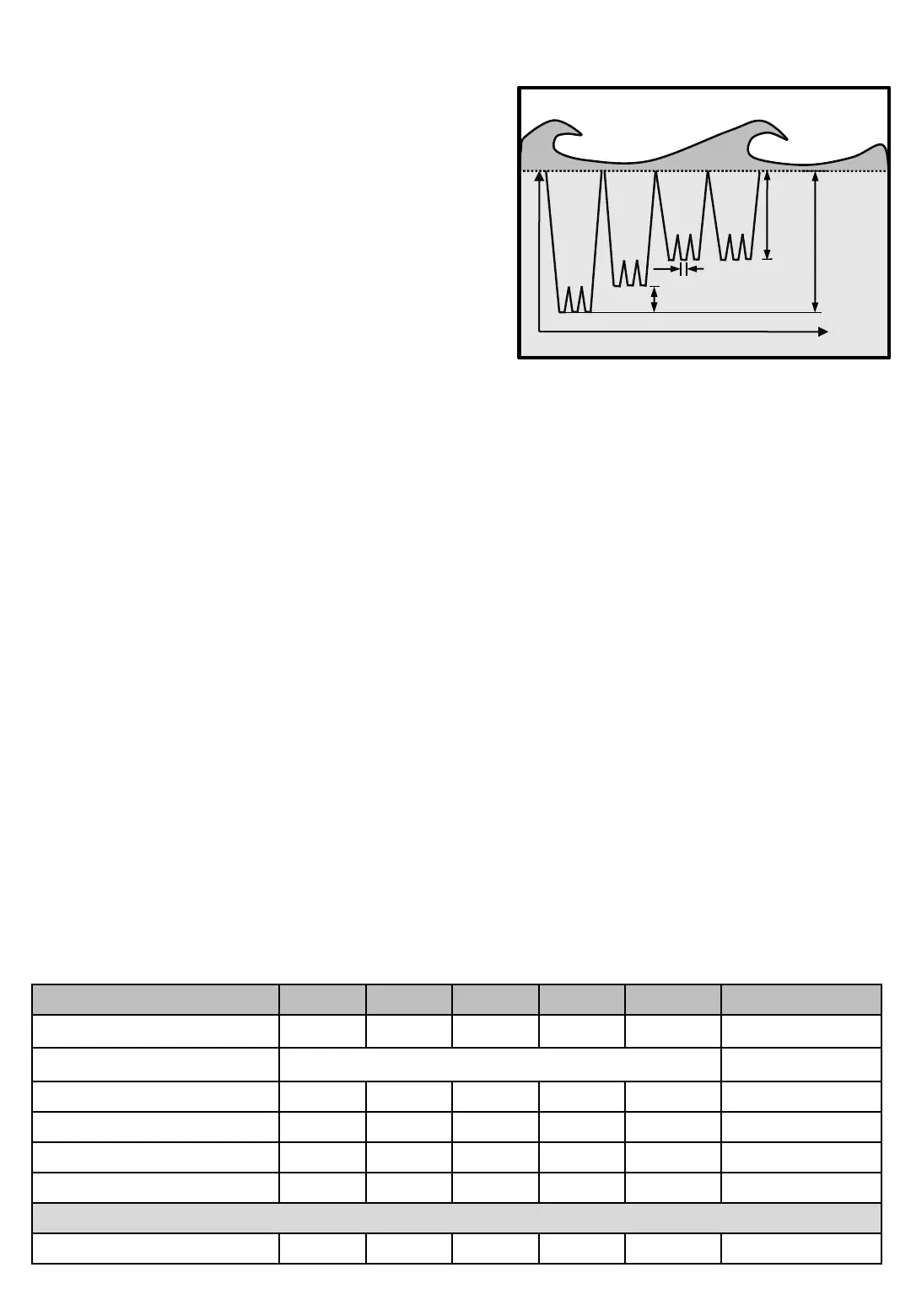
Diagram 6Mackrel fishing with Jig
Time
Depth
Dyp minskning
Minimum
depth
[P]6
Screens Min Max Factory Step Unit Navigation
Line out 0 999 - 1 M/Fm/Ft Main screen
Fish program Mackrel fishing with Jig
Screens in Mackrel fishing with Jig
Time
Depth
Depth reduction.
Minimum
depth
Depth paus
The diagram shows theoretically how the sinker is drawing
on an echo sounder image, with the depth of the vertical
axis and the time on the horizontal.
Programming Mackerel fishing with Jig.
1. Press [P]rog and check that top tow shows "Fish program". Change with buttons [3] and [6] until row 3
shows "Mackerel fishing with Jig“.
2. Press [P]rog, set Fishing depth.
3. Press [P]rog, set Jig length.
4. Press [P]rog, set No Of Jig.
5. Press [P]rog, set Depth reduction.
6. Press [P]rog, set Minimum depth.
7. When done, press [P]rog or [E]nter for Main screen
In Mackerel fishing with Jig, the Catch depth is not shown, but Catch registration on High load, and
Low load is still active in order to enter Catch mode which gives more options to variate motor power and
speed. After hauling up to Zeropoint when in Catch mode, the machine continue at last Fishing depth
and continue the Number of Jig from last number.
For availiable Catch detection sensors in this program, see Table 1 on page Machine - 4


 To Next Page